Read direction, position, and button presses from a rotary encoder on the Glyph ESP32-C6 board using interrupts and example Arduino code.
Rotary Encoder with Push Button on GLYPH Boards
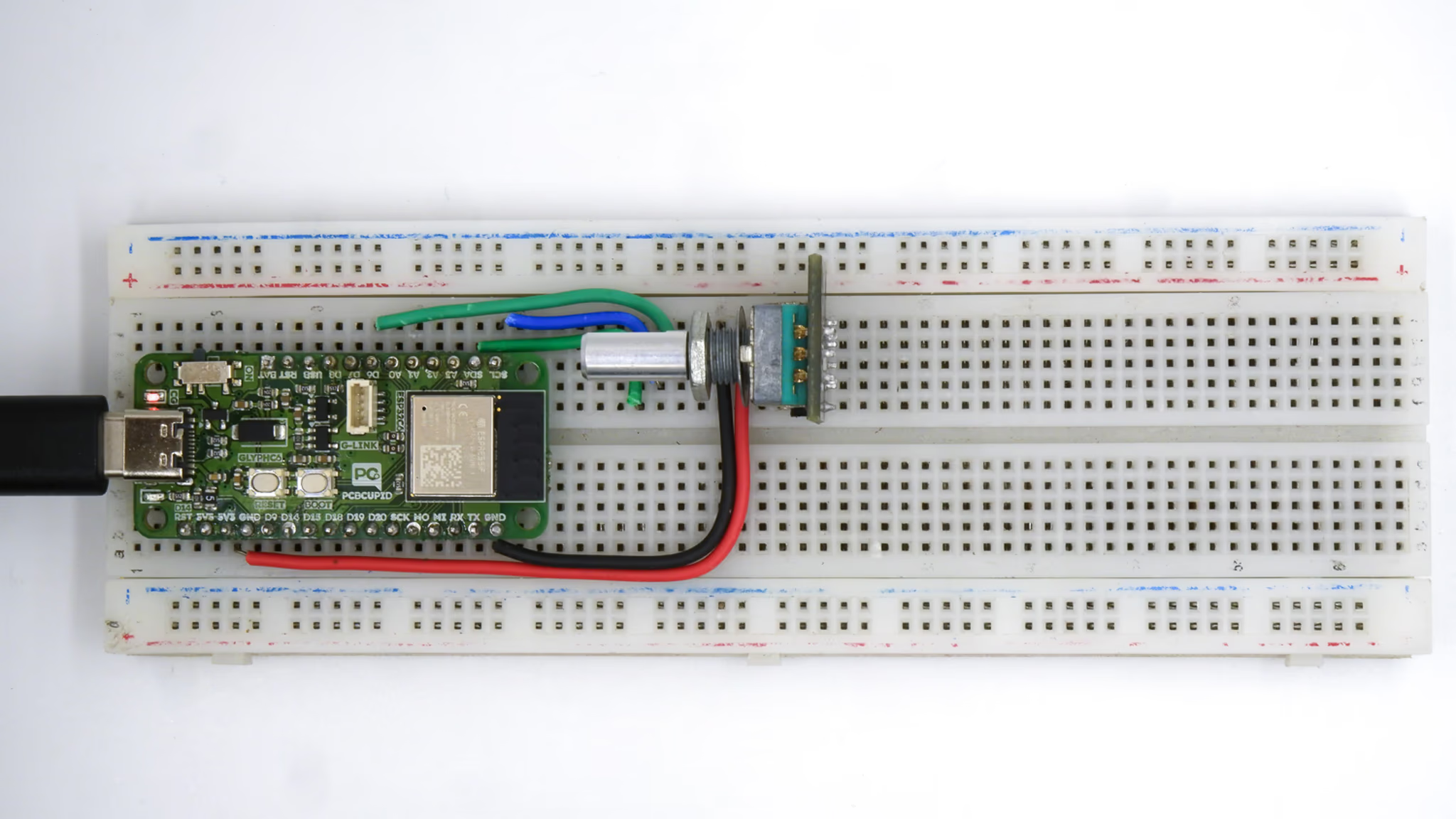
A rotary encoder is a mechanical device that converts rotational movement into digital signals. The encoder outputs two signals, typically labeled CLK (Clock) and DT (Data), which provide information about the direction and amount of rotationA rotary encoder is a device that converts rotational motion into electrical signals. It is commonly used for position sensing, volume control, and menu navigation in electronics.Inside a mechanical rotary encoder, the movement of the shaft generates electrical signals based on physical contact with a conductive disk. Let’s break it down step by step.Rotary Shaft: The part you rotate.
Slotted or Conductive Disk: A circular disk with evenly spaced openings or conductive areas.
Two Contact Brushes (A & B Terminals): These touch the disk to detect movement.
Spring Mechanism: Provides the “clicky” feel and holds the shaft in place.
Push Button Mechanism: (Optional) Detects when the knob is pressed.This guide demonstrates how to use a rotary encoder with a push-button switch to track the position and direction of rotation, and detect button presses with a GLYPH board. This example is also compatible with GLYPH-C3 and GLYPH-H2 boardsThe push-button switch on the encoder can be used to trigger specific actions when pressed.
Step 1: Hardware Required
GLYPH-C6
Rotor encoder module
Jumper Wires
Breadboard
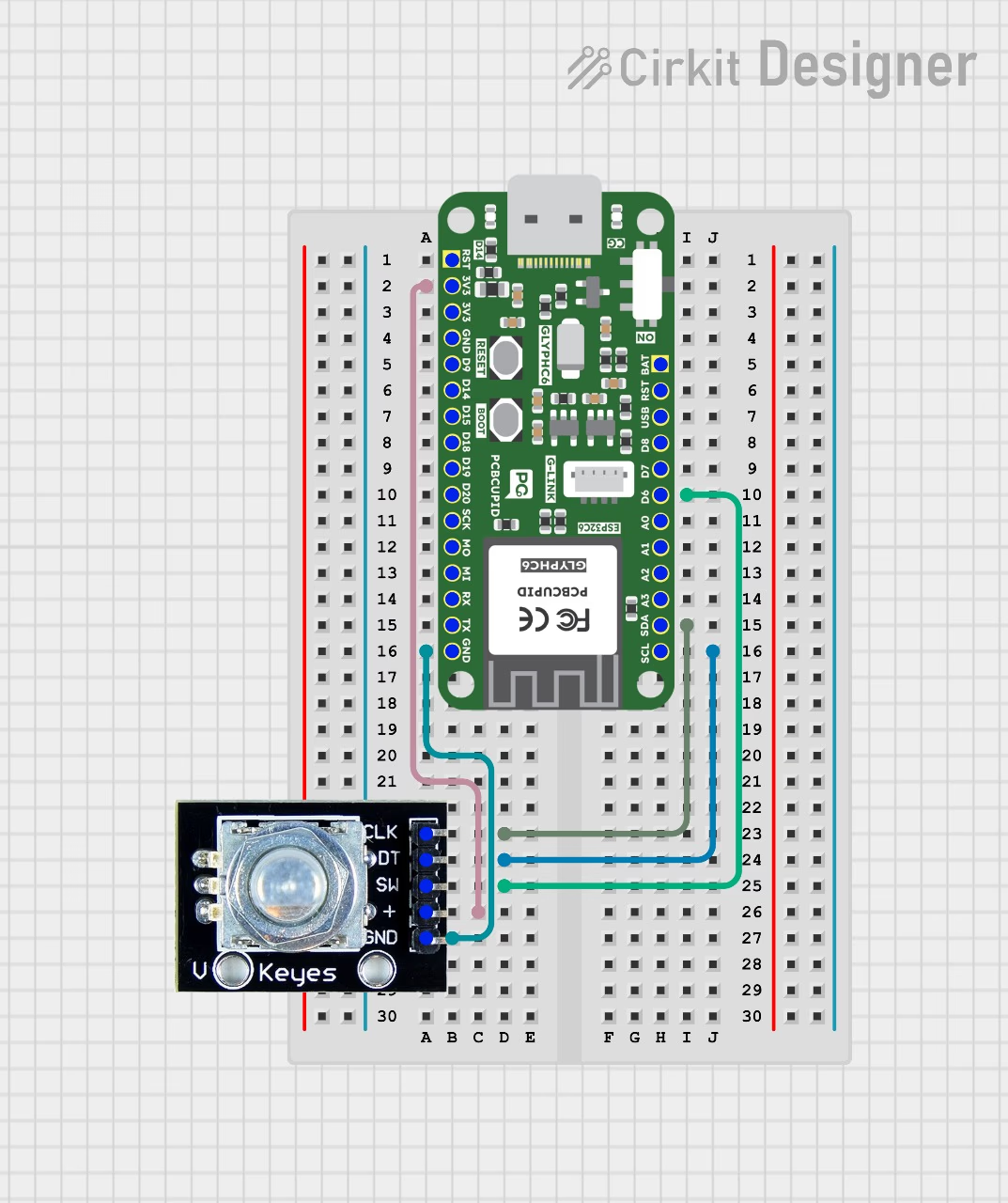
Step 2: Circuit Diagram
Rotary Encoder Pinout:
CLK (Clock): The main pin that outputs the clock signal used for determining rotation direction.
DT (Data): The data pin that works with the clock signal to calculate the rotation direction.
SW (Switch): The button pin used for detecting button presses.Connect the encoder as follows:CLK Pin → GPIO4 (or any available digital pin)
DT Pin → GPIO5 (or any available digital pin)
SW Pin → GPIO6 (or any available digital pin)
VCC → 3.3V or 5V (depending on your encoder module)
GND → Ground
Step 3: Code Setup
Arduino Code
CircuitPython Code
#define ENCODER_CLK 4#define ENCODER_DT 5#define ENCODER_SW 6 // Button Pinvolatile int position = 0;volatile int direction = 0;bool buttonPressed = false;void IRAM_ATTR readEncoder() {if (digitalRead(ENCODER_CLK) == digitalRead(ENCODER_DT)) { position--; // Counter-clockwise direction = -1;} else{ position++; // Clockwise direction = 1;}}void IRAM_ATTR buttonISR() {buttonPressed = true; // Set flag when button is pressed}void setup() {Serial.begin(115200);pinMode(ENCODER_CLK, INPUT_PULLUP);pinMode(ENCODER_DT, INPUT_PULLUP);pinMode(ENCODER_SW, INPUT_PULLUP);attachInterrupt(digitalPinToInterrupt(ENCODER_CLK), readEncoder, CHANGE);attachInterrupt(digitalPinToInterrupt(ENCODER_SW), buttonISR, FALLING);}void loop() {static int lastPosition = 0;// Print position updateif (lastPosition != position) { Serial.print("Position: "); Serial.print(position); Serial.print(" | Direction: "); Serial.println(direction == 1 ? "Increasing" : "Decreasing"); lastPosition = position;}// Print button press messageif (buttonPressed) { Serial.println("Button Pressed!"); buttonPressed = false; // Reset flag}}
Power the encoder module from 3.3 V so its CLK, DT, and SW outputs stay within GLYPH C6’s 3.3 V GPIO limits.Follow the CircuitPython setup guide and save this example as code.py on the board.
import timeimport digitalioimport microcontrollerclk = digitalio.DigitalInOut(microcontroller.pin.GPIO4)dt = digitalio.DigitalInOut(microcontroller.pin.GPIO5)button = digitalio.DigitalInOut(microcontroller.pin.GPIO6)for pin in (clk, dt, button): pin.direction = digitalio.Direction.INPUT pin.pull = digitalio.Pull.UPposition = 0last_clk = clk.valuelast_button = button.valuewhile True: current_clk = clk.value if last_clk and not current_clk: direction = 1 if dt.value != current_clk else -1 position += direction print("Position:", position, "Direction:", "Increasing" if direction > 0 else "Decreasing") last_clk = current_clk current_button = button.value if last_button and not current_button: print("Button Pressed!") last_button = current_button time.sleep(0.002)
Step 4: Upload the Code
Connect the Board
Connect your GLYPH board to your computer
Select the Board and PortDo the following settings in your Arduino IDE,
Do the following settings in your Arduino IDE,
Tools > Board > esp32 > Pcbcupid GLYPH C6
For the Pcbcupid GLYPH C6 to appear under Tools > Board > esp32, the esp32 board version installed in the Arduino IDE should be greater than or equal to 3.1.0.
Tools > Port and select the port connected to your GLYPH.
Tools > USB CDC on Boot >Enabled
If USB CDC on BOOT not enabled, you won’t be seeing any serial data on Arduino IDE.
Upload the Code
Click the upload button (➡️ icon) or use the shortcut CTRL + U in Arduino IDE to upload the code to the board.
Step 5: Observe the Output
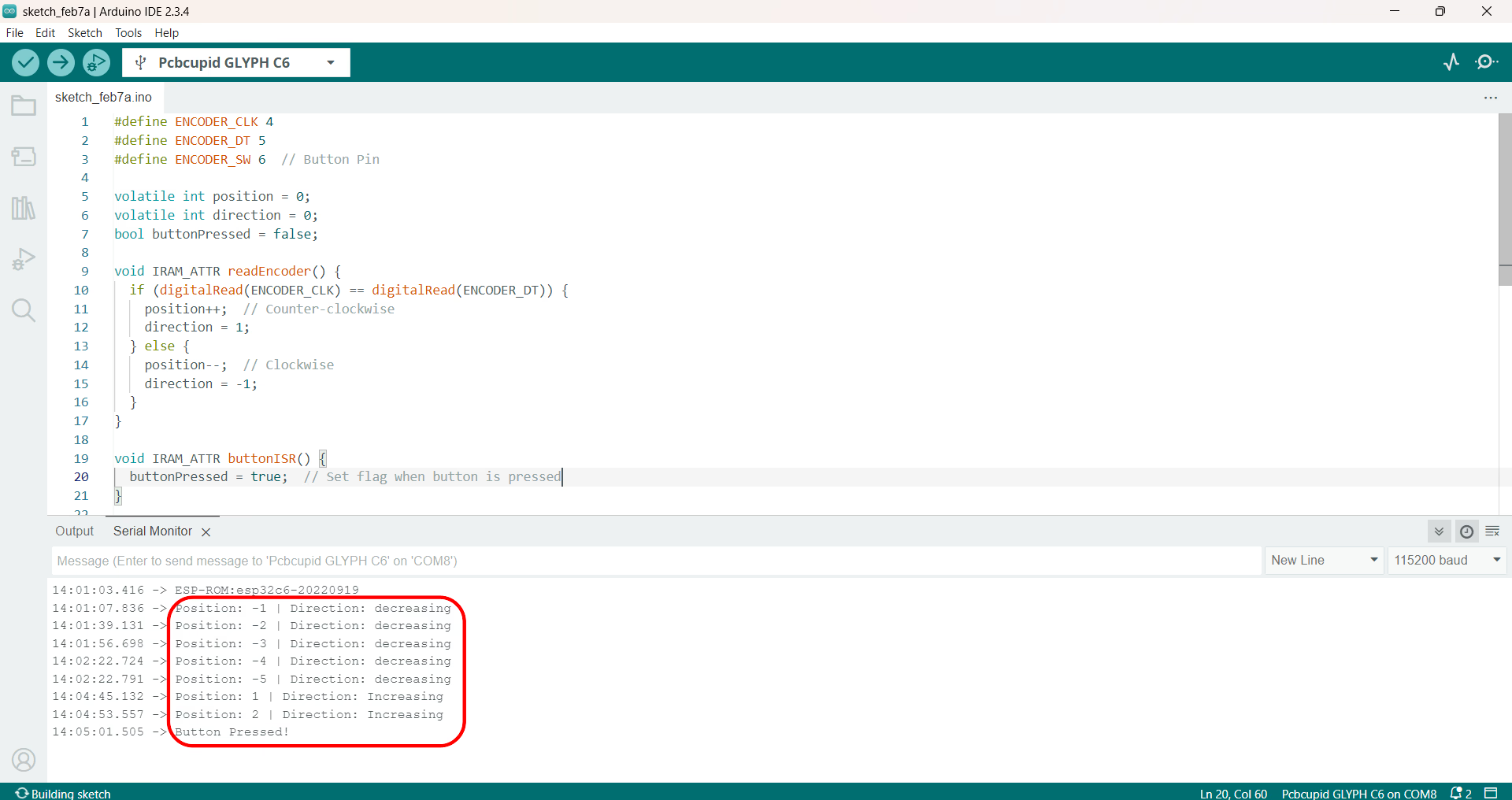
The Serial Monitor will display updates to the encoder’s position and direction as it rotates. When the button is pressed, the message “Button Pressed!” will be printed to indicate that the button was activated.
{"docsConfig":{"theme":"mint","$schema":"https://mintlify.com/docs.json","name":"PCB Cupid","colors":{"primary":"#0D9373"},"favicon":"https://mintcdn.com/pcbcupid-bae3761c/4dXNuJjZhqL5zqVd/images/favicon_PCBcupid.png?fit=max\u0026auto=format\u0026n=4dXNuJjZhqL5zqVd\u0026q=85\u0026s=697c4189e0a983e1722bddbedde79f61","appearance":{"strict":true},"background":{"decoration":"gradient"},"navbar":{"links":[{"href":"https://spell.pcbcupid.com","label":"Circuit Spell"},{"href":"https://shop.pcbcupid.com","label":"Shop"},{"href":"/","label":"Learn"},{"href":"https://events.pcbcupid.com","label":"Events"},{"href":"https://forum.pcbcupid.com","label":"Forum"},{"href":"https://pcbcupid.com/articles","label":"Articles"},{"href":"https://pcbcupid.com/tools","label":"Tools"}]},"seo":{"indexing":"all"},"fonts":{"family":"Space Grotesk","weight":400},"icons":{"library":"lucide"},"styling":{"eyebrows":"breadcrumbs","latex":true},"contextual":{"options":["copy","chatgpt","claude","cursor","vscode","mcp"],"display":"toc"},"thumbnails":{"appearance":"dark"},"navigation":{"pages":[]}},"deployment":{"deploymentMetadataValue":{"subdomain":"pcbcupid-bae3761c","hasAudioNarration":false,"actualSubdomain":"pcbcupid-bae3761c","customDomains":["learn.pcbcupid.com"],"gitSource":{"type":"github","owner":"pcbcupid","repo":"pcbcupid-docs","deployBranch":"main","contentDirectory":"","isPrivate":false,"mountPath":"","label":""},"feedback":{"thumbs":true,"edits":true,"issues":true},"entitlements":{"AI_CHAT":{"status":"DISABLED"}},"buildId":"6ae268427b458a5c875a9a81","clientVersion":"0.0.4177","searchFilterCounts":[{"language":"default","tag":"Documentation","count":77},{"language":"default","tag":"Modules","count":67},{"language":"default","tag":"PCB Design","count":45},{"language":"default","tag":"Examples","count":32},{"language":"default","tag":"Glyph","count":25},{"language":"default","tag":"G-Mod","count":17},{"language":"default","tag":"KiCad","count":16},{"language":"default","tag":"Basic","count":15},{"language":"default","tag":"Welcome","count":9},{"language":"default","tag":"G-Sense","count":8}]},"assistantConfig":{"enableAskAiButton":false,"enableStarterQuestions":false,"enableContextualStarterQuestions":false,"enableAskAiSearchBar":true},"basePath":"","hasChatPermissions":false,"hasWebMcpPermissions":false,"toggles":[{"name":"kill-isr","enabled":true,"variant":{"name":"disabled","enabled":false,"feature_enabled":true},"impressionData":false},{"name":"custom-rbac-roles","enabled":true,"variant":{"name":"disabled","enabled":false,"feature_enabled":true},"impressionData":false},{"name":"agent-mintlify-slack","enabled":true,"variant":{"name":"disabled","enabled":false,"feature_enabled":true},"impressionData":false},{"name":"agent-integrations-settings","enabled":true,"variant":{"name":"disabled","enabled":false,"feature_enabled":true},"impressionData":false},{"name":"rbac-expansion","enabled":true,"variant":{"name":"disabled","enabled":false,"feature_enabled":true},"impressionData":false},{"name":"automations-pr-grouping","enabled":true,"variant":{"name":"disabled","enabled":false,"feature_enabled":true},"impressionData":false},{"name":"custom-prefix","enabled":true,"variant":{"name":"disabled","enabled":false,"feature_enabled":true},"impressionData":false},{"name":"analytics-v7","enabled":true,"variant":{"name":"disabled","enabled":false,"feature_enabled":true},"impressionData":false},{"name":"user-flows-analytics","enabled":true,"variant":{"name":"disabled","enabled":false,"feature_enabled":true},"impressionData":false},{"name":"no-publish-flow","enabled":true,"variant":{"name":"disabled","enabled":false,"feature_enabled":true},"impressionData":false},{"name":"workos-onboarding","enabled":true,"variant":{"name":"disabled","enabled":false,"feature_enabled":true},"impressionData":false},{"name":"snapshot-serving-live","enabled":true,"variant":{"name":"disabled","enabled":false,"feature_enabled":true},"impressionData":false},{"name":"stripTemperatureMiddleware","enabled":true,"variant":{"name":"disabled","enabled":false,"feature_enabled":true},"impressionData":false},{"name":"support-platform-pylon-zendesk","enabled":true,"variant":{"name":"disabled","enabled":false,"feature_enabled":true},"impressionData":false},{"name":"snapshot-serving","enabled":true,"variant":{"name":"disabled","enabled":false,"feature_enabled":true},"impressionData":false},{"name":"instant-rollback","enabled":true,"variant":{"name":"disabled","enabled":false,"feature_enabled":true},"impressionData":false},{"name":"granular-notifications-server","enabled":true,"variant":{"name":"disabled","enabled":false,"feature_enabled":true},"impressionData":false},{"name":"granular-notifications","enabled":true,"variant":{"name":"disabled","enabled":false,"feature_enabled":true},"impressionData":false},{"name":"automations-fable","enabled":true,"variant":{"name":"disabled","enabled":false,"feature_enabled":true},"impressionData":false},{"name":"fixed-ai-action-pricing","enabled":true,"variant":{"name":"disabled","enabled":false,"feature_enabled":true},"impressionData":false},{"name":"automation-resolve-merge-conflict","enabled":true,"variant":{"name":"disabled","enabled":false,"feature_enabled":true},"impressionData":false},{"name":"scoped-publishing","enabled":true,"variant":{"name":"disabled","enabled":false,"feature_enabled":true},"impressionData":false},{"name":"mintql","enabled":true,"variant":{"name":"disabled","enabled":false,"feature_enabled":true},"impressionData":false},{"name":"page-level-analytics","enabled":true,"variant":{"name":"disabled","enabled":false,"feature_enabled":true},"impressionData":false},{"name":"editor-version-history-v2","enabled":true,"variant":{"name":"disabled","enabled":false,"feature_enabled":true},"impressionData":false},{"name":"billing-page-v2","enabled":true,"variant":{"name":"disabled","enabled":false,"feature_enabled":true},"impressionData":false},{"name":"full-page-search","enabled":true,"variant":{"name":"disabled","enabled":false,"feature_enabled":true},"impressionData":false},{"name":"workspace-projects","enabled":true,"variant":{"name":"disabled","enabled":false,"feature_enabled":true},"impressionData":false},{"name":"assistant-v5","enabled":true,"variant":{"name":"disabled","enabled":false,"feature_enabled":true},"impressionData":false},{"name":"fork-pr-previews","enabled":true,"variant":{"name":"disabled","enabled":false,"feature_enabled":true},"impressionData":false},{"name":"revalidation-jwt","enabled":true,"variant":{"name":"disabled","enabled":false,"feature_enabled":true},"impressionData":false},{"name":"workos-sso-scim","enabled":true,"variant":{"name":"disabled","enabled":false,"feature_enabled":true},"impressionData":false},{"name":"hobby-abuse-scan","enabled":true,"variant":{"name":"disabled","enabled":false,"feature_enabled":true},"impressionData":false},{"name":"dashboard-inbox","enabled":true,"variant":{"name":"disabled","enabled":false,"feature_enabled":true},"impressionData":false},{"name":"workos-signup","enabled":true,"variant":{"name":"disabled","enabled":false,"feature_enabled":true},"impressionData":false},{"name":"turbopuffer-dual-write","enabled":true,"variant":{"name":"disabled","enabled":false,"feature_enabled":true},"impressionData":false},{"name":"workos-enabled","enabled":true,"variant":{"name":"disabled","enabled":false,"feature_enabled":true},"impressionData":false},{"name":"approve-review-flow","enabled":true,"variant":{"name":"disabled","enabled":false,"feature_enabled":true},"impressionData":false},{"name":"editor-metadata","enabled":true,"variant":{"name":"disabled","enabled":false,"feature_enabled":true},"impressionData":false},{"name":"sso-setup-deadline-banner","enabled":true,"variant":{"name":"disabled","enabled":false,"feature_enabled":true},"impressionData":false},{"name":"turbopuffer-serve","enabled":true,"variant":{"name":"disabled","enabled":false,"feature_enabled":true},"impressionData":false},{"name":"live-agents","enabled":true,"variant":{"name":"disabled","enabled":false,"feature_enabled":true},"impressionData":false},{"name":"starter-pricing","enabled":true,"variant":{"name":"treatment","enabled":true,"payload":{"type":"string","value":"treatment"},"feature_enabled":true},"impressionData":false},{"name":"llms-txt-v2","enabled":true,"variant":{"name":"disabled","enabled":false,"feature_enabled":true},"impressionData":false}],"googleFontsInlined":true},"customCss":[],"page":{"pagePath":"guides/rotor-encoder-with-glyph-c6","slug":"/guides/rotor-encoder-with-glyph-c6","pageMetadata":{"description":"Read direction, position, and button presses from a rotary encoder on the Glyph ESP32-C6 board using interrupts and example Arduino code.","title":"Rotary Encoder with Glyph ESP32-C6","sidebarTitle":"Rotary Encoder","href":"/guides/rotor-encoder-with-glyph-c6"},"description":{"compiledSource":"\"use strict\";\nconst {jsx: _jsx} = arguments[0];\nconst {useMDXComponents: _provideComponents} = arguments[0];\nfunction _createMdxContent(props) {\n const _components = {\n p: \"p\",\n ..._provideComponents(),\n ...props.components\n };\n return _jsx(_components.p, {\n children: \"Read direction, position, and button presses from a rotary encoder on the Glyph ESP32-C6 board using interrupts and example Arduino code.\"\n });\n}\nfunction MDXContent(props = {}) {\n const {wrapper: MDXLayout} = {\n ..._provideComponents(),\n ...props.components\n };\n return MDXLayout ? _jsx(MDXLayout, {\n ...props,\n children: _jsx(_createMdxContent, {\n ...props\n })\n }) : _createMdxContent(props);\n}\nreturn {\n default: MDXContent\n};\n","frontmatter":{},"scope":{}},"pageType":"default","mdx":{"mdxSource":{"compiledSource":"\"use strict\";const{Fragment:_Fragment,jsx:_jsx,jsxs:_jsxs}=arguments[0];const{useMDXComponents:_provideComponents}=arguments[0];function _createMdxContent(props){const _components={a:`a`,code:`code`,em:`em`,img:`img`,li:`li`,ol:`ol`,p:`p`,pre:`pre`,span:`span`,strong:`strong`,ul:`ul`,..._provideComponents(),...props.components},{CodeBlock,Heading,OptimizedFrame,Tab,Tabs,Warning}=_components;if(!CodeBlock)_missingMdxReference(`CodeBlock`,true);if(!Heading)_missingMdxReference(`Heading`,true);if(!OptimizedFrame)_missingMdxReference(`OptimizedFrame`,true);if(!Tab)_missingMdxReference(`Tab`,true);if(!Tabs)_missingMdxReference(`Tabs`,true);if(!Warning)_missingMdxReference(`Warning`,true);return _jsxs(_Fragment,{children:[_jsx(OptimizedFrame,{className:`mint-w-full mint-aspect-video mint-rounded-xl`,src:`https://www.youtube.com/embed/ecCt8cw4js8?si=kkVtwp_yOrLE5PbP`,title:`YouTube video player`,allow:`accelerometer; autoplay; clipboard-write; encrypted-media; gyroscope; picture-in-picture`,allowFullScreen:true}),`\n`,_jsx(Heading,{level:`1`,id:`rotary-encoder-with-push-button-on-glyph-boards`,children:`Rotary Encoder with Push Button on GLYPH Boards`}),`\n`,_jsx(_components.p,{children:_jsx(_components.img,{src:`https://files.pcbcupid.com/Documentation/Boards/Examples/rotary_encoder/PCBCUPID_rotaryencodertest.avif`,alt:`pcbcupid_rotary_encoder`})}),`\n`,_jsx(_components.p,{children:`A rotary encoder is a mechanical device that converts rotational movement into digital signals. The encoder outputs two signals, typically labeled CLK (Clock) and DT (Data), which provide information about the direction and amount of rotation`}),`\n`,_jsx(_components.p,{children:`A rotary encoder is a device that converts rotational motion into electrical signals. It is commonly used for position sensing, volume control, and menu navigation in electronics.`}),`\n`,_jsx(_components.p,{children:`Inside a mechanical rotary encoder, the movement of the shaft generates electrical signals based on physical contact with a conductive disk. Let’s break it down step by step.`}),`\n`,_jsx(_components.p,{children:`Rotary Shaft: The part you rotate.\nSlotted or Conductive Disk: A circular disk with evenly spaced openings or conductive areas.\nTwo Contact Brushes (A \u0026 B Terminals): These touch the disk to detect movement.\nSpring Mechanism: Provides the “clicky” feel and holds the shaft in place.\nPush Button Mechanism: (Optional) Detects when the knob is pressed.`}),`\n`,_jsx(_components.p,{children:_jsx(_components.img,{src:`https://files.pcbcupid.com/Documentation/Boards/Examples/rotary_encoder/PCBCUPID_rotaryencodertest.avif`,alt:`pcbcupid_rotary_encoder`})}),`\n`,_jsxs(_components.p,{children:[`This guide demonstrates how to use a rotary encoder with a push-button switch to track the position and direction of rotation, and detect button presses with a GLYPH board. This example is also compatible with `,_jsx(_components.a,{href:`https://shop.pcbcupid.com/product/gd001/`,children:`GLYPH-C3`}),` and `,_jsx(_components.a,{href:`https://shop.pcbcupid.com/product/gd003/`,children:`GLYPH-H2`}),` boards`]}),`\n`,_jsx(_components.p,{children:`The push-button switch on the encoder can be used to trigger specific actions when pressed.`}),`\n`,_jsx(Heading,{level:`2`,id:`step-1-hardware-required`,children:`Step 1: Hardware Required`}),`\n`,_jsxs(_components.ol,{children:[`\n`,_jsx(_components.li,{children:`GLYPH-C6`}),`\n`,_jsx(_components.li,{children:`Rotor encoder module`}),`\n`,_jsx(_components.li,{children:`Jumper Wires`}),`\n`,_jsx(_components.li,{children:`Breadboard`}),`\n`]}),`\n`,_jsx(Heading,{level:`2`,id:`step-2-circuit-diagram`,children:`Step 2: Circuit Diagram`}),`\n`,_jsx(_components.p,{children:`Rotary Encoder Pinout:\nCLK (Clock): The main pin that outputs the clock signal used for determining rotation direction.\nDT (Data): The data pin that works with the clock signal to calculate the rotation direction.\nSW (Switch): The button pin used for detecting button presses.`}),`\n`,_jsx(_components.p,{children:`Connect the encoder as follows:`}),`\n`,_jsx(_components.p,{children:`CLK Pin → GPIO4 (or any available digital pin)\nDT Pin → GPIO5 (or any available digital pin)\nSW Pin → GPIO6 (or any available digital pin)\nVCC → 3.3V or 5V (depending on your encoder module)\nGND → Ground`}),`\n`,_jsx(_components.p,{children:_jsx(_components.img,{src:`https://files.pcbcupid.com/Documentation/Boards/Examples/rotary_encoder/PCBCUPID_rotaryencodercirkitdiagram.avif`,alt:`pcbcupid_rotaryencoder`})}),`\n`,_jsx(Heading,{level:`2`,id:`step-3-code-setup`,children:`Step 3: Code Setup`}),`\n`,_jsxs(Tabs,{children:[_jsx(Tab,{title:`Arduino Code`,id:`arduino-code`,children:_jsx(CodeBlock,{filename:``,numberOfLines:`52`,language:`cpp`,children:_jsx(_components.pre,{className:`shiki shiki-themes github-light-default dark-plus`,style:{backgroundColor:`#ffffff`,\"--shiki-dark-bg\":`#0B0C0E`,color:`#1f2328`,\"--shiki-dark\":`#D4D4D4`},language:`cpp`,children:_jsxs(_components.code,{language:`cpp`,numberOfLines:`52`,children:[_jsxs(_components.span,{className:`line`,children:[_jsx(_components.span,{style:{color:`#CF222E`,\"--shiki-dark\":`#C586C0`},children:`#define`}),_jsx(_components.span,{style:{color:`#8250DF`,\"--shiki-dark\":`#569CD6`},children:` ENCODER_CLK`}),_jsx(_components.span,{style:{color:`#0550AE`,\"--shiki-dark\":`#B5CEA8`},children:` 4`})]}),`\n`,_jsxs(_components.span,{className:`line`,children:[_jsx(_components.span,{style:{color:`#CF222E`,\"--shiki-dark\":`#C586C0`},children:`#define`}),_jsx(_components.span,{style:{color:`#8250DF`,\"--shiki-dark\":`#569CD6`},children:` ENCODER_DT`}),_jsx(_components.span,{style:{color:`#0550AE`,\"--shiki-dark\":`#B5CEA8`},children:` 5`})]}),`\n`,_jsxs(_components.span,{className:`line`,children:[_jsx(_components.span,{style:{color:`#CF222E`,\"--shiki-dark\":`#C586C0`},children:`#define`}),_jsx(_components.span,{style:{color:`#8250DF`,\"--shiki-dark\":`#569CD6`},children:` ENCODER_SW`}),_jsx(_components.span,{style:{color:`#0550AE`,\"--shiki-dark\":`#B5CEA8`},children:` 6`}),_jsx(_components.span,{style:{color:`#6E7781`,\"--shiki-dark\":`#6A9955`},children:` // Button Pin`})]}),`\n`,_jsx(_components.span,{className:`line`}),`\n`,_jsxs(_components.span,{className:`line`,children:[_jsx(_components.span,{style:{color:`#CF222E`,\"--shiki-dark\":`#569CD6`},children:`volatile`}),_jsx(_components.span,{style:{color:`#CF222E`,\"--shiki-dark\":`#569CD6`},children:` int`}),_jsx(_components.span,{style:{color:`#1F2328`,\"--shiki-dark\":`#D4D4D4`},children:` position `}),_jsx(_components.span,{style:{color:`#CF222E`,\"--shiki-dark\":`#D4D4D4`},children:`=`}),_jsx(_components.span,{style:{color:`#0550AE`,\"--shiki-dark\":`#B5CEA8`},children:` 0`}),_jsx(_components.span,{style:{color:`#1F2328`,\"--shiki-dark\":`#D4D4D4`},children:`;`})]}),`\n`,_jsxs(_components.span,{className:`line`,children:[_jsx(_components.span,{style:{color:`#CF222E`,\"--shiki-dark\":`#569CD6`},children:`volatile`}),_jsx(_components.span,{style:{color:`#CF222E`,\"--shiki-dark\":`#569CD6`},children:` int`}),_jsx(_components.span,{style:{color:`#1F2328`,\"--shiki-dark\":`#D4D4D4`},children:` direction `}),_jsx(_components.span,{style:{color:`#CF222E`,\"--shiki-dark\":`#D4D4D4`},children:`=`}),_jsx(_components.span,{style:{color:`#0550AE`,\"--shiki-dark\":`#B5CEA8`},children:` 0`}),_jsx(_components.span,{style:{color:`#1F2328`,\"--shiki-dark\":`#D4D4D4`},children:`;`})]}),`\n`,_jsxs(_components.span,{className:`line`,children:[_jsx(_components.span,{style:{color:`#CF222E`,\"--shiki-dark\":`#569CD6`},children:`bool`}),_jsx(_components.span,{style:{color:`#1F2328`,\"--shiki-dark\":`#D4D4D4`},children:` buttonPressed `}),_jsx(_components.span,{style:{color:`#CF222E`,\"--shiki-dark\":`#D4D4D4`},children:`=`}),_jsx(_components.span,{style:{color:`#0550AE`,\"--shiki-dark\":`#569CD6`},children:` false`}),_jsx(_components.span,{style:{color:`#1F2328`,\"--shiki-dark\":`#D4D4D4`},children:`;`})]}),`\n`,_jsx(_components.span,{className:`line`}),`\n`,_jsxs(_components.span,{className:`line`,children:[_jsx(_components.span,{style:{color:`#CF222E`,\"--shiki-dark\":`#569CD6`},children:`void`}),_jsx(_components.span,{style:{color:`#1F2328`,\"--shiki-dark\":`#D4D4D4`},children:` IRAM_ATTR `}),_jsx(_components.span,{style:{color:`#8250DF`,\"--shiki-dark\":`#DCDCAA`},children:`readEncoder`}),_jsx(_components.span,{style:{color:`#1F2328`,\"--shiki-dark\":`#D4D4D4`},children:`() {`})]}),`\n`,_jsxs(_components.span,{className:`line`,children:[_jsx(_components.span,{style:{color:`#CF222E`,\"--shiki-dark\":`#C586C0`},children:`if`}),_jsx(_components.span,{style:{color:`#1F2328`,\"--shiki-dark\":`#D4D4D4`},children:` (`}),_jsx(_components.span,{style:{color:`#8250DF`,\"--shiki-dark\":`#DCDCAA`},children:`digitalRead`}),_jsx(_components.span,{style:{color:`#1F2328`,\"--shiki-dark\":`#D4D4D4`},children:`(ENCODER_CLK) `}),_jsx(_components.span,{style:{color:`#CF222E`,\"--shiki-dark\":`#D4D4D4`},children:`==`}),_jsx(_components.span,{style:{color:`#8250DF`,\"--shiki-dark\":`#DCDCAA`},children:` digitalRead`}),_jsx(_components.span,{style:{color:`#1F2328`,\"--shiki-dark\":`#D4D4D4`},children:`(ENCODER_DT)) `})]}),`\n`,_jsx(_components.span,{className:`line`,children:_jsx(_components.span,{style:{color:`#1F2328`,\"--shiki-dark\":`#D4D4D4`},children:`{`})}),`\n`,_jsxs(_components.span,{className:`line`,children:[_jsx(_components.span,{style:{color:`#1F2328`,\"--shiki-dark\":`#D4D4D4`},children:` position`}),_jsx(_components.span,{style:{color:`#CF222E`,\"--shiki-dark\":`#D4D4D4`},children:`--`}),_jsx(_components.span,{style:{color:`#1F2328`,\"--shiki-dark\":`#D4D4D4`},children:`;`}),_jsx(_components.span,{style:{color:`#6E7781`,\"--shiki-dark\":`#6A9955`},children:` // Counter-clockwise`})]}),`\n`,_jsxs(_components.span,{className:`line`,children:[_jsx(_components.span,{style:{color:`#1F2328`,\"--shiki-dark\":`#D4D4D4`},children:` direction `}),_jsx(_components.span,{style:{color:`#CF222E`,\"--shiki-dark\":`#D4D4D4`},children:`=`}),_jsx(_components.span,{style:{color:`#CF222E`,\"--shiki-dark\":`#D4D4D4`},children:` -`}),_jsx(_components.span,{style:{color:`#0550AE`,\"--shiki-dark\":`#B5CEA8`},children:`1`}),_jsx(_components.span,{style:{color:`#1F2328`,\"--shiki-dark\":`#D4D4D4`},children:`;`})]}),`\n`,_jsxs(_components.span,{className:`line`,children:[_jsx(_components.span,{style:{color:`#1F2328`,\"--shiki-dark\":`#D4D4D4`},children:`} `}),_jsx(_components.span,{style:{color:`#CF222E`,\"--shiki-dark\":`#C586C0`},children:`else`}),_jsx(_components.span,{style:{color:`#1F2328`,\"--shiki-dark\":`#D4D4D4`},children:` `})]}),`\n`,_jsx(_components.span,{className:`line`,children:_jsx(_components.span,{style:{color:`#1F2328`,\"--shiki-dark\":`#D4D4D4`},children:`{`})}),`\n`,_jsxs(_components.span,{className:`line`,children:[_jsx(_components.span,{style:{color:`#1F2328`,\"--shiki-dark\":`#D4D4D4`},children:` position`}),_jsx(_components.span,{style:{color:`#CF222E`,\"--shiki-dark\":`#D4D4D4`},children:`++`}),_jsx(_components.span,{style:{color:`#1F2328`,\"--shiki-dark\":`#D4D4D4`},children:`;`}),_jsx(_components.span,{style:{color:`#6E7781`,\"--shiki-dark\":`#6A9955`},children:` // Clockwise`})]}),`\n`,_jsxs(_components.span,{className:`line`,children:[_jsx(_components.span,{style:{color:`#1F2328`,\"--shiki-dark\":`#D4D4D4`},children:` direction `}),_jsx(_components.span,{style:{color:`#CF222E`,\"--shiki-dark\":`#D4D4D4`},children:`=`}),_jsx(_components.span,{style:{color:`#0550AE`,\"--shiki-dark\":`#B5CEA8`},children:` 1`}),_jsx(_components.span,{style:{color:`#1F2328`,\"--shiki-dark\":`#D4D4D4`},children:`;`})]}),`\n`,_jsx(_components.span,{className:`line`,children:_jsx(_components.span,{style:{color:`#1F2328`,\"--shiki-dark\":`#D4D4D4`},children:`}`})}),`\n`,_jsx(_components.span,{className:`line`,children:_jsx(_components.span,{style:{color:`#1F2328`,\"--shiki-dark\":`#D4D4D4`},children:`}`})}),`\n`,_jsx(_components.span,{className:`line`}),`\n`,_jsxs(_components.span,{className:`line`,children:[_jsx(_components.span,{style:{color:`#CF222E`,\"--shiki-dark\":`#569CD6`},children:`void`}),_jsx(_components.span,{style:{color:`#1F2328`,\"--shiki-dark\":`#D4D4D4`},children:` IRAM_ATTR `}),_jsx(_components.span,{style:{color:`#8250DF`,\"--shiki-dark\":`#DCDCAA`},children:`buttonISR`}),_jsx(_components.span,{style:{color:`#1F2328`,\"--shiki-dark\":`#D4D4D4`},children:`() {`})]}),`\n`,_jsxs(_components.span,{className:`line`,children:[_jsx(_components.span,{style:{color:`#1F2328`,\"--shiki-dark\":`#D4D4D4`},children:`buttonPressed `}),_jsx(_components.span,{style:{color:`#CF222E`,\"--shiki-dark\":`#D4D4D4`},children:`=`}),_jsx(_components.span,{style:{color:`#0550AE`,\"--shiki-dark\":`#569CD6`},children:` true`}),_jsx(_components.span,{style:{color:`#1F2328`,\"--shiki-dark\":`#D4D4D4`},children:`;`}),_jsx(_components.span,{style:{color:`#6E7781`,\"--shiki-dark\":`#6A9955`},children:` // Set flag when button is pressed`})]}),`\n`,_jsx(_components.span,{className:`line`,children:_jsx(_components.span,{style:{color:`#1F2328`,\"--shiki-dark\":`#D4D4D4`},children:`}`})}),`\n`,_jsx(_components.span,{className:`line`}),`\n`,_jsxs(_components.span,{className:`line`,children:[_jsx(_components.span,{style:{color:`#CF222E`,\"--shiki-dark\":`#569CD6`},children:`void`}),_jsx(_components.span,{style:{color:`#8250DF`,\"--shiki-dark\":`#DCDCAA`},children:` setup`}),_jsx(_components.span,{style:{color:`#1F2328`,\"--shiki-dark\":`#D4D4D4`},children:`() {`})]}),`\n`,_jsxs(_components.span,{className:`line`,children:[_jsx(_components.span,{style:{color:`#1F2328`,\"--shiki-dark\":`#9CDCFE`},children:`Serial`}),_jsx(_components.span,{style:{color:`#1F2328`,\"--shiki-dark\":`#D4D4D4`},children:`.`}),_jsx(_components.span,{style:{color:`#8250DF`,\"--shiki-dark\":`#DCDCAA`},children:`begin`}),_jsx(_components.span,{style:{color:`#1F2328`,\"--shiki-dark\":`#D4D4D4`},children:`(`}),_jsx(_components.span,{style:{color:`#0550AE`,\"--shiki-dark\":`#B5CEA8`},children:`115200`}),_jsx(_components.span,{style:{color:`#1F2328`,\"--shiki-dark\":`#D4D4D4`},children:`);`})]}),`\n`,_jsxs(_components.span,{className:`line`,children:[_jsx(_components.span,{style:{color:`#8250DF`,\"--shiki-dark\":`#DCDCAA`},children:`pinMode`}),_jsx(_components.span,{style:{color:`#1F2328`,\"--shiki-dark\":`#D4D4D4`},children:`(ENCODER_CLK, INPUT_PULLUP);`})]}),`\n`,_jsxs(_components.span,{className:`line`,children:[_jsx(_components.span,{style:{color:`#8250DF`,\"--shiki-dark\":`#DCDCAA`},children:`pinMode`}),_jsx(_components.span,{style:{color:`#1F2328`,\"--shiki-dark\":`#D4D4D4`},children:`(ENCODER_DT, INPUT_PULLUP);`})]}),`\n`,_jsxs(_components.span,{className:`line`,children:[_jsx(_components.span,{style:{color:`#8250DF`,\"--shiki-dark\":`#DCDCAA`},children:`pinMode`}),_jsx(_components.span,{style:{color:`#1F2328`,\"--shiki-dark\":`#D4D4D4`},children:`(ENCODER_SW, INPUT_PULLUP);`})]}),`\n`,_jsx(_components.span,{className:`line`}),`\n`,_jsxs(_components.span,{className:`line`,children:[_jsx(_components.span,{style:{color:`#8250DF`,\"--shiki-dark\":`#DCDCAA`},children:`attachInterrupt`}),_jsx(_components.span,{style:{color:`#1F2328`,\"--shiki-dark\":`#D4D4D4`},children:`(`}),_jsx(_components.span,{style:{color:`#8250DF`,\"--shiki-dark\":`#DCDCAA`},children:`digitalPinToInterrupt`}),_jsx(_components.span,{style:{color:`#1F2328`,\"--shiki-dark\":`#D4D4D4`},children:`(ENCODER_CLK), readEncoder, CHANGE);`})]}),`\n`,_jsxs(_components.span,{className:`line`,children:[_jsx(_components.span,{style:{color:`#8250DF`,\"--shiki-dark\":`#DCDCAA`},children:`attachInterrupt`}),_jsx(_components.span,{style:{color:`#1F2328`,\"--shiki-dark\":`#D4D4D4`},children:`(`}),_jsx(_components.span,{style:{color:`#8250DF`,\"--shiki-dark\":`#DCDCAA`},children:`digitalPinToInterrupt`}),_jsx(_components.span,{style:{color:`#1F2328`,\"--shiki-dark\":`#D4D4D4`},children:`(ENCODER_SW), buttonISR, FALLING);`})]}),`\n`,_jsx(_components.span,{className:`line`,children:_jsx(_components.span,{style:{color:`#1F2328`,\"--shiki-dark\":`#D4D4D4`},children:`}`})}),`\n`,_jsx(_components.span,{className:`line`}),`\n`,_jsxs(_components.span,{className:`line`,children:[_jsx(_components.span,{style:{color:`#CF222E`,\"--shiki-dark\":`#569CD6`},children:`void`}),_jsx(_components.span,{style:{color:`#8250DF`,\"--shiki-dark\":`#DCDCAA`},children:` loop`}),_jsx(_components.span,{style:{color:`#1F2328`,\"--shiki-dark\":`#D4D4D4`},children:`() {`})]}),`\n`,_jsxs(_components.span,{className:`line`,children:[_jsx(_components.span,{style:{color:`#CF222E`,\"--shiki-dark\":`#569CD6`},children:`static`}),_jsx(_components.span,{style:{color:`#CF222E`,\"--shiki-dark\":`#569CD6`},children:` int`}),_jsx(_components.span,{style:{color:`#1F2328`,\"--shiki-dark\":`#D4D4D4`},children:` lastPosition `}),_jsx(_components.span,{style:{color:`#CF222E`,\"--shiki-dark\":`#D4D4D4`},children:`=`}),_jsx(_components.span,{style:{color:`#0550AE`,\"--shiki-dark\":`#B5CEA8`},children:` 0`}),_jsx(_components.span,{style:{color:`#1F2328`,\"--shiki-dark\":`#D4D4D4`},children:`;`})]}),`\n`,_jsx(_components.span,{className:`line`}),`\n`,_jsx(_components.span,{className:`line`,children:_jsx(_components.span,{style:{color:`#6E7781`,\"--shiki-dark\":`#6A9955`},children:`// Print position update`})}),`\n`,_jsxs(_components.span,{className:`line`,children:[_jsx(_components.span,{style:{color:`#CF222E`,\"--shiki-dark\":`#C586C0`},children:`if`}),_jsx(_components.span,{style:{color:`#1F2328`,\"--shiki-dark\":`#D4D4D4`},children:` (lastPosition `}),_jsx(_components.span,{style:{color:`#CF222E`,\"--shiki-dark\":`#D4D4D4`},children:`!=`}),_jsx(_components.span,{style:{color:`#1F2328`,\"--shiki-dark\":`#D4D4D4`},children:` position) {`})]}),`\n`,_jsxs(_components.span,{className:`line`,children:[_jsx(_components.span,{style:{color:`#1F2328`,\"--shiki-dark\":`#9CDCFE`},children:` Serial`}),_jsx(_components.span,{style:{color:`#1F2328`,\"--shiki-dark\":`#D4D4D4`},children:`.`}),_jsx(_components.span,{style:{color:`#8250DF`,\"--shiki-dark\":`#DCDCAA`},children:`print`}),_jsx(_components.span,{style:{color:`#1F2328`,\"--shiki-dark\":`#D4D4D4`},children:`(`}),_jsx(_components.span,{style:{color:`#0A3069`,\"--shiki-dark\":`#CE9178`},children:`\"Position: \"`}),_jsx(_components.span,{style:{color:`#1F2328`,\"--shiki-dark\":`#D4D4D4`},children:`);`})]}),`\n`,_jsxs(_components.span,{className:`line`,children:[_jsx(_components.span,{style:{color:`#1F2328`,\"--shiki-dark\":`#9CDCFE`},children:` Serial`}),_jsx(_components.span,{style:{color:`#1F2328`,\"--shiki-dark\":`#D4D4D4`},children:`.`}),_jsx(_components.span,{style:{color:`#8250DF`,\"--shiki-dark\":`#DCDCAA`},children:`print`}),_jsx(_components.span,{style:{color:`#1F2328`,\"--shiki-dark\":`#D4D4D4`},children:`(position);`})]}),`\n`,_jsxs(_components.span,{className:`line`,children:[_jsx(_components.span,{style:{color:`#1F2328`,\"--shiki-dark\":`#9CDCFE`},children:` Serial`}),_jsx(_components.span,{style:{color:`#1F2328`,\"--shiki-dark\":`#D4D4D4`},children:`.`}),_jsx(_components.span,{style:{color:`#8250DF`,\"--shiki-dark\":`#DCDCAA`},children:`print`}),_jsx(_components.span,{style:{color:`#1F2328`,\"--shiki-dark\":`#D4D4D4`},children:`(`}),_jsx(_components.span,{style:{color:`#0A3069`,\"--shiki-dark\":`#CE9178`},children:`\" | Direction: \"`}),_jsx(_components.span,{style:{color:`#1F2328`,\"--shiki-dark\":`#D4D4D4`},children:`);`})]}),`\n`,_jsxs(_components.span,{className:`line`,children:[_jsx(_components.span,{style:{color:`#1F2328`,\"--shiki-dark\":`#9CDCFE`},children:` Serial`}),_jsx(_components.span,{style:{color:`#1F2328`,\"--shiki-dark\":`#D4D4D4`},children:`.`}),_jsx(_components.span,{style:{color:`#8250DF`,\"--shiki-dark\":`#DCDCAA`},children:`println`}),_jsx(_components.span,{style:{color:`#1F2328`,\"--shiki-dark\":`#D4D4D4`},children:`(direction `}),_jsx(_components.span,{style:{color:`#CF222E`,\"--shiki-dark\":`#D4D4D4`},children:`==`}),_jsx(_components.span,{style:{color:`#0550AE`,\"--shiki-dark\":`#B5CEA8`},children:` 1`}),_jsx(_components.span,{style:{color:`#CF222E`,\"--shiki-dark\":`#D4D4D4`},children:` ?`}),_jsx(_components.span,{style:{color:`#0A3069`,\"--shiki-dark\":`#CE9178`},children:` \"Increasing\"`}),_jsx(_components.span,{style:{color:`#CF222E`,\"--shiki-dark\":`#D4D4D4`},children:` :`}),_jsx(_components.span,{style:{color:`#0A3069`,\"--shiki-dark\":`#CE9178`},children:` \"Decreasing\"`}),_jsx(_components.span,{style:{color:`#1F2328`,\"--shiki-dark\":`#D4D4D4`},children:`);`})]}),`\n`,_jsxs(_components.span,{className:`line`,children:[_jsx(_components.span,{style:{color:`#1F2328`,\"--shiki-dark\":`#D4D4D4`},children:` lastPosition `}),_jsx(_components.span,{style:{color:`#CF222E`,\"--shiki-dark\":`#D4D4D4`},children:`=`}),_jsx(_components.span,{style:{color:`#1F2328`,\"--shiki-dark\":`#D4D4D4`},children:` position;`})]}),`\n`,_jsx(_components.span,{className:`line`,children:_jsx(_components.span,{style:{color:`#1F2328`,\"--shiki-dark\":`#D4D4D4`},children:`}`})}),`\n`,_jsx(_components.span,{className:`line`}),`\n`,_jsx(_components.span,{className:`line`,children:_jsx(_components.span,{style:{color:`#6E7781`,\"--shiki-dark\":`#6A9955`},children:`// Print button press message`})}),`\n`,_jsxs(_components.span,{className:`line`,children:[_jsx(_components.span,{style:{color:`#CF222E`,\"--shiki-dark\":`#C586C0`},children:`if`}),_jsx(_components.span,{style:{color:`#1F2328`,\"--shiki-dark\":`#D4D4D4`},children:` (buttonPressed) {`})]}),`\n`,_jsxs(_components.span,{className:`line`,children:[_jsx(_components.span,{style:{color:`#1F2328`,\"--shiki-dark\":`#9CDCFE`},children:` Serial`}),_jsx(_components.span,{style:{color:`#1F2328`,\"--shiki-dark\":`#D4D4D4`},children:`.`}),_jsx(_components.span,{style:{color:`#8250DF`,\"--shiki-dark\":`#DCDCAA`},children:`println`}),_jsx(_components.span,{style:{color:`#1F2328`,\"--shiki-dark\":`#D4D4D4`},children:`(`}),_jsx(_components.span,{style:{color:`#0A3069`,\"--shiki-dark\":`#CE9178`},children:`\"Button Pressed!\"`}),_jsx(_components.span,{style:{color:`#1F2328`,\"--shiki-dark\":`#D4D4D4`},children:`);`})]}),`\n`,_jsxs(_components.span,{className:`line`,children:[_jsx(_components.span,{style:{color:`#1F2328`,\"--shiki-dark\":`#D4D4D4`},children:` buttonPressed `}),_jsx(_components.span,{style:{color:`#CF222E`,\"--shiki-dark\":`#D4D4D4`},children:`=`}),_jsx(_components.span,{style:{color:`#0550AE`,\"--shiki-dark\":`#569CD6`},children:` false`}),_jsx(_components.span,{style:{color:`#1F2328`,\"--shiki-dark\":`#D4D4D4`},children:`;`}),_jsx(_components.span,{style:{color:`#6E7781`,\"--shiki-dark\":`#6A9955`},children:` // Reset flag`})]}),`\n`,_jsx(_components.span,{className:`line`,children:_jsx(_components.span,{style:{color:`#1F2328`,\"--shiki-dark\":`#D4D4D4`},children:`}`})}),`\n`,_jsx(_components.span,{className:`line`,children:_jsx(_components.span,{style:{color:`#1F2328`,\"--shiki-dark\":`#D4D4D4`},children:`}`})}),`\n`]})})})}),_jsxs(Tab,{title:`CircuitPython Code`,id:`circuitpython-code`,children:[_jsx(_components.p,{children:`Power the encoder module from 3.3 V so its CLK, DT, and SW outputs stay within GLYPH C6’s 3.3 V GPIO limits.`}),_jsxs(_components.p,{children:[`Follow the `,_jsx(_components.a,{href:`/documentation/welcome/prerequisites/circuitpython-setup-guide`,children:`CircuitPython setup guide`}),` and save this example as `,_jsx(_components.code,{children:`code.py`}),` on the board.`]}),_jsx(CodeBlock,{filename:``,numberOfLines:`27`,language:`python`,children:_jsx(_components.pre,{className:`shiki shiki-themes github-light-default dark-plus`,style:{backgroundColor:`#ffffff`,\"--shiki-dark-bg\":`#0B0C0E`,color:`#1f2328`,\"--shiki-dark\":`#D4D4D4`},language:`python`,children:_jsxs(_components.code,{language:`python`,numberOfLines:`27`,children:[_jsxs(_components.span,{className:`line`,children:[_jsx(_components.span,{style:{color:`#CF222E`,\"--shiki-dark\":`#C586C0`},children:`import`}),_jsx(_components.span,{style:{color:`#1F2328`,\"--shiki-dark\":`#D4D4D4`},children:` time`})]}),`\n`,_jsxs(_components.span,{className:`line`,children:[_jsx(_components.span,{style:{color:`#CF222E`,\"--shiki-dark\":`#C586C0`},children:`import`}),_jsx(_components.span,{style:{color:`#1F2328`,\"--shiki-dark\":`#D4D4D4`},children:` digitalio`})]}),`\n`,_jsxs(_components.span,{className:`line`,children:[_jsx(_components.span,{style:{color:`#CF222E`,\"--shiki-dark\":`#C586C0`},children:`import`}),_jsx(_components.span,{style:{color:`#1F2328`,\"--shiki-dark\":`#D4D4D4`},children:` microcontroller`})]}),`\n`,_jsx(_components.span,{className:`line`}),`\n`,_jsxs(_components.span,{className:`line`,children:[_jsx(_components.span,{style:{color:`#1F2328`,\"--shiki-dark\":`#D4D4D4`},children:`clk `}),_jsx(_components.span,{style:{color:`#CF222E`,\"--shiki-dark\":`#D4D4D4`},children:`=`}),_jsx(_components.span,{style:{color:`#1F2328`,\"--shiki-dark\":`#D4D4D4`},children:` digitalio.DigitalInOut(microcontroller.pin.`}),_jsx(_components.span,{style:{color:`#0550AE`,\"--shiki-dark\":`#D4D4D4`},children:`GPIO4`}),_jsx(_components.span,{style:{color:`#1F2328`,\"--shiki-dark\":`#D4D4D4`},children:`)`})]}),`\n`,_jsxs(_components.span,{className:`line`,children:[_jsx(_components.span,{style:{color:`#1F2328`,\"--shiki-dark\":`#D4D4D4`},children:`dt `}),_jsx(_components.span,{style:{color:`#CF222E`,\"--shiki-dark\":`#D4D4D4`},children:`=`}),_jsx(_components.span,{style:{color:`#1F2328`,\"--shiki-dark\":`#D4D4D4`},children:` digitalio.DigitalInOut(microcontroller.pin.`}),_jsx(_components.span,{style:{color:`#0550AE`,\"--shiki-dark\":`#D4D4D4`},children:`GPIO5`}),_jsx(_components.span,{style:{color:`#1F2328`,\"--shiki-dark\":`#D4D4D4`},children:`)`})]}),`\n`,_jsxs(_components.span,{className:`line`,children:[_jsx(_components.span,{style:{color:`#1F2328`,\"--shiki-dark\":`#D4D4D4`},children:`button `}),_jsx(_components.span,{style:{color:`#CF222E`,\"--shiki-dark\":`#D4D4D4`},children:`=`}),_jsx(_components.span,{style:{color:`#1F2328`,\"--shiki-dark\":`#D4D4D4`},children:` digitalio.DigitalInOut(microcontroller.pin.`}),_jsx(_components.span,{style:{color:`#0550AE`,\"--shiki-dark\":`#D4D4D4`},children:`GPIO6`}),_jsx(_components.span,{style:{color:`#1F2328`,\"--shiki-dark\":`#D4D4D4`},children:`)`})]}),`\n`,_jsxs(_components.span,{className:`line`,children:[_jsx(_components.span,{style:{color:`#CF222E`,\"--shiki-dark\":`#C586C0`},children:`for`}),_jsx(_components.span,{style:{color:`#1F2328`,\"--shiki-dark\":`#D4D4D4`},children:` pin `}),_jsx(_components.span,{style:{color:`#CF222E`,\"--shiki-dark\":`#C586C0`},children:`in`}),_jsx(_components.span,{style:{color:`#1F2328`,\"--shiki-dark\":`#D4D4D4`},children:` (clk, dt, button):`})]}),`\n`,_jsxs(_components.span,{className:`line`,children:[_jsx(_components.span,{style:{color:`#1F2328`,\"--shiki-dark\":`#D4D4D4`},children:` pin.direction `}),_jsx(_components.span,{style:{color:`#CF222E`,\"--shiki-dark\":`#D4D4D4`},children:`=`}),_jsx(_components.span,{style:{color:`#1F2328`,\"--shiki-dark\":`#D4D4D4`},children:` digitalio.Direction.`}),_jsx(_components.span,{style:{color:`#0550AE`,\"--shiki-dark\":`#D4D4D4`},children:`INPUT`})]}),`\n`,_jsxs(_components.span,{className:`line`,children:[_jsx(_components.span,{style:{color:`#1F2328`,\"--shiki-dark\":`#D4D4D4`},children:` pin.pull `}),_jsx(_components.span,{style:{color:`#CF222E`,\"--shiki-dark\":`#D4D4D4`},children:`=`}),_jsx(_components.span,{style:{color:`#1F2328`,\"--shiki-dark\":`#D4D4D4`},children:` digitalio.Pull.`}),_jsx(_components.span,{style:{color:`#0550AE`,\"--shiki-dark\":`#D4D4D4`},children:`UP`})]}),`\n`,_jsx(_components.span,{className:`line`}),`\n`,_jsxs(_components.span,{className:`line`,children:[_jsx(_components.span,{style:{color:`#1F2328`,\"--shiki-dark\":`#D4D4D4`},children:`position `}),_jsx(_components.span,{style:{color:`#CF222E`,\"--shiki-dark\":`#D4D4D4`},children:`=`}),_jsx(_components.span,{style:{color:`#0550AE`,\"--shiki-dark\":`#B5CEA8`},children:` 0`})]}),`\n`,_jsxs(_components.span,{className:`line`,children:[_jsx(_components.span,{style:{color:`#1F2328`,\"--shiki-dark\":`#D4D4D4`},children:`last_clk `}),_jsx(_components.span,{style:{color:`#CF222E`,\"--shiki-dark\":`#D4D4D4`},children:`=`}),_jsx(_components.span,{style:{color:`#1F2328`,\"--shiki-dark\":`#D4D4D4`},children:` clk.value`})]}),`\n`,_jsxs(_components.span,{className:`line`,children:[_jsx(_components.span,{style:{color:`#1F2328`,\"--shiki-dark\":`#D4D4D4`},children:`last_button `}),_jsx(_components.span,{style:{color:`#CF222E`,\"--shiki-dark\":`#D4D4D4`},children:`=`}),_jsx(_components.span,{style:{color:`#1F2328`,\"--shiki-dark\":`#D4D4D4`},children:` button.value`})]}),`\n`,_jsx(_components.span,{className:`line`}),`\n`,_jsxs(_components.span,{className:`line`,children:[_jsx(_components.span,{style:{color:`#CF222E`,\"--shiki-dark\":`#C586C0`},children:`while`}),_jsx(_components.span,{style:{color:`#0550AE`,\"--shiki-dark\":`#569CD6`},children:` True`}),_jsx(_components.span,{style:{color:`#1F2328`,\"--shiki-dark\":`#D4D4D4`},children:`:`})]}),`\n`,_jsxs(_components.span,{className:`line`,children:[_jsx(_components.span,{style:{color:`#1F2328`,\"--shiki-dark\":`#D4D4D4`},children:` current_clk `}),_jsx(_components.span,{style:{color:`#CF222E`,\"--shiki-dark\":`#D4D4D4`},children:`=`}),_jsx(_components.span,{style:{color:`#1F2328`,\"--shiki-dark\":`#D4D4D4`},children:` clk.value`})]}),`\n`,_jsxs(_components.span,{className:`line`,children:[_jsx(_components.span,{style:{color:`#CF222E`,\"--shiki-dark\":`#C586C0`},children:` if`}),_jsx(_components.span,{style:{color:`#1F2328`,\"--shiki-dark\":`#D4D4D4`},children:` last_clk `}),_jsx(_components.span,{style:{color:`#CF222E`,\"--shiki-dark\":`#569CD6`},children:`and`}),_jsx(_components.span,{style:{color:`#CF222E`,\"--shiki-dark\":`#569CD6`},children:` not`}),_jsx(_components.span,{style:{color:`#1F2328`,\"--shiki-dark\":`#D4D4D4`},children:` current_clk:`})]}),`\n`,_jsxs(_components.span,{className:`line`,children:[_jsx(_components.span,{style:{color:`#1F2328`,\"--shiki-dark\":`#D4D4D4`},children:` direction `}),_jsx(_components.span,{style:{color:`#CF222E`,\"--shiki-dark\":`#D4D4D4`},children:`=`}),_jsx(_components.span,{style:{color:`#0550AE`,\"--shiki-dark\":`#B5CEA8`},children:` 1`}),_jsx(_components.span,{style:{color:`#CF222E`,\"--shiki-dark\":`#C586C0`},children:` if`}),_jsx(_components.span,{style:{color:`#1F2328`,\"--shiki-dark\":`#D4D4D4`},children:` dt.value `}),_jsx(_components.span,{style:{color:`#CF222E`,\"--shiki-dark\":`#D4D4D4`},children:`!=`}),_jsx(_components.span,{style:{color:`#1F2328`,\"--shiki-dark\":`#D4D4D4`},children:` current_clk `}),_jsx(_components.span,{style:{color:`#CF222E`,\"--shiki-dark\":`#C586C0`},children:`else`}),_jsx(_components.span,{style:{color:`#CF222E`,\"--shiki-dark\":`#D4D4D4`},children:` -`}),_jsx(_components.span,{style:{color:`#0550AE`,\"--shiki-dark\":`#B5CEA8`},children:`1`})]}),`\n`,_jsxs(_components.span,{className:`line`,children:[_jsx(_components.span,{style:{color:`#1F2328`,\"--shiki-dark\":`#D4D4D4`},children:` position `}),_jsx(_components.span,{style:{color:`#CF222E`,\"--shiki-dark\":`#D4D4D4`},children:`+=`}),_jsx(_components.span,{style:{color:`#1F2328`,\"--shiki-dark\":`#D4D4D4`},children:` direction`})]}),`\n`,_jsxs(_components.span,{className:`line`,children:[_jsx(_components.span,{style:{color:`#0550AE`,\"--shiki-dark\":`#DCDCAA`},children:` print`}),_jsx(_components.span,{style:{color:`#1F2328`,\"--shiki-dark\":`#D4D4D4`},children:`(`}),_jsx(_components.span,{style:{color:`#0A3069`,\"--shiki-dark\":`#CE9178`},children:`\"Position:\"`}),_jsx(_components.span,{style:{color:`#1F2328`,\"--shiki-dark\":`#D4D4D4`},children:`, position, `}),_jsx(_components.span,{style:{color:`#0A3069`,\"--shiki-dark\":`#CE9178`},children:`\"Direction:\"`}),_jsx(_components.span,{style:{color:`#1F2328`,\"--shiki-dark\":`#D4D4D4`},children:`, `}),_jsx(_components.span,{style:{color:`#0A3069`,\"--shiki-dark\":`#CE9178`},children:`\"Increasing\"`}),_jsx(_components.span,{style:{color:`#CF222E`,\"--shiki-dark\":`#C586C0`},children:` if`}),_jsx(_components.span,{style:{color:`#1F2328`,\"--shiki-dark\":`#D4D4D4`},children:` direction `}),_jsx(_components.span,{style:{color:`#CF222E`,\"--shiki-dark\":`#D4D4D4`},children:`>`}),_jsx(_components.span,{style:{color:`#0550AE`,\"--shiki-dark\":`#B5CEA8`},children:` 0`}),_jsx(_components.span,{style:{color:`#CF222E`,\"--shiki-dark\":`#C586C0`},children:` else`}),_jsx(_components.span,{style:{color:`#0A3069`,\"--shiki-dark\":`#CE9178`},children:` \"Decreasing\"`}),_jsx(_components.span,{style:{color:`#1F2328`,\"--shiki-dark\":`#D4D4D4`},children:`)`})]}),`\n`,_jsxs(_components.span,{className:`line`,children:[_jsx(_components.span,{style:{color:`#1F2328`,\"--shiki-dark\":`#D4D4D4`},children:` last_clk `}),_jsx(_components.span,{style:{color:`#CF222E`,\"--shiki-dark\":`#D4D4D4`},children:`=`}),_jsx(_components.span,{style:{color:`#1F2328`,\"--shiki-dark\":`#D4D4D4`},children:` current_clk`})]}),`\n`,_jsxs(_components.span,{className:`line`,children:[_jsx(_components.span,{style:{color:`#1F2328`,\"--shiki-dark\":`#D4D4D4`},children:` current_button `}),_jsx(_components.span,{style:{color:`#CF222E`,\"--shiki-dark\":`#D4D4D4`},children:`=`}),_jsx(_components.span,{style:{color:`#1F2328`,\"--shiki-dark\":`#D4D4D4`},children:` button.value`})]}),`\n`,_jsxs(_components.span,{className:`line`,children:[_jsx(_components.span,{style:{color:`#CF222E`,\"--shiki-dark\":`#C586C0`},children:` if`}),_jsx(_components.span,{style:{color:`#1F2328`,\"--shiki-dark\":`#D4D4D4`},children:` last_button `}),_jsx(_components.span,{style:{color:`#CF222E`,\"--shiki-dark\":`#569CD6`},children:`and`}),_jsx(_components.span,{style:{color:`#CF222E`,\"--shiki-dark\":`#569CD6`},children:` not`}),_jsx(_components.span,{style:{color:`#1F2328`,\"--shiki-dark\":`#D4D4D4`},children:` current_button:`})]}),`\n`,_jsxs(_components.span,{className:`line`,children:[_jsx(_components.span,{style:{color:`#0550AE`,\"--shiki-dark\":`#DCDCAA`},children:` print`}),_jsx(_components.span,{style:{color:`#1F2328`,\"--shiki-dark\":`#D4D4D4`},children:`(`}),_jsx(_components.span,{style:{color:`#0A3069`,\"--shiki-dark\":`#CE9178`},children:`\"Button Pressed!\"`}),_jsx(_components.span,{style:{color:`#1F2328`,\"--shiki-dark\":`#D4D4D4`},children:`)`})]}),`\n`,_jsxs(_components.span,{className:`line`,children:[_jsx(_components.span,{style:{color:`#1F2328`,\"--shiki-dark\":`#D4D4D4`},children:` last_button `}),_jsx(_components.span,{style:{color:`#CF222E`,\"--shiki-dark\":`#D4D4D4`},children:`=`}),_jsx(_components.span,{style:{color:`#1F2328`,\"--shiki-dark\":`#D4D4D4`},children:` current_button`})]}),`\n`,_jsxs(_components.span,{className:`line`,children:[_jsx(_components.span,{style:{color:`#1F2328`,\"--shiki-dark\":`#D4D4D4`},children:` time.sleep(`}),_jsx(_components.span,{style:{color:`#0550AE`,\"--shiki-dark\":`#B5CEA8`},children:`0.002`}),_jsx(_components.span,{style:{color:`#1F2328`,\"--shiki-dark\":`#D4D4D4`},children:`)`})]}),`\n`]})})})]})]}),`\n`,_jsx(Heading,{level:`2`,id:`step-4-upload-the-code`,children:`Step 4: Upload the Code`}),`\n`,_jsxs(_components.ol,{children:[`\n`,_jsx(_components.li,{children:_jsx(_components.strong,{children:`Connect the Board`})}),`\n`]}),`\n`,_jsxs(_components.ul,{children:[`\n`,_jsx(_components.li,{children:`Connect your GLYPH board to your computer`}),`\n`]}),`\n`,_jsxs(_components.ol,{start:`2`,children:[`\n`,_jsxs(_components.li,{children:[`\n`,_jsx(_components.p,{children:_jsx(_components.strong,{children:`Select the Board and Port`})}),`\n`,_jsx(_components.p,{children:`Do the following settings in your Arduino IDE,\nDo the following settings in your Arduino IDE,`}),`\n`,_jsxs(_components.ul,{children:[`\n`,_jsx(_components.li,{children:_jsx(_components.code,{children:`Tools > Board > esp32 > Pcbcupid GLYPH C6`})}),`\n`]}),`\n`]}),`\n`]}),`\n`,_jsx(Warning,{children:_jsxs(_components.p,{children:[`For the `,_jsx(_components.code,{children:`Pcbcupid GLYPH C6 `}),` to appear under `,_jsx(_components.code,{children:`Tools > Board > esp32`}),`, the esp32 board version installed in the Arduino IDE should be greater than or equal to 3.1.0.`]})}),`\n`,_jsxs(_components.ul,{children:[`\n`,_jsxs(_components.li,{children:[_jsx(_components.code,{children:`Tools > Port`}),` and select the port connected to your GLYPH.`]}),`\n`,_jsxs(_components.li,{children:[_jsx(_components.code,{children:`Tools > USB CDC on Boot >`}),` `,_jsx(_components.em,{children:_jsx(_components.strong,{children:`Enabled`})})]}),`\n`]}),`\n`,_jsx(Warning,{children:_jsxs(_components.p,{children:[`If `,_jsx(_components.code,{children:`USB CDC on BOOT`}),` not enabled, you won’t be seeing any serial data on Arduino IDE.`]})}),`\n`,_jsxs(_components.ol,{start:`3`,children:[`\n`,_jsx(_components.li,{children:_jsx(_components.strong,{children:`Upload the Code`})}),`\n`]}),`\n`,_jsxs(_components.ul,{children:[`\n`,_jsxs(_components.li,{children:[`Click the upload button (➡️ icon) or use the shortcut `,_jsx(_components.code,{children:`CTRL + U`}),` in Arduino IDE to upload the code to the board.`]}),`\n`]}),`\n`,_jsx(Heading,{level:`2`,id:`step-5-observe-the-output`,children:`Step 5: Observe the Output`}),`\n`,_jsx(_components.p,{children:`The Serial Monitor will display updates to the encoder’s position and direction as it rotates. When the button is pressed, the message “Button Pressed!” will be printed to indicate that the button was activated.`}),`\n`,_jsx(_components.p,{children:_jsx(_components.img,{src:`https://files.pcbcupid.com/Documentation/Boards/Examples/rotary_encoder/PCBCUPID_rotaryencoder_serialmon.avif`,alt:`pcbcupid_rotary_encoder`})})]})}function MDXContent(props={}){const{wrapper:MDXLayout}={..._provideComponents(),...props.components};return MDXLayout?_jsx(MDXLayout,{...props,children:_jsx(_createMdxContent,{...props})}):_createMdxContent(props)}return{default:MDXContent};function _missingMdxReference(id,component){throw new Error(`Expected `+(component?`component`:`object`)+\" `\"+id+\"` to be defined: you likely forgot to import, pass, or provide it.\")}","frontmatter":{},"scope":{"config":{},"pageMetadata":{"description":"Read direction, position, and button presses from a rotary encoder on the Glyph ESP32-C6 board using interrupts and example Arduino code.","title":"Rotary Encoder with Glyph ESP32-C6","sidebarTitle":"Rotary Encoder","href":"/guides/rotor-encoder-with-glyph-c6"}}},"mdxSourceWithNoJs":null},"mdxExtracts":{"tableOfContents":[{"title":"Rotary Encoder with Push Button on GLYPH Boards","slug":"rotary-encoder-with-push-button-on-glyph-boards","depth":1,"children":[]},{"title":"Step 1: Hardware Required","slug":"step-1-hardware-required","depth":2,"children":[]},{"title":"Step 2: Circuit Diagram","slug":"step-2-circuit-diagram","depth":2,"children":[]},{"title":"Step 3: Code Setup","slug":"step-3-code-setup","depth":2,"children":[]},{"title":"Step 4: Upload the Code","slug":"step-4-upload-the-code","depth":2,"children":[]},{"title":"Step 5: Observe the Output","slug":"step-5-observe-the-output","depth":2,"children":[]}],"codeExamples":{}},"jsLinks":[],"dynamicCss":".mint-aspect-video {\n aspect-ratio: 16 / 9\n}\n.mint-w-full {\n width: 100%\n}\n.mint-rounded-xl {\n border-radius: 0.75rem\n}","subdomain":"pcbcupid-bae3761c","siteName":"PCB Cupid","title":"Rotary Encoder with Glyph ESP32-C6 - PCB Cupid","navMaps":{"firstHrefInVersion":{},"firstHrefInLanguage":{}},"lastModified":"2026-10-17T08:18:02.756Z","originalFileLocation":"guides/rotor-encoder-with-glyph-c6.mdx"},"headHtml":"\u003cscript data-mint-head>(function(){var d=document.documentElement,p=null;if(!p){try{p=localStorage.getItem(\"isDarkMode\")}catch(e){}if(p==='true')p='dark';else if(p==='false')p='light';if(p!=='light'\u0026\u0026p!=='dark'\u0026\u0026p!=='system')p=\"system\"}var r=p==='system'?(matchMedia(\"(prefers-color-scheme: dark)\").matches?'dark':'light'):p;d.classList.remove(r==='dark'?'light':'dark');d.classList.add(r);d.setAttribute(\"data-theme-preference\",p)})();\u003c/script>\u003cmeta data-mint-head name=\"description\" content=\"Read direction, position, and button presses from a rotary encoder on the Glyph ESP32-C6 board using interrupts and example Arduino code.\">\u003cmeta data-mint-head name=\"application-name\" content=\"PCB Cupid\">\u003cmeta data-mint-head name=\"generator\" content=\"Mintlify\">\u003clink data-mint-head rel=\"icon\" type=\"image/png\" sizes=\"192x192\" href=\"/mintlify-assets/_mintlify/favicons/pcbcupid-bae3761c/TFd0Eu1csuxrLpjH/_generated/favicon/android-chrome-192x192.png\" media=\"(prefers-color-scheme: light)\">\u003clink data-mint-head rel=\"apple-touch-icon\" type=\"image/png\" sizes=\"180x180\" href=\"/mintlify-assets/_mintlify/favicons/pcbcupid-bae3761c/TFd0Eu1csuxrLpjH/_generated/favicon/apple-touch-icon.png\">\u003clink data-mint-head rel=\"icon\" type=\"image/png\" sizes=\"16x16\" href=\"/mintlify-assets/_mintlify/favicons/pcbcupid-bae3761c/TFd0Eu1csuxrLpjH/_generated/favicon/favicon-16x16.png\" media=\"(prefers-color-scheme: light)\">\u003clink data-mint-head rel=\"icon\" type=\"image/png\" sizes=\"32x32\" href=\"/mintlify-assets/_mintlify/favicons/pcbcupid-bae3761c/TFd0Eu1csuxrLpjH/_generated/favicon/favicon-32x32.png\" media=\"(prefers-color-scheme: light)\">\u003clink data-mint-head rel=\"shortcut icon\" type=\"image/x-icon\" href=\"/mintlify-assets/_mintlify/favicons/pcbcupid-bae3761c/TFd0Eu1csuxrLpjH/_generated/favicon/favicon.ico\" media=\"(prefers-color-scheme: light)\">\u003clink data-mint-head rel=\"icon\" type=\"image/png\" sizes=\"192x192\" href=\"/mintlify-assets/_mintlify/favicons/pcbcupid-bae3761c/TFd0Eu1csuxrLpjH/_generated/favicon-dark/android-chrome-192x192.png\" media=\"(prefers-color-scheme: dark)\">\u003clink data-mint-head rel=\"icon\" type=\"image/png\" sizes=\"16x16\" href=\"/mintlify-assets/_mintlify/favicons/pcbcupid-bae3761c/TFd0Eu1csuxrLpjH/_generated/favicon-dark/favicon-16x16.png\" media=\"(prefers-color-scheme: dark)\">\u003clink data-mint-head rel=\"icon\" type=\"image/png\" sizes=\"32x32\" href=\"/mintlify-assets/_mintlify/favicons/pcbcupid-bae3761c/TFd0Eu1csuxrLpjH/_generated/favicon-dark/favicon-32x32.png\" media=\"(prefers-color-scheme: dark)\">\u003clink data-mint-head rel=\"shortcut icon\" type=\"image/x-icon\" href=\"/mintlify-assets/_mintlify/favicons/pcbcupid-bae3761c/TFd0Eu1csuxrLpjH/_generated/favicon-dark/favicon.ico\" media=\"(prefers-color-scheme: dark)\">\u003cmeta data-mint-head property=\"og:title\" content=\"Rotary Encoder with Glyph ESP32-C6 - PCB Cupid\">\u003cmeta data-mint-head property=\"og:description\" content=\"Read direction, position, and button presses from a rotary encoder on the Glyph ESP32-C6 board using interrupts and example Arduino code.\">\u003cmeta data-mint-head property=\"og:site_name\" content=\"PCB Cupid\">\u003cmeta data-mint-head property=\"og:url\" content=\"https://learn.pcbcupid.com/guides/rotor-encoder-with-glyph-c6\">\u003cmeta data-mint-head property=\"og:type\" content=\"website\">\u003cmeta data-mint-head property=\"og:image\" content=\"https://pcbcupid-bae3761c.mintlify.site/_mintlify/api/og/v2?division=Basic\u0026amp;title=Rotary+Encoder+with+Glyph+ESP32-C6\u0026amp;description=Read+direction%2C+position%2C+and+button+presses+from+a+rotary+encoder+on+the+Glyph+ESP32-C6+board+using+interrupts+and+example+Arduino+code.\u0026amp;theme=2c7e3818cca0f9e7f4434aa9\u0026amp;signature=6c1b3d1c964bd840fff16f2f83810c3ad37ed717050fbbdb5ff80b0e457e0f23\">\u003cmeta data-mint-head property=\"og:image:width\" content=\"1200\">\u003cmeta data-mint-head property=\"og:image:height\" content=\"630\">\u003cmeta data-mint-head name=\"twitter:card\" content=\"summary_large_image\">\u003cmeta data-mint-head name=\"twitter:title\" content=\"Rotary Encoder with Glyph ESP32-C6 - PCB Cupid\">\u003cmeta data-mint-head name=\"twitter:description\" content=\"Read direction, position, and button presses from a rotary encoder on the Glyph ESP32-C6 board using interrupts and example Arduino code.\">\u003cmeta data-mint-head name=\"twitter:image\" content=\"https://pcbcupid-bae3761c.mintlify.site/_mintlify/api/og/v2?division=Basic\u0026amp;title=Rotary+Encoder+with+Glyph+ESP32-C6\u0026amp;description=Read+direction%2C+position%2C+and+button+presses+from+a+rotary+encoder+on+the+Glyph+ESP32-C6+board+using+interrupts+and+example+Arduino+code.\u0026amp;theme=2c7e3818cca0f9e7f4434aa9\u0026amp;signature=6c1b3d1c964bd840fff16f2f83810c3ad37ed717050fbbdb5ff80b0e457e0f23\">\u003cmeta data-mint-head name=\"twitter:image:width\" content=\"1200\">\u003cmeta data-mint-head name=\"twitter:image:height\" content=\"630\">\u003cmeta data-mint-head name=\"msapplication-config\" content=\"/mintlify-assets/_mintlify/favicons/pcbcupid-bae3761c/TFd0Eu1csuxrLpjH/_generated/favicon/browserconfig.xml\">\u003cmeta data-mint-head name=\"apple-mobile-web-app-title\" content=\"PCB Cupid\">\u003cmeta data-mint-head name=\"msapplication-TileColor\" content=\"#0D9373\">\u003clink data-mint-head rel=\"canonical\" href=\"https://learn.pcbcupid.com/guides/rotor-encoder-with-glyph-c6\">\u003clink data-mint-head rel=\"alternate\" type=\"application/xml\" href=\"/sitemap.xml\">\u003clink data-mint-head rel=\"alternate\" type=\"text/markdown\" href=\"/guides/rotor-encoder-with-glyph-c6.md\">\u003cscript data-mint-head type=\"application/ld+json\">{\"@context\":\"https://schema.org\",\"@graph\":[{\"@type\":\"Organization\",\"@id\":\"https://learn.pcbcupid.com/#organization\",\"name\":\"PCB Cupid\",\"url\":\"https://learn.pcbcupid.com\"},{\"@type\":\"WebSite\",\"@id\":\"https://learn.pcbcupid.com#website\",\"name\":\"PCB Cupid\",\"url\":\"https://learn.pcbcupid.com\",\"publisher\":{\"@id\":\"https://learn.pcbcupid.com/#organization\"}},{\"@type\":\"WebPage\",\"@id\":\"https://learn.pcbcupid.com/guides/rotor-encoder-with-glyph-c6#webpage\",\"url\":\"https://learn.pcbcupid.com/guides/rotor-encoder-with-glyph-c6\",\"name\":\"Rotary Encoder with Glyph ESP32-C6\",\"description\":\"Read direction, position, and button presses from a rotary encoder on the Glyph ESP32-C6 board using interrupts and example Arduino code.\",\"dateModified\":\"2026-10-17T08:18:02.756Z\",\"isPartOf\":{\"@id\":\"https://learn.pcbcupid.com#website\"},\"breadcrumb\":{\"@id\":\"https://learn.pcbcupid.com/guides/rotor-encoder-with-glyph-c6#breadcrumb\"}},{\"@type\":\"BreadcrumbList\",\"@id\":\"https://learn.pcbcupid.com/guides/rotor-encoder-with-glyph-c6#breadcrumb\",\"itemListElement\":[{\"@type\":\"ListItem\",\"position\":1,\"name\":\"Basic\",\"item\":\"https://learn.pcbcupid.com/guides/arduino-ide-blink-led\"},{\"@type\":\"ListItem\",\"position\":2,\"name\":\"Rotary Encoder with Glyph ESP32-C6\",\"item\":\"https://learn.pcbcupid.com/guides/rotor-encoder-with-glyph-c6\"}]},{\"@type\":[\"Article\",\"TechArticle\"],\"@id\":\"https://learn.pcbcupid.com/guides/rotor-encoder-with-glyph-c6#article\",\"headline\":\"Rotary Encoder with Glyph ESP32-C6\",\"name\":\"Rotary Encoder with Glyph ESP32-C6\",\"description\":\"Read direction, position, and button presses from a rotary encoder on the Glyph ESP32-C6 board using interrupts and example Arduino code.\",\"url\":\"https://learn.pcbcupid.com/guides/rotor-encoder-with-glyph-c6\",\"mainEntityOfPage\":{\"@id\":\"https://learn.pcbcupid.com/guides/rotor-encoder-with-glyph-c6#webpage\"},\"dateModified\":\"2026-10-17T08:18:02.756Z\",\"publisher\":{\"@id\":\"https://learn.pcbcupid.com/#organization\"},\"isPartOf\":{\"@id\":\"https://learn.pcbcupid.com#website\"}}]}\u003c/script>\u003cscript data-mint-head type=\"application/ld+json\">{\"@context\":\"https://schema.org\",\"@type\":\"WebSite\",\"name\":\"PCB Cupid\",\"publisher\":{\"@type\":\"Organization\",\"name\":\"PCB Cupid\"},\"provider\":{\"@type\":\"Organization\",\"name\":\"Mintlify\",\"url\":\"https://mintlify.com\"}}\u003c/script>","agentPointerHref":"/guides/rotor-encoder-with-glyph-c6.md","siteName":"PCB Cupid","nav":{"global":null,"tabs":[{"tab":"Documentation","pages":[{"title":"Documentation","href":""}]},{"tab":"Examples","pages":[{"group":"Basic","pages":[{"title":"Blink LED","sidebarTitle":"Blink LED","href":"/guides/arduino-ide-blink-led"},{"title":"Analog Input and Output","sidebarTitle":"Reading Analog Input","href":"/guides/reading-analoginput"},{"title":"Battery Voltage Measurement","sidebarTitle":"Battery Measurement","href":"/guides/battery-measurement"},{"title":"I2C Scanner","sidebarTitle":"I2C Scanner","href":"/guides/i2c-scan-test"},{"title":"BH1750 Adafruit Sensor","sidebarTitle":"BH1750 Sensor","href":"/guides/bh1750adafruit-compatibility"},{"title":"Parallel LCD Display","sidebarTitle":"Parallel LCD","href":"/guides/lcd"},{"description":"Connect a 16x2 LCD with I2C backpack to a Glyph ESP32 board over two wires and print messages using the LiquidCrystal_I2C Arduino library.","title":"I2C LCD Display","sidebarTitle":"I2C LCD","href":"/guides/lcd-i2c"},{"title":"Rotary Encoder with Glyph ESP32-C6","sidebarTitle":"Rotary Encoder","href":"/guides/rotor-encoder-with-glyph-c6"},{"description":"Control a hobby servo motor's angle using PWM on the Glyph ESP32-C6 development board with the ESP32Servo Arduino library and wiring diagram.","title":"Servo Motor Control with Glyph C6","sidebarTitle":"Servo Motor","href":"/guides/servo-motor-with-glyph-c6"},{"title":"Stepper Motor","sidebarTitle":"Stepper Motor","href":"/guides/stepper-motor-with-drv8833"},{"title":"OpenWeatherMap REST API","sidebarTitle":"REST API Weather","href":"/guides/temperature-monitoring-using-glyph"},{"title":"OLED Display Test","sidebarTitle":"OLED Display","href":"/guides/display-test"},{"title":"REST API Weather on SH1106 OLED","sidebarTitle":"REST API Weather with OLED","href":"/guides/temperaturemonitoring-glyph+sh1106oled"},{"title":"DHT Sensor One-Wire Communication","sidebarTitle":"DHT Sensor One-Wire","href":"/guides/dht-onewire-communication"},{"title":"Unipolar Stepper Motor (28BYJ-48)","sidebarTitle":"Unipolar Stepper Motor","href":"/guides/unipolar-stepper-motor"}]},{"group":"Kits","pages":[{"title":"Beginner Kit with GLYPH-C6","sidebarTitle":"Beginner Kit","href":"/guides/kits/beginner-kit"},{"title":"GLYPH Voice Kit","sidebarTitle":"GLYPH Voice Kit","href":"/guides/kits/glyph-voice"},{"title":"GLYPH MIDI Controller Kit","sidebarTitle":"GLYPH MIDI Controller","href":"/guides/kits/glyph-midi-controller"},{"title":"GLYPH Tank Kit","sidebarTitle":"GLYPH Tank Kit","href":"/guides/kits/glyph-tank"}]},{"group":"AI","pages":[{"title":"ESP32-C3 Voice Chatbot","sidebarTitle":"Voice Chatbot","href":"/guides/ai/esp32-c3-voice-chatbot"},{"title":"Z-Claw AI","sidebarTitle":"Z-Claw AI","href":"/guides/ai/z-claw"},{"title":"Edge Impulse Gesture Recognition","sidebarTitle":"Edge Impulse","href":"/guides/ai/edge-impulse"}]},{"group":"Basic Sensors","pages":[{"title":"HC-SR04 Ultrasonic Sensor","sidebarTitle":"Ultrasonic Sensor","href":"/guides/basic-sensors/ultrasonic-sensor"},{"title":"Flame Sensor Test","sidebarTitle":"Flame Sensor","href":"/guides/basic-sensors/flame-sensor"},{"title":"IR Sensor","sidebarTitle":"IR Sensor","href":"/guides/basic-sensors/infrared-sensor"},{"title":"LDR Light Sensor","sidebarTitle":"LDR Light Sensor","href":"/guides/basic-sensors/ldr"},{"title":"MQ2 Gas Sensor","sidebarTitle":"MQ2 Gas Sensor","href":"/guides/basic-sensors/mq2-sensor"},{"title":"Touch Sensor (TTP223)","sidebarTitle":"Touch Sensor","href":"/guides/basic-sensors/touch-sensor"}]},{"group":"Bluetooth","pages":[{"title":"BLE Server Demo","sidebarTitle":"BLE Server","href":"/guides/bluetooth/bluetoothglyph"}]},{"group":"WiFi","pages":[{"title":"Control a Dual Relay over Wi-Fi","sidebarTitle":"Wi-Fi Dual Relay","href":"/guides/wifi/local-webserver-to-control-relay"},{"title":"Create a Wi-Fi Access Point on Glyph","sidebarTitle":"Wi-Fi Access Point","href":"/guides/wifi/wifiaccess-point"}]},{"group":"Zigbee","pages":[{"title":"Arduino Zigbee Blink: C6 to H2","sidebarTitle":"Zigbee Blink","href":"/guides/zigbee/arduino-zigbee-blink"}]}]},{"tab":"PCB Design","pages":[{"title":"PCB Design","href":"/pcb-design/design/kicad/introduction-on-kicad"}]}]},"basePath":"","title":"Rotary Encoder with Glyph ESP32-C6 - PCB Cupid","deploymentId":"dpl_HhUetB7eHHDAmK9T1Teip38TgFx9","buildId":"dpl_HhUetB7eHHDAmK9T1Teip38TgFx9","dynamics":["a74be98ba7"],"chunks":["zoom-image-lightbox-DQG3o8Eu.js","lightbox-handle-r17bVUz3.js"]}
 A rotary encoder is a mechanical device that converts rotational movement into digital signals. The encoder outputs two signals, typically labeled CLK (Clock) and DT (Data), which provide information about the direction and amount of rotation
A rotary encoder is a device that converts rotational motion into electrical signals. It is commonly used for position sensing, volume control, and menu navigation in electronics.
Inside a mechanical rotary encoder, the movement of the shaft generates electrical signals based on physical contact with a conductive disk. Let’s break it down step by step.
Rotary Shaft: The part you rotate.
Slotted or Conductive Disk: A circular disk with evenly spaced openings or conductive areas.
Two Contact Brushes (A & B Terminals): These touch the disk to detect movement.
Spring Mechanism: Provides the “clicky” feel and holds the shaft in place.
Push Button Mechanism: (Optional) Detects when the knob is pressed.