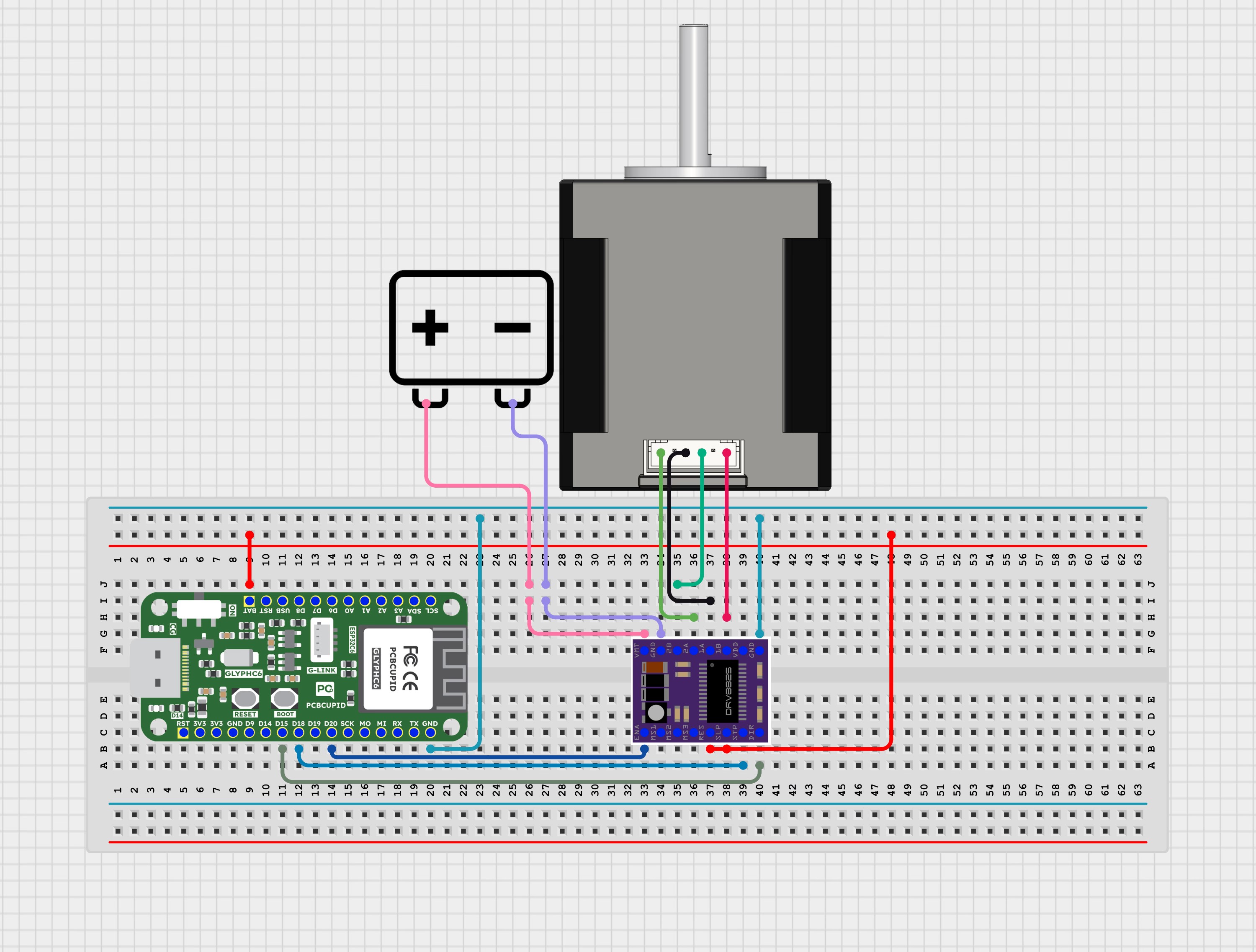
Stepper motors allow precise control of angular position, speed, and acceleration. The DRV8825 stepper driver module provides an easy interface to control bipolar stepper motors via simple digital signals (STEP and DIR).Stepper MotorA stepper motor is a type of electric motor that moves in precise, small steps instead of spinning continuously like a regular motor.
Each step rotates the motor by a fixed angle (called step angle).
You can control position, speed, and direction very accurately.
No need for feedback sensors (in most basic systems).
How does it work:A stepper motor has:
Multiple electromagnets (coils) arranged around a central rotor.
When you energize coils in a specific sequence, the magnetic field causes the rotor to move one “step” at a time.
DRV8825 Driver:The DRV8825 is a microstepping driver for controlling bipolar stepper motors. It can handle up to 2.5A per coil (with proper cooling) and supports up to 1/32 microstepping, allowing smooth and quiet motor operation.Key Signals:
STEP: Each pulse advances motor by one microstep.
DIR: Sets direction of rotation (HIGH = one direction, LOW = opposite).
ENABLE: Enables or disables motor coils (LOW = enable, HIGH = disable).
Smart home motorized appliances
Conveyor and material handling systems
Camera sliders and pan-tilt systems
Automatic feeders and dispensing units
Valve and actuator control systems
Industrial control applications
IoT-based remote motor control projects
For the Pcbcupid Glyph C3 to appear under Tools > Board > esp32, the esp32 board version installed in the Arduino IDE should be greater or equal to 3.1.0.
Tools > Port and select the port connected to your GLYPH.
Tools > USB CDC on Boot >Enabled
If USB CDC on BOOT not enabled, you won’t be seeing any serial data on Arduino IDE.
Upload the Code
Click the upload button (➡️ icon) or use the shortcut CRTL + U in Arduino IDE to upload the code to the board.