Connect the BH1750 Adafruit light sensor to a Glyph development board over I2C using the Glink/Qwiic connector and read ambient lux values.
Integrating Adafruit with GLYPH Boards
This guide helps you integrate the BH1750 light sensor with GLYPH Boards assuming you are using GLYPH-C3 (but any GLYPH development board from the ESP32 Series should work). Along with that it should prove to be a good example for using G-LINK that comes as a part of GLYPH board and also shows cross compatibility between G-LINK and QWIIC Connector. The provided code in this example should reads light levels and prints them to the Serial Monitor. We’ll walk you through setting up the sensor and modifying the code.
Step 1: Hardware Required
Glyph Boards
BH1750 light sensor
GLINK / QWIIC connector
Breadboard (optional)
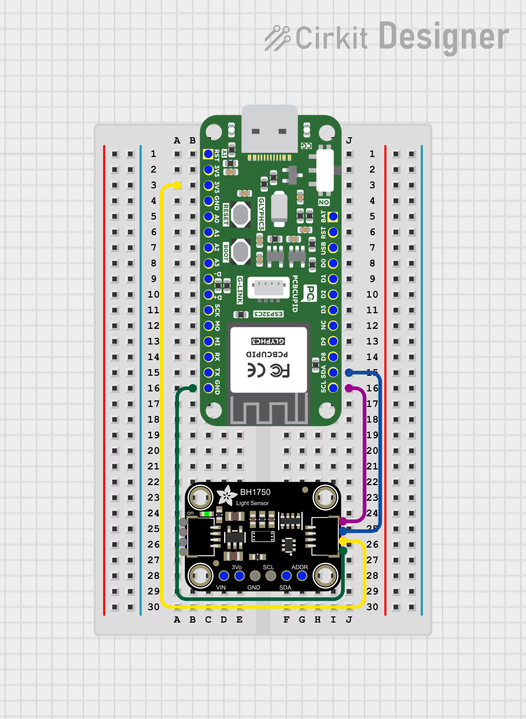
Step 2: Circuit Diagram
Connect the BH1750 sensor to the Glyph boards using the following pin configurations:
VCC to 3.3V (on the Adafruit board)
GND to GND
SCL to SCL
SDA to SDA
Step 3: Code setup
Open Arduino IDE.
Copy and paste the following code into the Arduino IDE:
Arduino Code
CircuitPython Code
#include <BH1750.h>#include <Wire.h>BH1750 lightMeter;void setup() { Serial.begin(9600); // Initialize the I2C bus (BH1750 library doesn't do this automatically) Wire.begin(); lightMeter.begin(); Serial.println(F("BH1750 begin"));}void loop() { float lux = lightMeter.readLightLevel(); Serial.print("Light: "); Serial.print(lux); Serial.println(" lx"); delay(1000);}
Copy adafruit_bh1750.mpy and its adafruit_bus_device dependency into lib/ before saving code.py. Use the same GLINK/Qwiic wiring shown above.Follow the CircuitPython setup guide and save this example as code.py on the board.
Wire.begin(): On the GLYPH boards, you can use the default Wire.begin() to initialize the I2C bus, or specify the SDA and SCL pins manually if needed.
Sensor Setup: The lightMeter.begin() function initializes the BH1750 sensor.
Step 4: Upload the Code
Connect the Board
Connect your GLYPH board to your computer
Select the Board and PortDo the following settings in your Arduino IDE,
Do the following settings in your Arduino IDE,
Tools > Board > esp32 > Pcbcupid GLYPH C3
For the Pcbcupid GLYPH C3 to appear under Tools > Board > esp32, the esp32 board version installed in the Arduino IDE should be greater or equal to 3.1.0.
Tools > Port and select the port connected to your GLYPH.
Tools > USB CDC on Boot >Enabled
If USB CDC on BOOT not enabled, you won’t be seeing any serial data on Arduino IDE.
Upload the Code
Click the upload button (➡️ icon) or use the shortcut CTRL + U in Arduino IDE to upload the code to the board.
Step 5: Check the Output on Serial Monitor
Open the Serial Monitor
After uploading the code, open the Serial Monitor by clicking on the magnifying glass icon in the top right corner of Arduino IDE or by going to Tools > Serial Monitor.
Set the Baud Rate
Ensure the baud rate is set to 9600.
Read the Light Levels
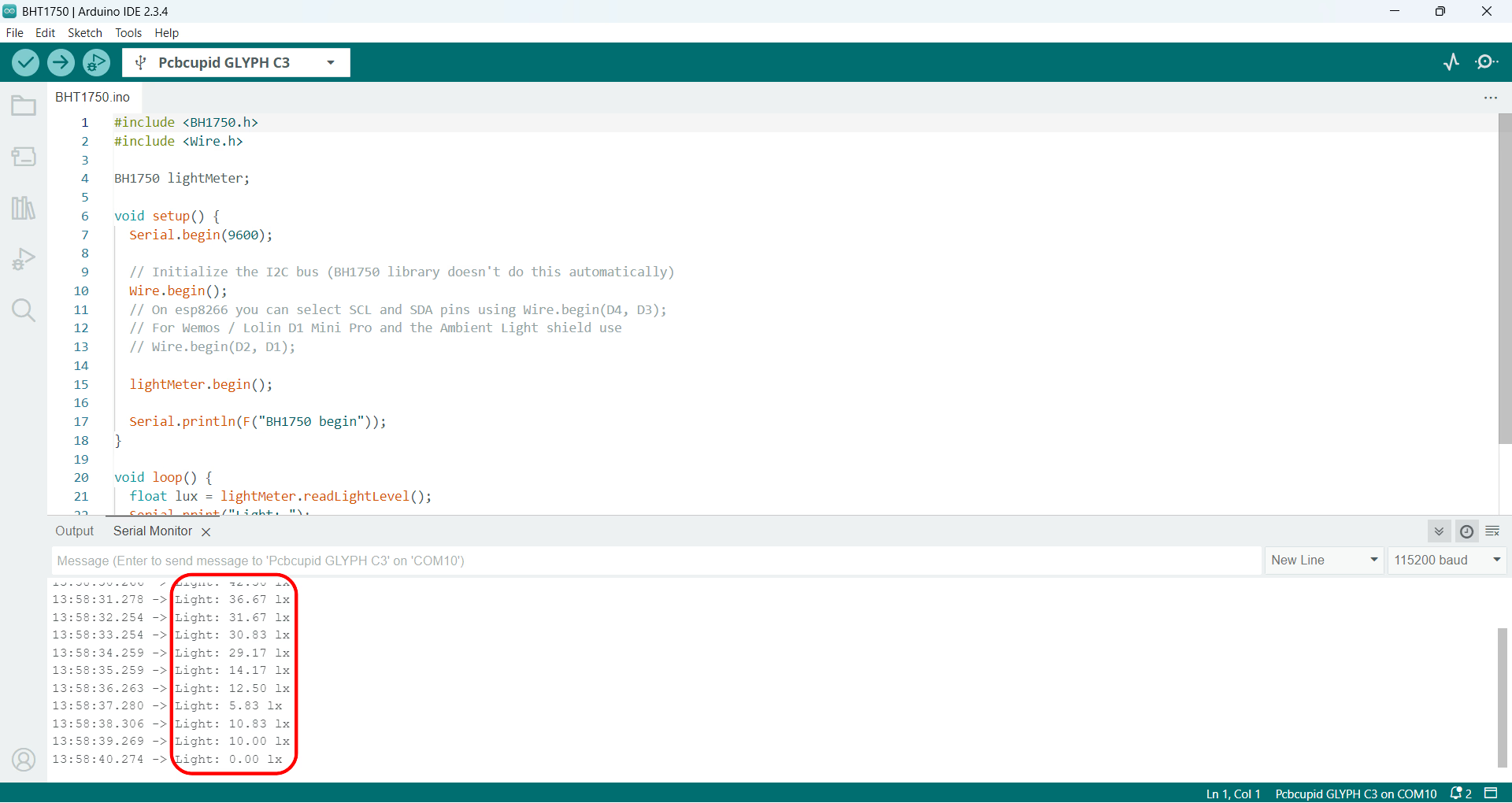
The Serial Monitor will display light levels in lux measured by the BH1750 sensor. The output should look something like this:
{"docsConfig":{"theme":"mint","$schema":"https://mintlify.com/docs.json","name":"PCB Cupid","colors":{"primary":"#0D9373"},"favicon":"https://mintcdn.com/pcbcupid-bae3761c/4dXNuJjZhqL5zqVd/images/favicon_PCBcupid.png?fit=max\u0026auto=format\u0026n=4dXNuJjZhqL5zqVd\u0026q=85\u0026s=697c4189e0a983e1722bddbedde79f61","appearance":{"strict":true},"background":{"decoration":"gradient"},"navbar":{"links":[{"href":"https://spell.pcbcupid.com","label":"Circuit Spell"},{"href":"https://shop.pcbcupid.com","label":"Shop"},{"href":"/","label":"Learn"},{"href":"https://events.pcbcupid.com","label":"Events"},{"href":"https://forum.pcbcupid.com","label":"Forum"},{"href":"https://pcbcupid.com/articles","label":"Articles"},{"href":"https://pcbcupid.com/tools","label":"Tools"}]},"seo":{"indexing":"all"},"fonts":{"family":"Space Grotesk","weight":400},"icons":{"library":"lucide"},"styling":{"eyebrows":"breadcrumbs","latex":true},"contextual":{"options":["copy","chatgpt","claude","cursor","vscode","mcp"],"display":"toc"},"thumbnails":{"appearance":"dark"},"navigation":{"pages":[]}},"deployment":{"deploymentMetadataValue":{"subdomain":"pcbcupid-bae3761c","hasAudioNarration":false,"actualSubdomain":"pcbcupid-bae3761c","customDomains":["learn.pcbcupid.com"],"gitSource":{"type":"github","owner":"pcbcupid","repo":"pcbcupid-docs","deployBranch":"main","contentDirectory":"","isPrivate":false,"mountPath":"","label":""},"feedback":{"thumbs":true,"edits":true,"issues":true},"entitlements":{"AI_CHAT":{"status":"DISABLED"}},"buildId":"6ae268427b458a5c875a9a81","clientVersion":"0.0.4177","searchFilterCounts":[{"language":"default","tag":"Documentation","count":77},{"language":"default","tag":"Modules","count":67},{"language":"default","tag":"PCB Design","count":45},{"language":"default","tag":"Examples","count":32},{"language":"default","tag":"Glyph","count":25},{"language":"default","tag":"G-Mod","count":17},{"language":"default","tag":"KiCad","count":16},{"language":"default","tag":"Basic","count":15},{"language":"default","tag":"Welcome","count":9},{"language":"default","tag":"G-Sense","count":8}]},"assistantConfig":{"enableAskAiButton":false,"enableStarterQuestions":false,"enableContextualStarterQuestions":false,"enableAskAiSearchBar":true},"basePath":"","hasChatPermissions":false,"hasWebMcpPermissions":false,"toggles":[{"name":"kill-isr","enabled":true,"variant":{"name":"disabled","enabled":false,"feature_enabled":true},"impressionData":false},{"name":"custom-rbac-roles","enabled":true,"variant":{"name":"disabled","enabled":false,"feature_enabled":true},"impressionData":false},{"name":"agent-mintlify-slack","enabled":true,"variant":{"name":"disabled","enabled":false,"feature_enabled":true},"impressionData":false},{"name":"agent-integrations-settings","enabled":true,"variant":{"name":"disabled","enabled":false,"feature_enabled":true},"impressionData":false},{"name":"rbac-expansion","enabled":true,"variant":{"name":"disabled","enabled":false,"feature_enabled":true},"impressionData":false},{"name":"automations-pr-grouping","enabled":true,"variant":{"name":"disabled","enabled":false,"feature_enabled":true},"impressionData":false},{"name":"custom-prefix","enabled":true,"variant":{"name":"disabled","enabled":false,"feature_enabled":true},"impressionData":false},{"name":"analytics-v7","enabled":true,"variant":{"name":"disabled","enabled":false,"feature_enabled":true},"impressionData":false},{"name":"user-flows-analytics","enabled":true,"variant":{"name":"disabled","enabled":false,"feature_enabled":true},"impressionData":false},{"name":"no-publish-flow","enabled":true,"variant":{"name":"disabled","enabled":false,"feature_enabled":true},"impressionData":false},{"name":"workos-onboarding","enabled":true,"variant":{"name":"disabled","enabled":false,"feature_enabled":true},"impressionData":false},{"name":"snapshot-serving-live","enabled":true,"variant":{"name":"disabled","enabled":false,"feature_enabled":true},"impressionData":false},{"name":"stripTemperatureMiddleware","enabled":true,"variant":{"name":"disabled","enabled":false,"feature_enabled":true},"impressionData":false},{"name":"support-platform-pylon-zendesk","enabled":true,"variant":{"name":"disabled","enabled":false,"feature_enabled":true},"impressionData":false},{"name":"snapshot-serving","enabled":true,"variant":{"name":"disabled","enabled":false,"feature_enabled":true},"impressionData":false},{"name":"instant-rollback","enabled":true,"variant":{"name":"disabled","enabled":false,"feature_enabled":true},"impressionData":false},{"name":"granular-notifications-server","enabled":true,"variant":{"name":"disabled","enabled":false,"feature_enabled":true},"impressionData":false},{"name":"granular-notifications","enabled":true,"variant":{"name":"disabled","enabled":false,"feature_enabled":true},"impressionData":false},{"name":"automations-fable","enabled":true,"variant":{"name":"disabled","enabled":false,"feature_enabled":true},"impressionData":false},{"name":"fixed-ai-action-pricing","enabled":true,"variant":{"name":"disabled","enabled":false,"feature_enabled":true},"impressionData":false},{"name":"automation-resolve-merge-conflict","enabled":true,"variant":{"name":"disabled","enabled":false,"feature_enabled":true},"impressionData":false},{"name":"scoped-publishing","enabled":true,"variant":{"name":"disabled","enabled":false,"feature_enabled":true},"impressionData":false},{"name":"mintql","enabled":true,"variant":{"name":"disabled","enabled":false,"feature_enabled":true},"impressionData":false},{"name":"page-level-analytics","enabled":true,"variant":{"name":"disabled","enabled":false,"feature_enabled":true},"impressionData":false},{"name":"editor-version-history-v2","enabled":true,"variant":{"name":"disabled","enabled":false,"feature_enabled":true},"impressionData":false},{"name":"billing-page-v2","enabled":true,"variant":{"name":"disabled","enabled":false,"feature_enabled":true},"impressionData":false},{"name":"full-page-search","enabled":true,"variant":{"name":"disabled","enabled":false,"feature_enabled":true},"impressionData":false},{"name":"workspace-projects","enabled":true,"variant":{"name":"disabled","enabled":false,"feature_enabled":true},"impressionData":false},{"name":"assistant-v5","enabled":true,"variant":{"name":"disabled","enabled":false,"feature_enabled":true},"impressionData":false},{"name":"fork-pr-previews","enabled":true,"variant":{"name":"disabled","enabled":false,"feature_enabled":true},"impressionData":false},{"name":"revalidation-jwt","enabled":true,"variant":{"name":"disabled","enabled":false,"feature_enabled":true},"impressionData":false},{"name":"workos-sso-scim","enabled":true,"variant":{"name":"disabled","enabled":false,"feature_enabled":true},"impressionData":false},{"name":"hobby-abuse-scan","enabled":true,"variant":{"name":"disabled","enabled":false,"feature_enabled":true},"impressionData":false},{"name":"dashboard-inbox","enabled":true,"variant":{"name":"disabled","enabled":false,"feature_enabled":true},"impressionData":false},{"name":"workos-signup","enabled":true,"variant":{"name":"disabled","enabled":false,"feature_enabled":true},"impressionData":false},{"name":"turbopuffer-dual-write","enabled":true,"variant":{"name":"disabled","enabled":false,"feature_enabled":true},"impressionData":false},{"name":"workos-enabled","enabled":true,"variant":{"name":"disabled","enabled":false,"feature_enabled":true},"impressionData":false},{"name":"approve-review-flow","enabled":true,"variant":{"name":"disabled","enabled":false,"feature_enabled":true},"impressionData":false},{"name":"editor-metadata","enabled":true,"variant":{"name":"disabled","enabled":false,"feature_enabled":true},"impressionData":false},{"name":"sso-setup-deadline-banner","enabled":true,"variant":{"name":"disabled","enabled":false,"feature_enabled":true},"impressionData":false},{"name":"turbopuffer-serve","enabled":true,"variant":{"name":"disabled","enabled":false,"feature_enabled":true},"impressionData":false},{"name":"live-agents","enabled":true,"variant":{"name":"disabled","enabled":false,"feature_enabled":true},"impressionData":false},{"name":"starter-pricing","enabled":true,"variant":{"name":"treatment","enabled":true,"payload":{"type":"string","value":"treatment"},"feature_enabled":true},"impressionData":false},{"name":"llms-txt-v2","enabled":true,"variant":{"name":"disabled","enabled":false,"feature_enabled":true},"impressionData":false},{"name":"wildcard-email-auth","enabled":true,"variant":{"name":"disabled","enabled":false,"feature_enabled":true},"impressionData":false}],"googleFontsInlined":true},"customCss":[],"page":{"pagePath":"guides/bh1750adafruit-compatibility","slug":"/guides/bh1750adafruit-compatibility","pageMetadata":{"description":"Connect the BH1750 Adafruit light sensor to a Glyph development board over I2C using the Glink/Qwiic connector and read ambient lux values.","title":"BH1750 Adafruit Sensor","sidebarTitle":"BH1750 Sensor","href":"/guides/bh1750adafruit-compatibility"},"description":{"compiledSource":"\"use strict\";\nconst {jsx: _jsx} = arguments[0];\nconst {useMDXComponents: _provideComponents} = arguments[0];\nfunction _createMdxContent(props) {\n const _components = {\n p: \"p\",\n ..._provideComponents(),\n ...props.components\n };\n return _jsx(_components.p, {\n children: \"Connect the BH1750 Adafruit light sensor to a Glyph development board over I2C using the Glink/Qwiic connector and read ambient lux values.\"\n });\n}\nfunction MDXContent(props = {}) {\n const {wrapper: MDXLayout} = {\n ..._provideComponents(),\n ...props.components\n };\n return MDXLayout ? _jsx(MDXLayout, {\n ...props,\n children: _jsx(_createMdxContent, {\n ...props\n })\n }) : _createMdxContent(props);\n}\nreturn {\n default: MDXContent\n};\n","frontmatter":{},"scope":{}},"pageType":"default","mdx":{"mdxSource":{"compiledSource":"\"use strict\";const{Fragment:_Fragment,jsx:_jsx,jsxs:_jsxs}=arguments[0];const{useMDXComponents:_provideComponents}=arguments[0];function _createMdxContent(props){const _components={a:`a`,code:`code`,em:`em`,img:`img`,li:`li`,ol:`ol`,p:`p`,pre:`pre`,span:`span`,strong:`strong`,ul:`ul`,..._provideComponents(),...props.components},{CodeBlock,Heading,OptimizedImage,Tab,Tabs,Warning}=_components;if(!CodeBlock)_missingMdxReference(`CodeBlock`,true);if(!Heading)_missingMdxReference(`Heading`,true);if(!OptimizedImage)_missingMdxReference(`OptimizedImage`,true);if(!Tab)_missingMdxReference(`Tab`,true);if(!Tabs)_missingMdxReference(`Tabs`,true);if(!Warning)_missingMdxReference(`Warning`,true);return _jsxs(_Fragment,{children:[_jsx(Heading,{level:`1`,id:`integrating-adafruit-with-glyph-boards`,children:`Integrating Adafruit with GLYPH Boards`}),`\n`,_jsx(_components.p,{children:_jsx(_components.img,{src:`https://files.pcbcupid.com/Documentation/Boards/Examples/bh1750_adafruit_lightsensor/PCBCUPID_bh1750adafruitlightsensor_intro.avif`,alt:`pcbcupid_bh1750adafruit`})}),`\n`,_jsxs(_components.p,{children:[`This guide helps you integrate the BH1750 light sensor with GLYPH Boards assuming you are using `,_jsx(_components.a,{href:`https://learn.pcbcupid.com/boards/glyph-c3/overview`,children:`GLYPH-C3`}),` (but any `,_jsx(_components.a,{href:`https://shop.pcbcupid.com/product-category/development-boards/`,children:`GLYPH development board`}),` from the ESP32 Series should work). Along with that it should prove to be a good example for using `,_jsx(_components.a,{href:`https://learn.pcbcupid.com/boards/needs/glink`,children:`G-LINK`}),` that comes as a part of GLYPH board and also shows cross compatibility between `,_jsx(_components.a,{href:`https://learn.pcbcupid.com/boards/needs/glink`,children:`G-LINK`}),` and `,_jsx(_components.a,{href:`https://www.sparkfun.com/qwiic`,children:`QWIIC`}),` Connector. The provided code in this example should reads light levels and prints them to the Serial Monitor. We’ll walk you through setting up the sensor and modifying the code.`]}),`\n`,_jsx(Heading,{level:`2`,id:`step-1-hardware-required`,children:`Step 1: Hardware Required`}),`\n`,_jsxs(_components.ul,{children:[`\n`,_jsx(_components.li,{children:`Glyph Boards`}),`\n`,_jsx(_components.li,{children:`BH1750 light sensor`}),`\n`,_jsx(_components.li,{children:`GLINK / QWIIC connector`}),`\n`,_jsx(_components.li,{children:`Breadboard (optional)`}),`\n`]}),`\n`,_jsx(Heading,{level:`2`,id:`step-2-circuit-diagram`,children:`Step 2: Circuit Diagram`}),`\n`,_jsx(_components.p,{children:`Connect the BH1750 sensor to the Glyph boards using the following pin configurations:`}),`\n`,_jsxs(_components.ul,{children:[`\n`,_jsxs(_components.li,{children:[_jsx(_components.strong,{children:`VCC to 3.3V`}),` (on the Adafruit board)`]}),`\n`,_jsx(_components.li,{children:_jsx(_components.strong,{children:`GND to GND`})}),`\n`,_jsx(_components.li,{children:_jsx(_components.strong,{children:`SCL to SCL`})}),`\n`,_jsx(_components.li,{children:_jsx(_components.strong,{children:`SDA to SDA`})}),`\n`]}),`\n`,_jsx(`div`,{style:{textAlign:`center`},children:_jsx(OptimizedImage,{src:`https://files.pcbcupid.com/Documentation/Boards/Examples/bh1750_adafruit_lightsensor/PCBCUPID_adafruitlightsensor_circuitdiagram.avif`,alt:`pcbcupid-smowcode-window-setup`,width:`600`})}),`\n`,_jsx(`br`,{}),`\n`,_jsx(Heading,{level:`2`,id:`step-3-code-setup`,children:`Step 3: Code setup`}),`\n`,_jsxs(_components.ol,{children:[`\n`,_jsx(_components.li,{children:_jsx(_components.strong,{children:`Open Arduino IDE.`})}),`\n`,_jsx(_components.li,{children:_jsx(_components.strong,{children:`Copy and paste the following code into the Arduino IDE:`})}),`\n`]}),`\n`,_jsxs(Tabs,{children:[_jsx(Tab,{title:`Arduino Code`,id:`arduino-code`,children:_jsx(CodeBlock,{filename:``,numberOfLines:`25`,language:`cpp`,children:_jsx(_components.pre,{className:`shiki shiki-themes github-light-default dark-plus`,style:{backgroundColor:`#ffffff`,\"--shiki-dark-bg\":`#0B0C0E`,color:`#1f2328`,\"--shiki-dark\":`#D4D4D4`},language:`cpp`,children:_jsxs(_components.code,{language:`cpp`,numberOfLines:`25`,children:[_jsxs(_components.span,{className:`line`,children:[_jsx(_components.span,{style:{color:`#CF222E`,\"--shiki-dark\":`#C586C0`},children:`#include`}),_jsx(_components.span,{style:{color:`#0A3069`,\"--shiki-dark\":`#CE9178`},children:` \u003cBH1750.h>`})]}),`\n`,_jsxs(_components.span,{className:`line`,children:[_jsx(_components.span,{style:{color:`#CF222E`,\"--shiki-dark\":`#C586C0`},children:`#include`}),_jsx(_components.span,{style:{color:`#0A3069`,\"--shiki-dark\":`#CE9178`},children:` \u003cWire.h>`})]}),`\n`,_jsx(_components.span,{className:`line`}),`\n`,_jsx(_components.span,{className:`line`,children:_jsx(_components.span,{style:{color:`#1F2328`,\"--shiki-dark\":`#D4D4D4`},children:`BH1750 lightMeter;`})}),`\n`,_jsx(_components.span,{className:`line`}),`\n`,_jsxs(_components.span,{className:`line`,children:[_jsx(_components.span,{style:{color:`#CF222E`,\"--shiki-dark\":`#569CD6`},children:`void`}),_jsx(_components.span,{style:{color:`#8250DF`,\"--shiki-dark\":`#DCDCAA`},children:` setup`}),_jsx(_components.span,{style:{color:`#1F2328`,\"--shiki-dark\":`#D4D4D4`},children:`() `})]}),`\n`,_jsx(_components.span,{className:`line`,children:_jsx(_components.span,{style:{color:`#1F2328`,\"--shiki-dark\":`#D4D4D4`},children:`{`})}),`\n`,_jsxs(_components.span,{className:`line`,children:[_jsx(_components.span,{style:{color:`#1F2328`,\"--shiki-dark\":`#9CDCFE`},children:` Serial`}),_jsx(_components.span,{style:{color:`#1F2328`,\"--shiki-dark\":`#D4D4D4`},children:`.`}),_jsx(_components.span,{style:{color:`#8250DF`,\"--shiki-dark\":`#DCDCAA`},children:`begin`}),_jsx(_components.span,{style:{color:`#1F2328`,\"--shiki-dark\":`#D4D4D4`},children:`(`}),_jsx(_components.span,{style:{color:`#0550AE`,\"--shiki-dark\":`#B5CEA8`},children:`9600`}),_jsx(_components.span,{style:{color:`#1F2328`,\"--shiki-dark\":`#D4D4D4`},children:`);`})]}),`\n`,_jsx(_components.span,{className:`line`}),`\n`,_jsx(_components.span,{className:`line`,children:_jsx(_components.span,{style:{color:`#6E7781`,\"--shiki-dark\":`#6A9955`},children:` // Initialize the I2C bus (BH1750 library doesn't do this automatically)`})}),`\n`,_jsxs(_components.span,{className:`line`,children:[_jsx(_components.span,{style:{color:`#1F2328`,\"--shiki-dark\":`#9CDCFE`},children:` Wire`}),_jsx(_components.span,{style:{color:`#1F2328`,\"--shiki-dark\":`#D4D4D4`},children:`.`}),_jsx(_components.span,{style:{color:`#8250DF`,\"--shiki-dark\":`#DCDCAA`},children:`begin`}),_jsx(_components.span,{style:{color:`#1F2328`,\"--shiki-dark\":`#D4D4D4`},children:`();`})]}),`\n`,_jsx(_components.span,{className:`line`}),`\n`,_jsxs(_components.span,{className:`line`,children:[_jsx(_components.span,{style:{color:`#1F2328`,\"--shiki-dark\":`#9CDCFE`},children:` lightMeter`}),_jsx(_components.span,{style:{color:`#1F2328`,\"--shiki-dark\":`#D4D4D4`},children:`.`}),_jsx(_components.span,{style:{color:`#8250DF`,\"--shiki-dark\":`#DCDCAA`},children:`begin`}),_jsx(_components.span,{style:{color:`#1F2328`,\"--shiki-dark\":`#D4D4D4`},children:`();`})]}),`\n`,_jsx(_components.span,{className:`line`}),`\n`,_jsxs(_components.span,{className:`line`,children:[_jsx(_components.span,{style:{color:`#1F2328`,\"--shiki-dark\":`#9CDCFE`},children:` Serial`}),_jsx(_components.span,{style:{color:`#1F2328`,\"--shiki-dark\":`#D4D4D4`},children:`.`}),_jsx(_components.span,{style:{color:`#8250DF`,\"--shiki-dark\":`#DCDCAA`},children:`println`}),_jsx(_components.span,{style:{color:`#1F2328`,\"--shiki-dark\":`#D4D4D4`},children:`(`}),_jsx(_components.span,{style:{color:`#8250DF`,\"--shiki-dark\":`#DCDCAA`},children:`F`}),_jsx(_components.span,{style:{color:`#1F2328`,\"--shiki-dark\":`#D4D4D4`},children:`(`}),_jsx(_components.span,{style:{color:`#0A3069`,\"--shiki-dark\":`#CE9178`},children:`\"BH1750 begin\"`}),_jsx(_components.span,{style:{color:`#1F2328`,\"--shiki-dark\":`#D4D4D4`},children:`));`})]}),`\n`,_jsx(_components.span,{className:`line`,children:_jsx(_components.span,{style:{color:`#1F2328`,\"--shiki-dark\":`#D4D4D4`},children:`}`})}),`\n`,_jsx(_components.span,{className:`line`}),`\n`,_jsxs(_components.span,{className:`line`,children:[_jsx(_components.span,{style:{color:`#CF222E`,\"--shiki-dark\":`#569CD6`},children:`void`}),_jsx(_components.span,{style:{color:`#8250DF`,\"--shiki-dark\":`#DCDCAA`},children:` loop`}),_jsx(_components.span,{style:{color:`#1F2328`,\"--shiki-dark\":`#D4D4D4`},children:`() `})]}),`\n`,_jsx(_components.span,{className:`line`,children:_jsx(_components.span,{style:{color:`#1F2328`,\"--shiki-dark\":`#D4D4D4`},children:`{`})}),`\n`,_jsxs(_components.span,{className:`line`,children:[_jsx(_components.span,{style:{color:`#CF222E`,\"--shiki-dark\":`#569CD6`},children:` float`}),_jsx(_components.span,{style:{color:`#1F2328`,\"--shiki-dark\":`#D4D4D4`},children:` lux `}),_jsx(_components.span,{style:{color:`#CF222E`,\"--shiki-dark\":`#D4D4D4`},children:`=`}),_jsx(_components.span,{style:{color:`#1F2328`,\"--shiki-dark\":`#9CDCFE`},children:` lightMeter`}),_jsx(_components.span,{style:{color:`#1F2328`,\"--shiki-dark\":`#D4D4D4`},children:`.`}),_jsx(_components.span,{style:{color:`#8250DF`,\"--shiki-dark\":`#DCDCAA`},children:`readLightLevel`}),_jsx(_components.span,{style:{color:`#1F2328`,\"--shiki-dark\":`#D4D4D4`},children:`();`})]}),`\n`,_jsxs(_components.span,{className:`line`,children:[_jsx(_components.span,{style:{color:`#1F2328`,\"--shiki-dark\":`#9CDCFE`},children:` Serial`}),_jsx(_components.span,{style:{color:`#1F2328`,\"--shiki-dark\":`#D4D4D4`},children:`.`}),_jsx(_components.span,{style:{color:`#8250DF`,\"--shiki-dark\":`#DCDCAA`},children:`print`}),_jsx(_components.span,{style:{color:`#1F2328`,\"--shiki-dark\":`#D4D4D4`},children:`(`}),_jsx(_components.span,{style:{color:`#0A3069`,\"--shiki-dark\":`#CE9178`},children:`\"Light: \"`}),_jsx(_components.span,{style:{color:`#1F2328`,\"--shiki-dark\":`#D4D4D4`},children:`);`})]}),`\n`,_jsxs(_components.span,{className:`line`,children:[_jsx(_components.span,{style:{color:`#1F2328`,\"--shiki-dark\":`#9CDCFE`},children:` Serial`}),_jsx(_components.span,{style:{color:`#1F2328`,\"--shiki-dark\":`#D4D4D4`},children:`.`}),_jsx(_components.span,{style:{color:`#8250DF`,\"--shiki-dark\":`#DCDCAA`},children:`print`}),_jsx(_components.span,{style:{color:`#1F2328`,\"--shiki-dark\":`#D4D4D4`},children:`(lux);`})]}),`\n`,_jsxs(_components.span,{className:`line`,children:[_jsx(_components.span,{style:{color:`#1F2328`,\"--shiki-dark\":`#9CDCFE`},children:` Serial`}),_jsx(_components.span,{style:{color:`#1F2328`,\"--shiki-dark\":`#D4D4D4`},children:`.`}),_jsx(_components.span,{style:{color:`#8250DF`,\"--shiki-dark\":`#DCDCAA`},children:`println`}),_jsx(_components.span,{style:{color:`#1F2328`,\"--shiki-dark\":`#D4D4D4`},children:`(`}),_jsx(_components.span,{style:{color:`#0A3069`,\"--shiki-dark\":`#CE9178`},children:`\" lx\"`}),_jsx(_components.span,{style:{color:`#1F2328`,\"--shiki-dark\":`#D4D4D4`},children:`);`})]}),`\n`,_jsxs(_components.span,{className:`line`,children:[_jsx(_components.span,{style:{color:`#8250DF`,\"--shiki-dark\":`#DCDCAA`},children:` delay`}),_jsx(_components.span,{style:{color:`#1F2328`,\"--shiki-dark\":`#D4D4D4`},children:`(`}),_jsx(_components.span,{style:{color:`#0550AE`,\"--shiki-dark\":`#B5CEA8`},children:`1000`}),_jsx(_components.span,{style:{color:`#1F2328`,\"--shiki-dark\":`#D4D4D4`},children:`);`})]}),`\n`,_jsx(_components.span,{className:`line`,children:_jsx(_components.span,{style:{color:`#1F2328`,\"--shiki-dark\":`#D4D4D4`},children:`}`})}),`\n`]})})})}),_jsxs(Tab,{title:`CircuitPython Code`,id:`circuitpython-code`,children:[_jsx(_components.p,{children:`Copy adafruit_bh1750.mpy and its adafruit_bus_device dependency into lib/ before saving code.py. Use the same GLINK/Qwiic wiring shown above.`}),_jsxs(_components.p,{children:[`Follow the `,_jsx(_components.a,{href:`/documentation/welcome/prerequisites/circuitpython-setup-guide`,children:`CircuitPython setup guide`}),` and save this example as `,_jsx(_components.code,{children:`code.py`}),` on the board.`]}),_jsx(CodeBlock,{filename:``,numberOfLines:`9`,language:`python`,children:_jsx(_components.pre,{className:`shiki shiki-themes github-light-default dark-plus`,style:{backgroundColor:`#ffffff`,\"--shiki-dark-bg\":`#0B0C0E`,color:`#1f2328`,\"--shiki-dark\":`#D4D4D4`},language:`python`,children:_jsxs(_components.code,{language:`python`,numberOfLines:`9`,children:[_jsxs(_components.span,{className:`line`,children:[_jsx(_components.span,{style:{color:`#CF222E`,\"--shiki-dark\":`#C586C0`},children:`import`}),_jsx(_components.span,{style:{color:`#1F2328`,\"--shiki-dark\":`#D4D4D4`},children:` time`})]}),`\n`,_jsxs(_components.span,{className:`line`,children:[_jsx(_components.span,{style:{color:`#CF222E`,\"--shiki-dark\":`#C586C0`},children:`import`}),_jsx(_components.span,{style:{color:`#1F2328`,\"--shiki-dark\":`#D4D4D4`},children:` board`})]}),`\n`,_jsxs(_components.span,{className:`line`,children:[_jsx(_components.span,{style:{color:`#CF222E`,\"--shiki-dark\":`#C586C0`},children:`import`}),_jsx(_components.span,{style:{color:`#1F2328`,\"--shiki-dark\":`#D4D4D4`},children:` adafruit_bh1750`})]}),`\n`,_jsx(_components.span,{className:`line`}),`\n`,_jsxs(_components.span,{className:`line`,children:[_jsx(_components.span,{style:{color:`#1F2328`,\"--shiki-dark\":`#D4D4D4`},children:`sensor `}),_jsx(_components.span,{style:{color:`#CF222E`,\"--shiki-dark\":`#D4D4D4`},children:`=`}),_jsx(_components.span,{style:{color:`#1F2328`,\"--shiki-dark\":`#D4D4D4`},children:` adafruit_bh1750.BH1750(board.I2C())`})]}),`\n`,_jsx(_components.span,{className:`line`}),`\n`,_jsxs(_components.span,{className:`line`,children:[_jsx(_components.span,{style:{color:`#CF222E`,\"--shiki-dark\":`#C586C0`},children:`while`}),_jsx(_components.span,{style:{color:`#0550AE`,\"--shiki-dark\":`#569CD6`},children:` True`}),_jsx(_components.span,{style:{color:`#1F2328`,\"--shiki-dark\":`#D4D4D4`},children:`:`})]}),`\n`,_jsxs(_components.span,{className:`line`,children:[_jsx(_components.span,{style:{color:`#0550AE`,\"--shiki-dark\":`#DCDCAA`},children:` print`}),_jsx(_components.span,{style:{color:`#1F2328`,\"--shiki-dark\":`#D4D4D4`},children:`(`}),_jsx(_components.span,{style:{color:`#0A3069`,\"--shiki-dark\":`#CE9178`},children:`\"Light: `}),_jsx(_components.span,{style:{color:`#CF222E`,\"--shiki-dark\":`#569CD6`},children:`{:.1f}`}),_jsx(_components.span,{style:{color:`#0A3069`,\"--shiki-dark\":`#CE9178`},children:` lx\"`}),_jsx(_components.span,{style:{color:`#1F2328`,\"--shiki-dark\":`#D4D4D4`},children:`.format(sensor.lux))`})]}),`\n`,_jsxs(_components.span,{className:`line`,children:[_jsx(_components.span,{style:{color:`#1F2328`,\"--shiki-dark\":`#D4D4D4`},children:` time.sleep(`}),_jsx(_components.span,{style:{color:`#0550AE`,\"--shiki-dark\":`#B5CEA8`},children:`1`}),_jsx(_components.span,{style:{color:`#1F2328`,\"--shiki-dark\":`#D4D4D4`},children:`)`})]}),`\n`]})})})]})]}),`\n`,_jsx(Heading,{level:`3`,id:`explanation`,children:`Explanation`}),`\n`,_jsxs(_components.ul,{children:[`\n`,_jsxs(_components.li,{children:[_jsx(_components.strong,{children:`Wire.begin():`}),` On the GLYPH boards, you can use the default `,_jsx(_components.code,{children:`Wire.begin()`}),` to initialize the I2C bus, or specify the SDA and SCL pins manually if needed.`]}),`\n`,_jsxs(_components.li,{children:[_jsx(_components.strong,{children:`Sensor Setup:`}),` The `,_jsx(_components.code,{children:`lightMeter.begin()`}),` function initializes the BH1750 sensor.`]}),`\n`]}),`\n`,_jsx(Heading,{level:`2`,id:`step-4-upload-the-code`,children:`Step 4: Upload the Code`}),`\n`,_jsxs(_components.ol,{children:[`\n`,_jsx(_components.li,{children:_jsx(_components.strong,{children:`Connect the Board`})}),`\n`]}),`\n`,_jsxs(_components.ul,{children:[`\n`,_jsx(_components.li,{children:`Connect your GLYPH board to your computer`}),`\n`]}),`\n`,_jsxs(_components.ol,{start:`2`,children:[`\n`,_jsxs(_components.li,{children:[`\n`,_jsx(_components.p,{children:_jsx(_components.strong,{children:`Select the Board and Port`})}),`\n`,_jsx(_components.p,{children:`Do the following settings in your Arduino IDE,\nDo the following settings in your Arduino IDE,`}),`\n`,_jsxs(_components.ul,{children:[`\n`,_jsx(_components.li,{children:_jsx(_components.code,{children:`Tools > Board > esp32 > Pcbcupid GLYPH C3`})}),`\n`]}),`\n`]}),`\n`]}),`\n`,_jsx(Warning,{children:_jsxs(_components.p,{children:[`For the `,_jsx(_components.code,{children:`Pcbcupid GLYPH C3 `}),` to appear under `,_jsx(_components.code,{children:`Tools > Board > esp32`}),`, the esp32 board version installed in the Arduino IDE should be greater or equal to 3.1.0.`]})}),`\n`,_jsxs(_components.ul,{children:[`\n`,_jsxs(_components.li,{children:[_jsx(_components.code,{children:`Tools > Port`}),` and select the port connected to your GLYPH.`]}),`\n`,_jsxs(_components.li,{children:[_jsx(_components.code,{children:`Tools > USB CDC on Boot >`}),` `,_jsx(_components.em,{children:_jsx(_components.strong,{children:`Enabled`})})]}),`\n`]}),`\n`,_jsx(Warning,{children:_jsxs(_components.p,{children:[`If `,_jsx(_components.code,{children:`USB CDC on BOOT`}),` not enabled, you won’t be seeing any serial data on Arduino IDE.`]})}),`\n`,_jsxs(_components.ol,{start:`3`,children:[`\n`,_jsx(_components.li,{children:_jsx(_components.strong,{children:`Upload the Code`})}),`\n`]}),`\n`,_jsxs(_components.ul,{children:[`\n`,_jsxs(_components.li,{children:[`Click the upload button (➡️ icon) or use the shortcut `,_jsx(_components.code,{children:`CTRL + U`}),` in Arduino IDE to upload the code to the board.`]}),`\n`]}),`\n`,_jsx(Heading,{level:`2`,id:`step-5-check-the-output-on-serial-monitor`,children:`Step 5: Check the Output on Serial Monitor`}),`\n`,_jsxs(_components.ol,{children:[`\n`,_jsxs(_components.li,{children:[`\n`,_jsx(_components.p,{children:_jsx(_components.strong,{children:`Open the Serial Monitor`})}),`\n`,_jsxs(_components.ul,{children:[`\n`,_jsxs(_components.li,{children:[`After uploading the code, open the Serial Monitor by clicking on the magnifying glass icon in the top right corner of Arduino IDE or by going to `,_jsx(_components.code,{children:`Tools > Serial Monitor`}),`.`]}),`\n`]}),`\n`]}),`\n`,_jsxs(_components.li,{children:[`\n`,_jsx(_components.p,{children:_jsx(_components.strong,{children:`Set the Baud Rate`})}),`\n`,_jsxs(_components.ul,{children:[`\n`,_jsxs(_components.li,{children:[`Ensure the baud rate is set to `,_jsx(_components.code,{children:`9600`}),`.`]}),`\n`]}),`\n`]}),`\n`,_jsxs(_components.li,{children:[`\n`,_jsx(_components.p,{children:_jsx(_components.strong,{children:`Read the Light Levels`})}),`\n`,_jsxs(_components.ul,{children:[`\n`,_jsx(_components.li,{children:`The Serial Monitor will display light levels in lux measured by the BH1750 sensor. The output should look something like this:`}),`\n`]}),`\n`]}),`\n`]}),`\n`,_jsx(_components.p,{children:_jsx(_components.img,{src:`https://files.pcbcupid.com/Documentation/Boards/Examples/bh1750_adafruit_lightsensor/PCBCUPID_bh1750adafruitlightsensor_serialmonitor.avif`,alt:`pcbcupid_bh1750adafruit_serialmon1`})})]})}function MDXContent(props={}){const{wrapper:MDXLayout}={..._provideComponents(),...props.components};return MDXLayout?_jsx(MDXLayout,{...props,children:_jsx(_createMdxContent,{...props})}):_createMdxContent(props)}return{default:MDXContent};function _missingMdxReference(id,component){throw new Error(`Expected `+(component?`component`:`object`)+\" `\"+id+\"` to be defined: you likely forgot to import, pass, or provide it.\")}","frontmatter":{},"scope":{"config":{},"pageMetadata":{"description":"Connect the BH1750 Adafruit light sensor to a Glyph development board over I2C using the Glink/Qwiic connector and read ambient lux values.","title":"BH1750 Adafruit Sensor","sidebarTitle":"BH1750 Sensor","href":"/guides/bh1750adafruit-compatibility"}}},"mdxSourceWithNoJs":null},"mdxExtracts":{"tableOfContents":[{"title":"Integrating Adafruit with GLYPH Boards","slug":"integrating-adafruit-with-glyph-boards","depth":1,"children":[]},{"title":"Step 1: Hardware Required","slug":"step-1-hardware-required","depth":2,"children":[]},{"title":"Step 2: Circuit Diagram","slug":"step-2-circuit-diagram","depth":2,"children":[]},{"title":"Step 3: Code setup","slug":"step-3-code-setup","depth":2,"children":[{"title":"Explanation","slug":"explanation","depth":3,"children":[]}]},{"title":"Step 4: Upload the Code","slug":"step-4-upload-the-code","depth":2,"children":[]},{"title":"Step 5: Check the Output on Serial Monitor","slug":"step-5-check-the-output-on-serial-monitor","depth":2,"children":[]}],"codeExamples":{}},"jsLinks":[],"subdomain":"pcbcupid-bae3761c","siteName":"PCB Cupid","title":"BH1750 Adafruit Sensor - PCB Cupid","navMaps":{"firstHrefInVersion":{},"firstHrefInLanguage":{}},"lastModified":"2026-10-17T08:18:02.762Z","originalFileLocation":"guides/bh1750adafruit-compatibility.mdx"},"headHtml":"\u003cscript data-mint-head>(function(){var d=document.documentElement,p=null;if(!p){try{p=localStorage.getItem(\"isDarkMode\")}catch(e){}if(p==='true')p='dark';else if(p==='false')p='light';if(p!=='light'\u0026\u0026p!=='dark'\u0026\u0026p!=='system')p=\"system\"}var r=p==='system'?(matchMedia(\"(prefers-color-scheme: dark)\").matches?'dark':'light'):p;d.classList.remove(r==='dark'?'light':'dark');d.classList.add(r);d.setAttribute(\"data-theme-preference\",p)})();\u003c/script>\u003cmeta data-mint-head name=\"description\" content=\"Connect the BH1750 Adafruit light sensor to a Glyph development board over I2C using the Glink/Qwiic connector and read ambient lux values.\">\u003cmeta data-mint-head name=\"application-name\" content=\"PCB Cupid\">\u003cmeta data-mint-head name=\"generator\" content=\"Mintlify\">\u003clink data-mint-head rel=\"icon\" type=\"image/png\" sizes=\"192x192\" href=\"/mintlify-assets/_mintlify/favicons/pcbcupid-bae3761c/TFd0Eu1csuxrLpjH/_generated/favicon/android-chrome-192x192.png\" media=\"(prefers-color-scheme: light)\">\u003clink data-mint-head rel=\"apple-touch-icon\" type=\"image/png\" sizes=\"180x180\" href=\"/mintlify-assets/_mintlify/favicons/pcbcupid-bae3761c/TFd0Eu1csuxrLpjH/_generated/favicon/apple-touch-icon.png\">\u003clink data-mint-head rel=\"icon\" type=\"image/png\" sizes=\"16x16\" href=\"/mintlify-assets/_mintlify/favicons/pcbcupid-bae3761c/TFd0Eu1csuxrLpjH/_generated/favicon/favicon-16x16.png\" media=\"(prefers-color-scheme: light)\">\u003clink data-mint-head rel=\"icon\" type=\"image/png\" sizes=\"32x32\" href=\"/mintlify-assets/_mintlify/favicons/pcbcupid-bae3761c/TFd0Eu1csuxrLpjH/_generated/favicon/favicon-32x32.png\" media=\"(prefers-color-scheme: light)\">\u003clink data-mint-head rel=\"shortcut icon\" type=\"image/x-icon\" href=\"/mintlify-assets/_mintlify/favicons/pcbcupid-bae3761c/TFd0Eu1csuxrLpjH/_generated/favicon/favicon.ico\" media=\"(prefers-color-scheme: light)\">\u003clink data-mint-head rel=\"icon\" type=\"image/png\" sizes=\"192x192\" href=\"/mintlify-assets/_mintlify/favicons/pcbcupid-bae3761c/TFd0Eu1csuxrLpjH/_generated/favicon-dark/android-chrome-192x192.png\" media=\"(prefers-color-scheme: dark)\">\u003clink data-mint-head rel=\"icon\" type=\"image/png\" sizes=\"16x16\" href=\"/mintlify-assets/_mintlify/favicons/pcbcupid-bae3761c/TFd0Eu1csuxrLpjH/_generated/favicon-dark/favicon-16x16.png\" media=\"(prefers-color-scheme: dark)\">\u003clink data-mint-head rel=\"icon\" type=\"image/png\" sizes=\"32x32\" href=\"/mintlify-assets/_mintlify/favicons/pcbcupid-bae3761c/TFd0Eu1csuxrLpjH/_generated/favicon-dark/favicon-32x32.png\" media=\"(prefers-color-scheme: dark)\">\u003clink data-mint-head rel=\"shortcut icon\" type=\"image/x-icon\" href=\"/mintlify-assets/_mintlify/favicons/pcbcupid-bae3761c/TFd0Eu1csuxrLpjH/_generated/favicon-dark/favicon.ico\" media=\"(prefers-color-scheme: dark)\">\u003cmeta data-mint-head property=\"og:title\" content=\"BH1750 Adafruit Sensor - PCB Cupid\">\u003cmeta data-mint-head property=\"og:description\" content=\"Connect the BH1750 Adafruit light sensor to a Glyph development board over I2C using the Glink/Qwiic connector and read ambient lux values.\">\u003cmeta data-mint-head property=\"og:site_name\" content=\"PCB Cupid\">\u003cmeta data-mint-head property=\"og:url\" content=\"https://learn.pcbcupid.com/guides/bh1750adafruit-compatibility\">\u003cmeta data-mint-head property=\"og:type\" content=\"website\">\u003cmeta data-mint-head property=\"og:image\" content=\"https://pcbcupid-bae3761c.mintlify.site/_mintlify/api/og/v2?division=Basic\u0026amp;title=BH1750+Adafruit+Sensor\u0026amp;description=Connect+the+BH1750+Adafruit+light+sensor+to+a+Glyph+development+board+over+I2C+using+the+Glink%2FQwiic+connector+and+read+ambient+lux+values.\u0026amp;theme=2c7e3818cca0f9e7f4434aa9\u0026amp;signature=ad1aad939a74944b2241b86d5f47d63aed4465d601b5fffdc5245155b5ebc360\">\u003cmeta data-mint-head property=\"og:image:width\" content=\"1200\">\u003cmeta data-mint-head property=\"og:image:height\" content=\"630\">\u003cmeta data-mint-head name=\"twitter:card\" content=\"summary_large_image\">\u003cmeta data-mint-head name=\"twitter:title\" content=\"BH1750 Adafruit Sensor - PCB Cupid\">\u003cmeta data-mint-head name=\"twitter:description\" content=\"Connect the BH1750 Adafruit light sensor to a Glyph development board over I2C using the Glink/Qwiic connector and read ambient lux values.\">\u003cmeta data-mint-head name=\"twitter:image\" content=\"https://pcbcupid-bae3761c.mintlify.site/_mintlify/api/og/v2?division=Basic\u0026amp;title=BH1750+Adafruit+Sensor\u0026amp;description=Connect+the+BH1750+Adafruit+light+sensor+to+a+Glyph+development+board+over+I2C+using+the+Glink%2FQwiic+connector+and+read+ambient+lux+values.\u0026amp;theme=2c7e3818cca0f9e7f4434aa9\u0026amp;signature=ad1aad939a74944b2241b86d5f47d63aed4465d601b5fffdc5245155b5ebc360\">\u003cmeta data-mint-head name=\"twitter:image:width\" content=\"1200\">\u003cmeta data-mint-head name=\"twitter:image:height\" content=\"630\">\u003cmeta data-mint-head name=\"msapplication-config\" content=\"/mintlify-assets/_mintlify/favicons/pcbcupid-bae3761c/TFd0Eu1csuxrLpjH/_generated/favicon/browserconfig.xml\">\u003cmeta data-mint-head name=\"apple-mobile-web-app-title\" content=\"PCB Cupid\">\u003cmeta data-mint-head name=\"msapplication-TileColor\" content=\"#0D9373\">\u003clink data-mint-head rel=\"canonical\" href=\"https://learn.pcbcupid.com/guides/bh1750adafruit-compatibility\">\u003clink data-mint-head rel=\"alternate\" type=\"application/xml\" href=\"/sitemap.xml\">\u003clink data-mint-head rel=\"alternate\" type=\"text/markdown\" href=\"/guides/bh1750adafruit-compatibility.md\">\u003cscript data-mint-head type=\"application/ld+json\">{\"@context\":\"https://schema.org\",\"@graph\":[{\"@type\":\"Organization\",\"@id\":\"https://learn.pcbcupid.com/#organization\",\"name\":\"PCB Cupid\",\"url\":\"https://learn.pcbcupid.com\"},{\"@type\":\"WebSite\",\"@id\":\"https://learn.pcbcupid.com#website\",\"name\":\"PCB Cupid\",\"url\":\"https://learn.pcbcupid.com\",\"publisher\":{\"@id\":\"https://learn.pcbcupid.com/#organization\"}},{\"@type\":\"WebPage\",\"@id\":\"https://learn.pcbcupid.com/guides/bh1750adafruit-compatibility#webpage\",\"url\":\"https://learn.pcbcupid.com/guides/bh1750adafruit-compatibility\",\"name\":\"BH1750 Adafruit Sensor\",\"description\":\"Connect the BH1750 Adafruit light sensor to a Glyph development board over I2C using the Glink/Qwiic connector and read ambient lux values.\",\"dateModified\":\"2026-10-17T08:18:02.762Z\",\"isPartOf\":{\"@id\":\"https://learn.pcbcupid.com#website\"},\"breadcrumb\":{\"@id\":\"https://learn.pcbcupid.com/guides/bh1750adafruit-compatibility#breadcrumb\"}},{\"@type\":\"BreadcrumbList\",\"@id\":\"https://learn.pcbcupid.com/guides/bh1750adafruit-compatibility#breadcrumb\",\"itemListElement\":[{\"@type\":\"ListItem\",\"position\":1,\"name\":\"Basic\",\"item\":\"https://learn.pcbcupid.com/guides/arduino-ide-blink-led\"},{\"@type\":\"ListItem\",\"position\":2,\"name\":\"BH1750 Adafruit Sensor\",\"item\":\"https://learn.pcbcupid.com/guides/bh1750adafruit-compatibility\"}]},{\"@type\":[\"Article\",\"TechArticle\"],\"@id\":\"https://learn.pcbcupid.com/guides/bh1750adafruit-compatibility#article\",\"headline\":\"BH1750 Adafruit Sensor\",\"name\":\"BH1750 Adafruit Sensor\",\"description\":\"Connect the BH1750 Adafruit light sensor to a Glyph development board over I2C using the Glink/Qwiic connector and read ambient lux values.\",\"url\":\"https://learn.pcbcupid.com/guides/bh1750adafruit-compatibility\",\"mainEntityOfPage\":{\"@id\":\"https://learn.pcbcupid.com/guides/bh1750adafruit-compatibility#webpage\"},\"dateModified\":\"2026-10-17T08:18:02.762Z\",\"publisher\":{\"@id\":\"https://learn.pcbcupid.com/#organization\"},\"isPartOf\":{\"@id\":\"https://learn.pcbcupid.com#website\"}}]}\u003c/script>\u003cscript data-mint-head type=\"application/ld+json\">{\"@context\":\"https://schema.org\",\"@type\":\"WebSite\",\"name\":\"PCB Cupid\",\"publisher\":{\"@type\":\"Organization\",\"name\":\"PCB Cupid\"},\"provider\":{\"@type\":\"Organization\",\"name\":\"Mintlify\",\"url\":\"https://mintlify.com\"}}\u003c/script>","agentPointerHref":"/guides/bh1750adafruit-compatibility.md","siteName":"PCB Cupid","nav":{"global":null,"tabs":[{"tab":"Documentation","pages":[{"title":"Documentation","href":""}]},{"tab":"Examples","pages":[{"group":"Basic","pages":[{"title":"Blink LED","sidebarTitle":"Blink LED","href":"/guides/arduino-ide-blink-led"},{"title":"Analog Input and Output","sidebarTitle":"Reading Analog Input","href":"/guides/reading-analoginput"},{"title":"Battery Voltage Measurement","sidebarTitle":"Battery Measurement","href":"/guides/battery-measurement"},{"description":"Run an I2C scanner sketch on a Glyph ESP32 development board to discover the 7-bit addresses of connected I2C sensors, displays, and modules.","title":"I2C Scanner","sidebarTitle":"I2C Scanner","href":"/guides/i2c-scan-test"},{"title":"BH1750 Adafruit Sensor","sidebarTitle":"BH1750 Sensor","href":"/guides/bh1750adafruit-compatibility"},{"description":"Wire a 16x2 parallel LCD to a Glyph ESP32 board and print text using the LiquidCrystal library, covering pin connections and example code.","title":"Parallel LCD Display","sidebarTitle":"Parallel LCD","href":"/guides/lcd"},{"title":"I2C LCD Display","sidebarTitle":"I2C LCD","href":"/guides/lcd-i2c"},{"title":"Rotary Encoder with Glyph ESP32-C6","sidebarTitle":"Rotary Encoder","href":"/guides/rotor-encoder-with-glyph-c6"},{"title":"Servo Motor Control with Glyph C6","sidebarTitle":"Servo Motor","href":"/guides/servo-motor-with-glyph-c6"},{"title":"Stepper Motor","sidebarTitle":"Stepper Motor","href":"/guides/stepper-motor-with-drv8833"},{"title":"OpenWeatherMap REST API","sidebarTitle":"REST API Weather","href":"/guides/temperature-monitoring-using-glyph"},{"title":"OLED Display Test","sidebarTitle":"OLED Display","href":"/guides/display-test"},{"title":"REST API Weather on SH1106 OLED","sidebarTitle":"REST API Weather with OLED","href":"/guides/temperaturemonitoring-glyph+sh1106oled"},{"title":"DHT Sensor One-Wire Communication","sidebarTitle":"DHT Sensor One-Wire","href":"/guides/dht-onewire-communication"},{"title":"Unipolar Stepper Motor (28BYJ-48)","sidebarTitle":"Unipolar Stepper Motor","href":"/guides/unipolar-stepper-motor"}]},{"group":"Kits","pages":[{"title":"Beginner Kit with GLYPH-C6","sidebarTitle":"Beginner Kit","href":"/guides/kits/beginner-kit"},{"title":"GLYPH Voice Kit","sidebarTitle":"GLYPH Voice Kit","href":"/guides/kits/glyph-voice"},{"title":"GLYPH MIDI Controller Kit","sidebarTitle":"GLYPH MIDI Controller","href":"/guides/kits/glyph-midi-controller"},{"title":"GLYPH Tank Kit","sidebarTitle":"GLYPH Tank Kit","href":"/guides/kits/glyph-tank"}]},{"group":"AI","pages":[{"title":"ESP32-C3 Voice Chatbot","sidebarTitle":"Voice Chatbot","href":"/guides/ai/esp32-c3-voice-chatbot"},{"title":"Z-Claw AI","sidebarTitle":"Z-Claw AI","href":"/guides/ai/z-claw"},{"title":"Edge Impulse Gesture Recognition","sidebarTitle":"Edge Impulse","href":"/guides/ai/edge-impulse"}]},{"group":"Basic Sensors","pages":[{"title":"HC-SR04 Ultrasonic Sensor","sidebarTitle":"Ultrasonic Sensor","href":"/guides/basic-sensors/ultrasonic-sensor"},{"title":"Flame Sensor Test","sidebarTitle":"Flame Sensor","href":"/guides/basic-sensors/flame-sensor"},{"title":"IR Sensor","sidebarTitle":"IR Sensor","href":"/guides/basic-sensors/infrared-sensor"},{"title":"LDR Light Sensor","sidebarTitle":"LDR Light Sensor","href":"/guides/basic-sensors/ldr"},{"title":"MQ2 Gas Sensor","sidebarTitle":"MQ2 Gas Sensor","href":"/guides/basic-sensors/mq2-sensor"},{"title":"Touch Sensor (TTP223)","sidebarTitle":"Touch Sensor","href":"/guides/basic-sensors/touch-sensor"}]},{"group":"Bluetooth","pages":[{"title":"BLE Server Demo","sidebarTitle":"BLE Server","href":"/guides/bluetooth/bluetoothglyph"}]},{"group":"WiFi","pages":[{"title":"Control a Dual Relay over Wi-Fi","sidebarTitle":"Wi-Fi Dual Relay","href":"/guides/wifi/local-webserver-to-control-relay"},{"title":"Create a Wi-Fi Access Point on Glyph","sidebarTitle":"Wi-Fi Access Point","href":"/guides/wifi/wifiaccess-point"}]},{"group":"Zigbee","pages":[{"title":"Arduino Zigbee Blink: C6 to H2","sidebarTitle":"Zigbee Blink","href":"/guides/zigbee/arduino-zigbee-blink"}]}]},{"tab":"PCB Design","pages":[{"title":"PCB Design","href":"/pcb-design/design/kicad/introduction-on-kicad"}]}]},"basePath":"","title":"BH1750 Adafruit Sensor - PCB Cupid","deploymentId":"dpl_HhUetB7eHHDAmK9T1Teip38TgFx9","buildId":"dpl_HhUetB7eHHDAmK9T1Teip38TgFx9","dynamics":["a74be98ba7"],"chunks":["zoom-image-lightbox-DQG3o8Eu.js","lightbox-handle-r17bVUz3.js"]}
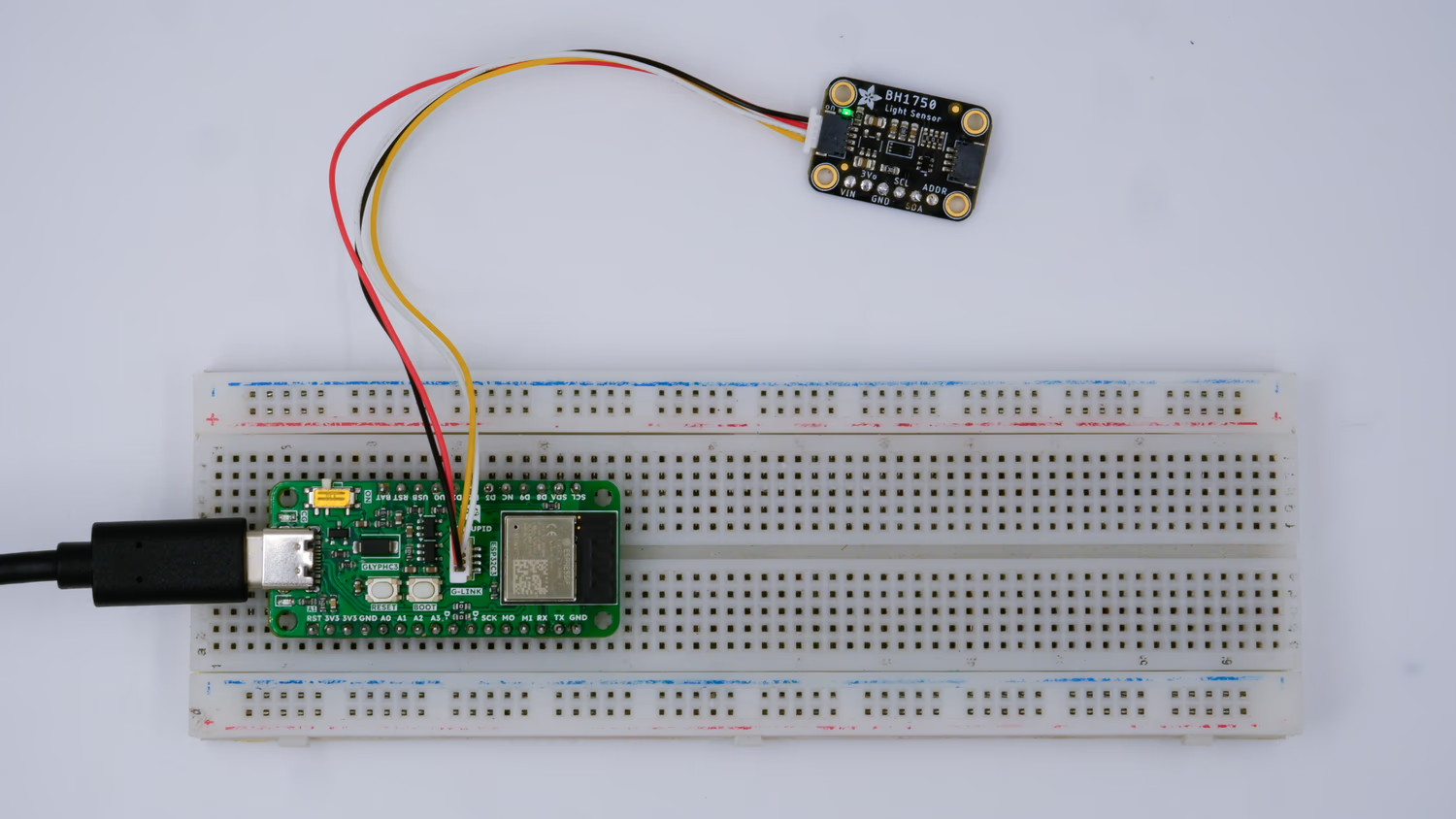 This guide helps you integrate the BH1750 light sensor with GLYPH Boards assuming you are using GLYPH-C3 (but any GLYPH development board from the ESP32 Series should work). Along with that it should prove to be a good example for using G-LINK that comes as a part of GLYPH board and also shows cross compatibility between G-LINK and QWIIC Connector. The provided code in this example should reads light levels and prints them to the Serial Monitor. We’ll walk you through setting up the sensor and modifying the code.