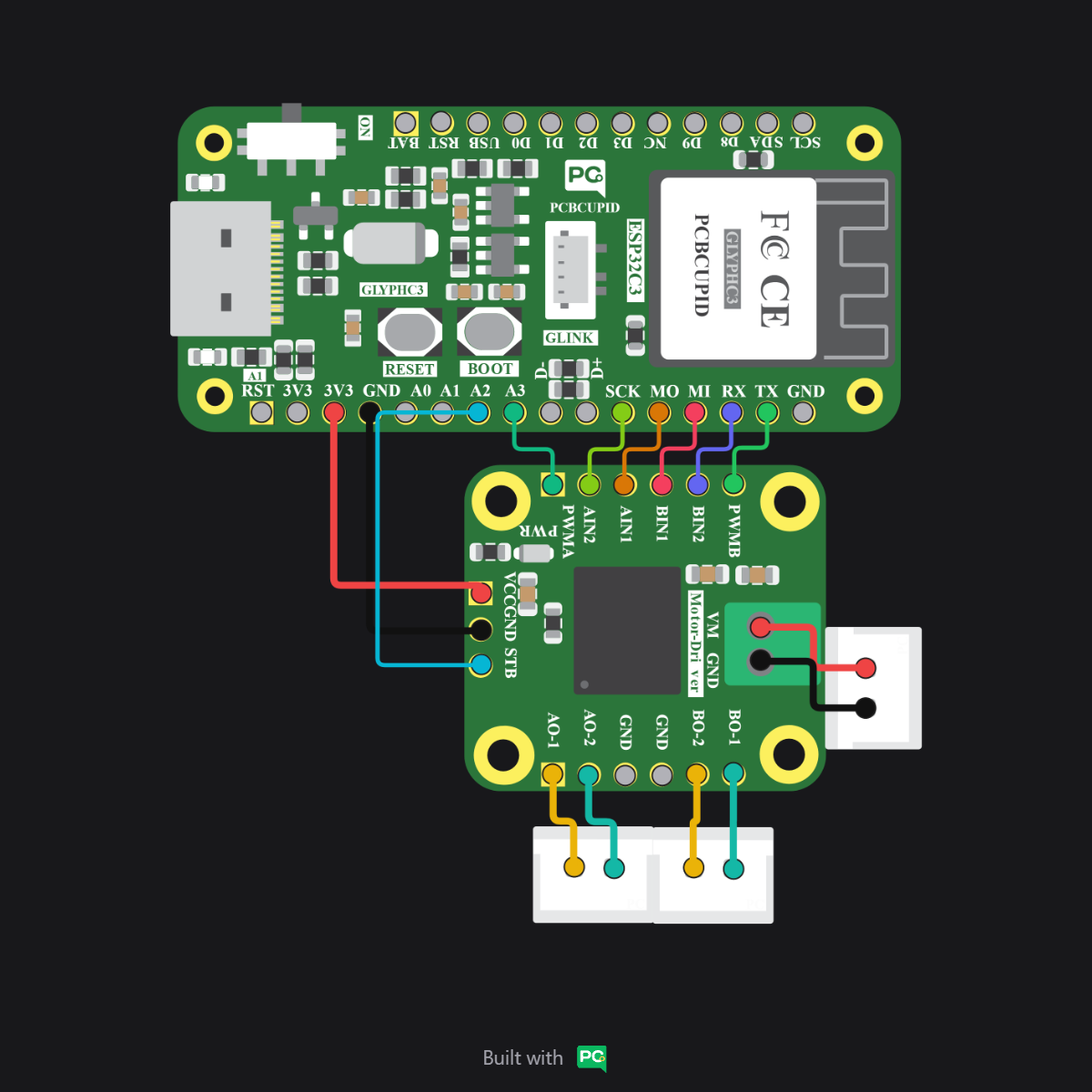
The G-Mod TB6612FNG dual motor driver controls two DC motors via an integrated dual H-bridge IC for efficient bidirectional speed and direction control.
The GMOD TB6612FNG Dual Motor Driver is a high-efficiency power control module designed to drive up to two DC motors or one bipolar stepper motor. Built around the advanced TB6612FNG dual H-bridge IC, it provides superior efficiency and lower heat generation compared to older drivers like the L298N.This module allows for precise bidirectional control (Forward/Reverse) and speed regulation using PWM signals, making it an essential component for robotics, automated vehicles, and high-performance embedded systems.
Connect the driver to your Glyph board following the GPIO definitions provided in your specific code example.
Always ensure the VM (Motor Power) and VCC (Logic Power) are not swapped, and that they share a common Ground (GND). Reversing polarity on VM can damage the TB6612FNG IC.
I2C Conflict: GPIO 5 is the default SCL pin for I2C communication across the entire GLYPH series (C3, C6, and S3). If you are using I2C sensors via the GLINK port, change the STBY pin in the code to an alternative digital pin (e.g., GPIO 6 or 14) to avoid communication conflicts.
Standby vs. Coast: Setting STBY to LOW puts the driver in Standby (Power Down). For a true Coast stop where the motor spins freely, keep STBY HIGH and set both AIN1 and AIN2 to LOW.
// Mapping pins for TB6612FNGconst int STBY = 5; // Standby pinconst int AIN1 = 18; // Motor A Direction 1const int AIN2 = 19; // Motor A Direction 2const int PWMA = 21; // Motor A Speed (PWM)void setup() { pinMode(STBY, OUTPUT); pinMode(AIN1, OUTPUT); pinMode(AIN2, OUTPUT); pinMode(PWMA, OUTPUT); // Enable the driver digitalWrite(STBY, HIGH);}void loop() { // Move Forward at half speed digitalWrite(AIN1, HIGH); digitalWrite(AIN2, LOW); analogWrite(PWMA, 127); // Range 0-255 delay(2000); // Stop (Short Brake) digitalWrite(AIN1, HIGH); digitalWrite(AIN2, HIGH); delay(1000); // Reverse at full speed digitalWrite(AIN1, LOW); digitalWrite(AIN2, HIGH); analogWrite(PWMA, 255); delay(2000); // Coast Stop digitalWrite(STBY, LOW); // Disable driver delay(1000); digitalWrite(STBY, HIGH); // Re-enable}
Once the code is uploaded, the connected motors should rotate forward for 2 seconds, brake briefly, and then reverse for 2 seconds before coasting to a stop.
STBY Pin: Remember that the STBY pin must be pulled HIGH for the motor driver to respond to any commands.
Common Ground: Ensure the external motor power supply Ground is connected to the microcontroller Ground.
Thermal Check: While the TB6612FNG is efficient, it may become warm when driving heavy loads. Ensure proper ventilation.