
Documentation Index

Fetch the complete documentation index at: https://learn.pcbcupid.com/llms.txt

Use this file to discover all available pages before exploring further.

The MCP79412 from Microchip Technology is a low-power, I²C-based real-time clock/calendar (RTCC) with integrated EEPROM, SRAM, and a unique ID. It provides highly accurate timekeeping (seconds, minutes, hours, day, date, month, year) and includes alarm functions, power-fail timestamping, and battery backup support, making it ideal for applications that require reliable time and date tracking.
Check the back of the RTC module: modules marked “M” use the MCP79412, while those marked “P” use the PCF8563.

Pin Configuration

  • VCC → VCC
  • GND → GND
  • CLK → SCK / Any GPIO
  • SDA → SDA
  • SCL → SCL
  • B → No connection / Internally connected to the 3V battery
Install a 3V Lithium Cell (CR1220) on the RTC module to retain time when the main circuit is powered off. The module can also operate without a battery if the circuit remains powered.

Key Features

  • I²C Interface (400 kHz Fast Mode)
  • Timekeeping: seconds, minutes, hours, day, date, month, year with leap year compensation
  • Two Alarms with programmable match options
  • Battery Backup with automatic switchover
  • Power-Fail Timestamp (records time of power loss)
  • 64 Bytes SRAM + 1 Kbit EEPROM (non-volatile storage)
  • Unique 64-bit ID (factory-programmed)
  • Digital Trimming for oscillator accuracy adjustment
  • Operating Voltage: 1.8V – 5.5V
  • Temperature Range: −40 °C to +85 °C (industrial)

Applications

  • Data loggers and metering systems
  • Security and access control devices
  • Consumer electronics (appliances, clocks, timers)
  • Automotive time-stamping and scheduling
  • Embedded systems requiring alarms, scheduling, or backup timekeeping

Step 1: Hardware Required

  1. Glyph Boards
  2. GMOD MCP79412 RTC

Step 2: Circuit Diagram
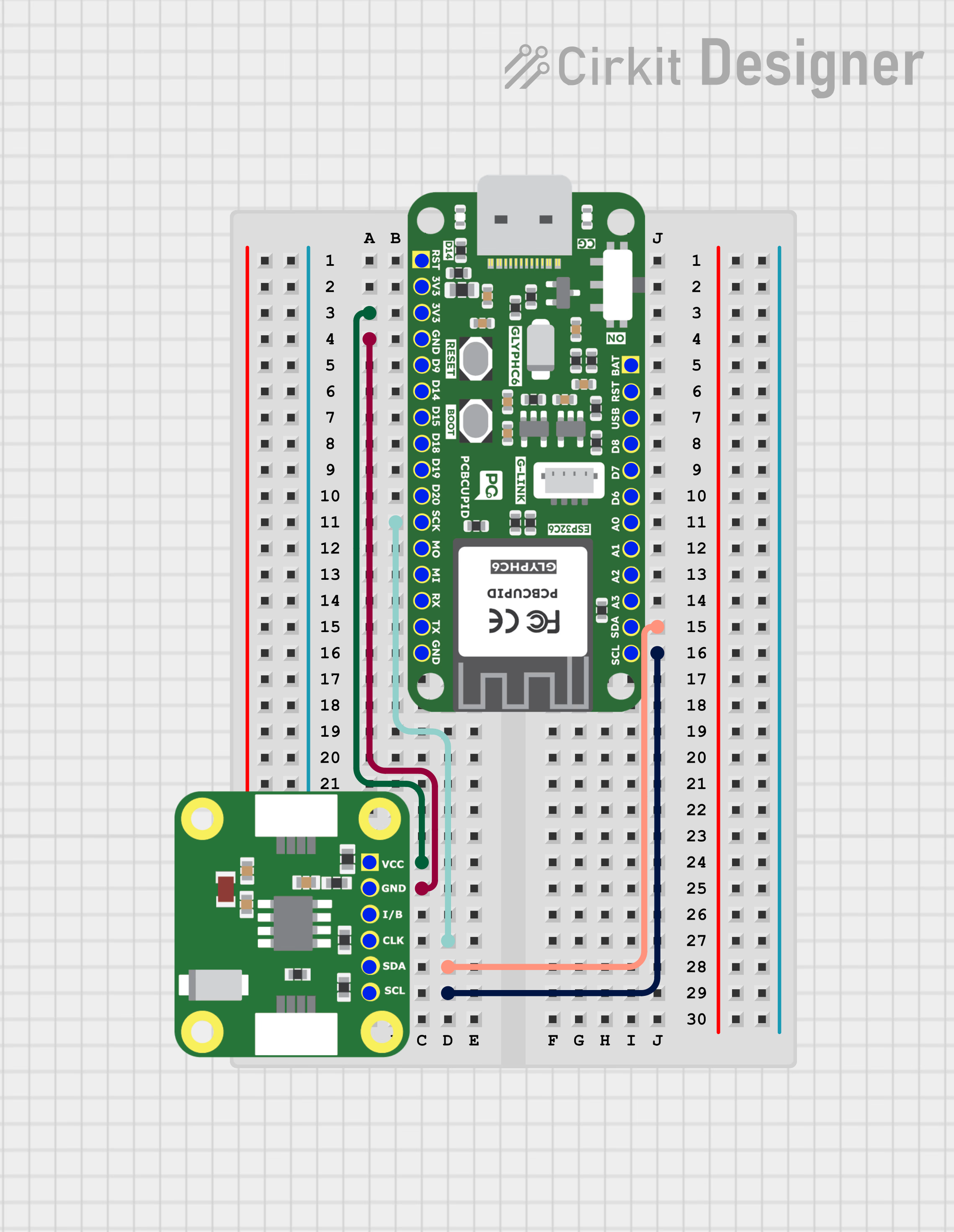
MCP79412-CIRCUIT-DIAGRAM

Step 3: Code Setup

  1. Open Arduino IDE.
  2. Make sure to install the library
  3. Copy and paste the following code into the Arduino IDE:
// You can downlaod PCBCUPID_MCP79412 from here https://github.com/pcbcupid/PCBCUPID-MCP79412 
#include <Wire.h> 
#include "PCBCUPID_MCP79412.h"
#include <TimeLib.h>

PCBCUPID_MCP79412RTC rtc;
tmElements_t tm;

// Helper to read an integer cleanly from Serial, flushing leftover chars
int readIntFromSerial() {
  while (!Serial.available()) {
    delay(10);
  }
  int val = Serial.parseInt();
  while (Serial.available()) Serial.read(); // flush
  return val;
}

void setup()
{
    Serial.begin(115200);
    delay(1000);
    Serial.println(F("\r\n=======PCBCUPID_MCP79412 RTC Test Menu ==========\r\n"));
    Serial.println(F("0: Wire.begin() default pins\r\n1: Wire.begin(sda,scl,clockFreq)\r\n2: Wire.begin(TwoWire*)"));
    Serial.println(F("Type 0-2 to select I2C init mode....."));

    uint8_t mode = 
    readIntFromSerial();

    // These are different way's to initialize the I2C of RTC module

    switch (mode)
    {
    case 0:
        rtc.begin();
        Serial.println(F(">>>Wire.begin() with default pins\r\n"));
        break;
    case 1:
        rtc.begin(4, 5, 400000); // ESP32 based glyph default SDA/SCL
        Serial.println(F(">>>Wire.begin(4,5,400kHz)\r\n"));
        break;
    case 2:
        rtc.begin(&Wire);
        Serial.println(F(">>>Wire.begin() using custom Twowire instance\r\n"));
        break;
    default:
        Serial.println(F("Invalid Input, using default Wire.begin()\r\n"));
        Wire.begin();
    }

    Serial.println(F("**********RTC Function Modes*************"));
    Serial.println(F("3. Set RTC using setTime() + now()"));
    Serial.println(F("4. Set RTC using tmElements_t"));
    Serial.println(F("5: Set RTC using compile time"));
    Serial.println(F("Type 3-5 to select RTC mode..."));

    mode = readIntFromSerial();

    // below are the different mode to setup the time for the RTC module

    switch (mode)
    {
    case 3:
        setTime(3, 43, 45, 20, 5, 2025); // HH, MM, SS, DD, MM, YYYY
        rtc.set(now());
        Serial.println(F(">> RTC set using setTime() + now()\r\n"));
        break;

    case 4:
        tm.Hour = 23;
        tm.Minute = 31;
        tm.Second = 30;
        tm.Year = 2009 - 1970;
        tm.Month = 5;
        tm.Day = 20;
        tm.Wday = dowTuesday;
        rtc.write(tm);
        Serial.println(F(">> RTC set using tmElements_t structure\r\n"));
        break;

    case 5:
        setTime(compileTime());
        rtc.set(now());
        Serial.println(F(">> RTC set using sketch compile time\r\n"));
        break;

    default:
        Serial.println(F("Invalid RTC mode, terminating.\r\n"));
        while (true)
            ;
    }
    delay(500);
}

void loop()
{
    Serial.println(F("\r\n--- Current Time ---"));
    printTime(now());

    if (rtc.read(tm))
    {
        Serial.print(F("RTC tmElements_t: "));
        Serial.print(tm.Hour); Serial.print(':');
        printI00(tm.Minute, ':');
        printI00(tm.Second, ' ');
        Serial.print(tm.Year + 1970);
        Serial.print('/');
        Serial.print(tm.Month);
        Serial.print('/');
        Serial.println(tm.Day);
    }
    else
    {
        Serial.println(F("Failed to read RTC time using .read()"));
    }
    delay(3000);
}

void printTime(time_t t)
{
    printI00(hour(t), ':');
    printI00(minute(t), ':');
    printI00(second(t), ' ');
    Serial.print(dayShortStr(weekday(t)));
    Serial.print(' ');
    printI00(day(t), ' ');
    Serial.print(monthShortStr(month(t)));
    Serial.print(' ');
    Serial.println(year(t));
}

void printI00(int value, char delimiter)
{
    if (value < 10)
        Serial.print('0');
    Serial.print(value);
    Serial.print(delimiter);
}

time_t compileTime()
{
    const char *months = "JanFebMarAprMayJunJulAugSepOctNovDec";
    char monthstr[4];
    tmElements_t tm;
    strncpy(monthstr, __DATE__, 3);
    monthstr[3] = '\0';

    tm.Month = (strstr(months, monthstr) - months) / 3 + 1;
    tm.Day = atoi(__DATE__ + 4);
    tm.Year = atoi(__DATE__ + 7) - 1970;

    char buf[3];

    memcpy(buf, __TIME__, 2);
    buf[2] = '\0';
    tm.Hour = atoi(buf);

    memcpy(buf, __TIME__ + 3, 2);
    buf[2] = '\0';
    tm.Minute = atoi(buf);

    memcpy(buf, __TIME__ + 6, 2);
    buf[2] = '\0';
    tm.Second = atoi(buf);

    return makeTime(tm) + 15; // fudge factor
}

Step 4: Upload the Code

  1. Connect the Board
  • Connect your GLYPH board to your computer
  1. Select the Board and Port
Do the following settings in your Arduino IDE,
  • Tools > Board > esp32 > Pcbcupid GLYPH C3
For the Pcbcupid Glyph C3 to appear under Tools > Board > esp32, the esp32 board version installed in the Arduino IDE should be greater or equal to 3.1.0.
  • Tools > Port and select the port connected to your GLYPH.
  • Tools > USB CDC on Boot > Enabled
If USB CDC on BOOT not enabled, you won’t be seeing any serial data on Arduino IDE.
  1. Upload the Code
    • Click the upload button (➡️ icon) or use the shortcut CRTL + U in Arduino IDE to upload the code to the board.

Step 5: Observe the Output

The RTC module tracks time independently. With the onboard 3V Lithium Cell (CR1220), it continues timekeeping even when the GLYPH is powered off. MCP79412-result