Interface the G-Mod micro SD card module with a Glyph ESP32 board over SPI to read and write files, log sensor data, and store project assets.
A Micro SD Card Module is a compact circuit designed to interface a microcontroller (e.g., Arduino, ESP32, Raspberry Pi) with a Micro SD card for data storage, retrieval, and management. This module can work both on SPI and SDIO mode, in this particular doc you will understand how to interface SD card with GLYPH in SPI mode.
Pin Configuration
3V3: Power supply for the module (3.3V).
D1 : data pin, used for data transfer
SCK: Clock single for SPI communication
MO : Master out slave in
MI : Master in Slave out
CS : chip select
GND : ground
D2 : data pin, used for data transfer
Key Features
Supports microSD Cards
SPI & SDIO Interface Compatible
Plug-and-Play Interface
Compact and Lightweight Design
File System Compatibility
Low Power Consumption
Push-push type socket
Application
Data Logging: Storing sensor data, logs, or measurements in projects like weather monitoring or IoT.
Media Storage: Saving and retrieving images, videos, or audio files.
Boot Media: Used in systems like Raspberry Pi for storing operating systems.
Portable Data Transfer: Enabling easy data transport between devices.
Step 1: Hardware Required
Glyph Boards
G-MOD Micro SDCard Module
Step 2: Circuit Diagram
Step 3: Code Setup
Open Arduino IDE.
Copy and paste the following code into the Arduino IDE:
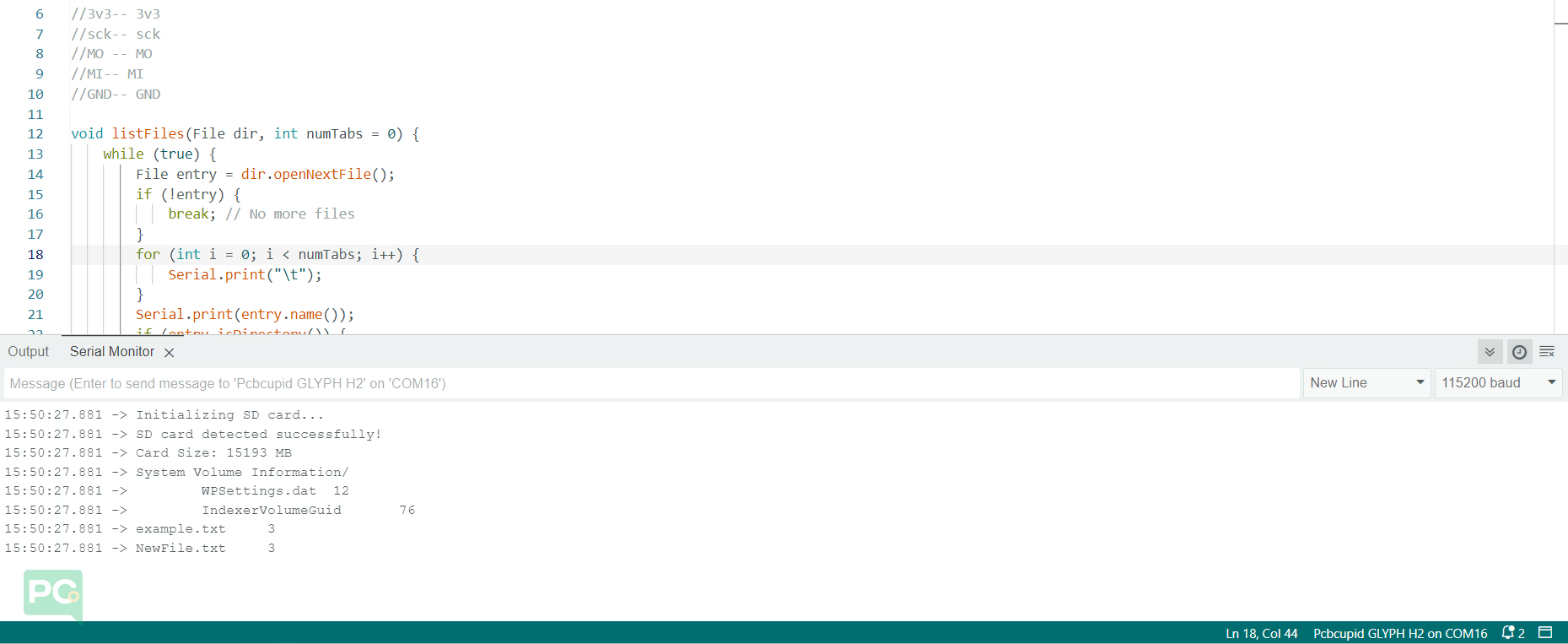
#include <SPI.h>#include <SD.h>#define SD_CS 17 // Change this to match your Glyph board's SD card CS pin//GMOD-- GLYPH//3v3-- 3v3//sck-- sck//MO -- MO//MI-- MI//GND-- GNDvoid listFiles(File dir, int numTabs = 0) { while (true) { File entry = dir.openNextFile(); if (!entry) { break; // No more files } for (int i = 0; i < numTabs; i++) { Serial.print("\t"); } Serial.print(entry.name()); if (entry.isDirectory()) { Serial.println("/"); listFiles(entry, numTabs + 1); // Recursively list directories } else { Serial.print("\t"); Serial.println(entry.size(), DEC); } entry.close(); }}void setup() { Serial.begin(115200); while (!Serial); Serial.println("Initializing SD card..."); if (!SD.begin(SD_CS)) { Serial.println("SD card not detected!"); return; } Serial.println("SD card detected successfully!"); // Print card information uint32_t cardSize = SD.cardSize() / (1024 * 1024); Serial.print("Card Size: "); Serial.print(cardSize); Serial.println(" MB"); // List files on SD card File root = SD.open("/"); listFiles(root); root.close();}void loop() { // Nothing to do in the loop}
Step 4: Upload the Code
Connect the Board
Connect your GLYPH board to your computer
Select the Board and Port
Do the following settings in your Arduino IDE,
Tools > Board > esp32 > Pcbcupid GLYPH C3
For the Pcbcupid Glyph C3 to appear under Tools > Board > esp32, the esp32 board version installed in the Arduino IDE should be greater or equal to 3.1.0.
Tools > Port and select the port connected to your GLYPH.
Tools > USB CDC on Boot >Enabled
If USB CDC on BOOT not enabled, you won’t be seeing any serial data on Arduino IDE.
Upload the Code
Click the upload button (➡️ icon) or use the shortcut CRTL + U in Arduino IDE to upload the code to the board.
{"docsConfig":{"theme":"mint","$schema":"https://mintlify.com/docs.json","name":"PCB Cupid","colors":{"primary":"#0D9373"},"favicon":"https://mintcdn.com/pcbcupid-bae3761c/4dXNuJjZhqL5zqVd/images/favicon_PCBcupid.png?fit=max\u0026auto=format\u0026n=4dXNuJjZhqL5zqVd\u0026q=85\u0026s=697c4189e0a983e1722bddbedde79f61","appearance":{"strict":true},"background":{"decoration":"gradient"},"navbar":{"links":[{"href":"https://spell.pcbcupid.com","label":"Circuit Spell"},{"href":"https://shop.pcbcupid.com","label":"Shop"},{"href":"/","label":"Learn"},{"href":"https://events.pcbcupid.com","label":"Events"},{"href":"https://forum.pcbcupid.com","label":"Forum"},{"href":"https://pcbcupid.com/articles","label":"Articles"},{"href":"https://pcbcupid.com/tools","label":"Tools"}]},"seo":{"indexing":"all"},"fonts":{"family":"Space Grotesk","weight":400},"icons":{"library":"lucide"},"styling":{"eyebrows":"breadcrumbs","latex":true},"contextual":{"options":["copy","chatgpt","claude","cursor","vscode","mcp"],"display":"toc"},"thumbnails":{"appearance":"dark"},"navigation":{"pages":[]}},"deployment":{"deploymentMetadataValue":{"subdomain":"pcbcupid-bae3761c","hasAudioNarration":false,"actualSubdomain":"pcbcupid-bae3761c","customDomains":["learn.pcbcupid.com"],"gitSource":{"type":"github","owner":"pcbcupid","repo":"pcbcupid-docs","deployBranch":"main","contentDirectory":"","isPrivate":false,"mountPath":"","label":""},"feedback":{"thumbs":true,"edits":true,"issues":true},"entitlements":{"AI_CHAT":{"status":"DISABLED"}},"buildId":"6ae268427b458a5c875a9a81","clientVersion":"0.0.4143","searchFilterCounts":[{"language":"default","tag":"Documentation","count":77},{"language":"default","tag":"Modules","count":67},{"language":"default","tag":"PCB Design","count":45},{"language":"default","tag":"Examples","count":32},{"language":"default","tag":"Glyph","count":25},{"language":"default","tag":"G-Mod","count":17},{"language":"default","tag":"KiCad","count":16},{"language":"default","tag":"Basic","count":15},{"language":"default","tag":"Welcome","count":9},{"language":"default","tag":"G-Sense","count":8}]},"assistantConfig":{"enableAskAiButton":false,"enableStarterQuestions":false,"enableContextualStarterQuestions":false,"enableAskAiSearchBar":true},"basePath":"","hasChatPermissions":false,"hasWebMcpPermissions":false,"toggles":[{"name":"kill-isr","enabled":true,"variant":{"name":"disabled","enabled":false,"feature_enabled":true},"impressionData":false},{"name":"custom-rbac-roles","enabled":true,"variant":{"name":"disabled","enabled":false,"feature_enabled":true},"impressionData":false},{"name":"agent-mintlify-slack","enabled":true,"variant":{"name":"disabled","enabled":false,"feature_enabled":true},"impressionData":false},{"name":"agent-integrations-settings","enabled":true,"variant":{"name":"disabled","enabled":false,"feature_enabled":true},"impressionData":false},{"name":"rbac-expansion","enabled":true,"variant":{"name":"disabled","enabled":false,"feature_enabled":true},"impressionData":false},{"name":"automations-pr-grouping","enabled":true,"variant":{"name":"disabled","enabled":false,"feature_enabled":true},"impressionData":false},{"name":"custom-prefix","enabled":true,"variant":{"name":"disabled","enabled":false,"feature_enabled":true},"impressionData":false},{"name":"analytics-v7","enabled":true,"variant":{"name":"disabled","enabled":false,"feature_enabled":true},"impressionData":false},{"name":"user-flows-analytics","enabled":true,"variant":{"name":"disabled","enabled":false,"feature_enabled":true},"impressionData":false},{"name":"no-publish-flow","enabled":true,"variant":{"name":"disabled","enabled":false,"feature_enabled":true},"impressionData":false},{"name":"workos-onboarding","enabled":true,"variant":{"name":"disabled","enabled":false,"feature_enabled":true},"impressionData":false},{"name":"snapshot-serving-live","enabled":true,"variant":{"name":"disabled","enabled":false,"feature_enabled":true},"impressionData":false},{"name":"stripTemperatureMiddleware","enabled":true,"variant":{"name":"disabled","enabled":false,"feature_enabled":true},"impressionData":false},{"name":"support-platform-pylon-zendesk","enabled":true,"variant":{"name":"disabled","enabled":false,"feature_enabled":true},"impressionData":false},{"name":"snapshot-serving","enabled":true,"variant":{"name":"disabled","enabled":false,"feature_enabled":true},"impressionData":false},{"name":"instant-rollback","enabled":true,"variant":{"name":"disabled","enabled":false,"feature_enabled":true},"impressionData":false},{"name":"granular-notifications-server","enabled":true,"variant":{"name":"disabled","enabled":false,"feature_enabled":true},"impressionData":false},{"name":"granular-notifications","enabled":true,"variant":{"name":"disabled","enabled":false,"feature_enabled":true},"impressionData":false},{"name":"automations-fable","enabled":true,"variant":{"name":"disabled","enabled":false,"feature_enabled":true},"impressionData":false},{"name":"fixed-ai-action-pricing","enabled":true,"variant":{"name":"disabled","enabled":false,"feature_enabled":true},"impressionData":false},{"name":"automation-resolve-merge-conflict","enabled":true,"variant":{"name":"disabled","enabled":false,"feature_enabled":true},"impressionData":false},{"name":"scoped-publishing","enabled":true,"variant":{"name":"disabled","enabled":false,"feature_enabled":true},"impressionData":false},{"name":"mintql","enabled":true,"variant":{"name":"disabled","enabled":false,"feature_enabled":true},"impressionData":false},{"name":"page-level-analytics","enabled":true,"variant":{"name":"disabled","enabled":false,"feature_enabled":true},"impressionData":false},{"name":"editor-version-history-v2","enabled":true,"variant":{"name":"disabled","enabled":false,"feature_enabled":true},"impressionData":false},{"name":"billing-page-v2","enabled":true,"variant":{"name":"disabled","enabled":false,"feature_enabled":true},"impressionData":false},{"name":"full-page-search","enabled":true,"variant":{"name":"disabled","enabled":false,"feature_enabled":true},"impressionData":false},{"name":"workspace-projects","enabled":true,"variant":{"name":"disabled","enabled":false,"feature_enabled":true},"impressionData":false},{"name":"assistant-v5","enabled":true,"variant":{"name":"disabled","enabled":false,"feature_enabled":true},"impressionData":false},{"name":"fork-pr-previews","enabled":true,"variant":{"name":"disabled","enabled":false,"feature_enabled":true},"impressionData":false},{"name":"revalidation-jwt","enabled":true,"variant":{"name":"disabled","enabled":false,"feature_enabled":true},"impressionData":false},{"name":"workos-sso-scim","enabled":true,"variant":{"name":"disabled","enabled":false,"feature_enabled":true},"impressionData":false},{"name":"hobby-abuse-scan","enabled":true,"variant":{"name":"disabled","enabled":false,"feature_enabled":true},"impressionData":false},{"name":"dashboard-inbox","enabled":true,"variant":{"name":"disabled","enabled":false,"feature_enabled":true},"impressionData":false},{"name":"workos-signup","enabled":true,"variant":{"name":"disabled","enabled":false,"feature_enabled":true},"impressionData":false},{"name":"turbopuffer-dual-write","enabled":true,"variant":{"name":"disabled","enabled":false,"feature_enabled":true},"impressionData":false},{"name":"workos-enabled","enabled":true,"variant":{"name":"disabled","enabled":false,"feature_enabled":true},"impressionData":false},{"name":"approve-review-flow","enabled":true,"variant":{"name":"disabled","enabled":false,"feature_enabled":true},"impressionData":false},{"name":"editor-metadata","enabled":true,"variant":{"name":"disabled","enabled":false,"feature_enabled":true},"impressionData":false},{"name":"sso-setup-deadline-banner","enabled":true,"variant":{"name":"disabled","enabled":false,"feature_enabled":true},"impressionData":false},{"name":"turbopuffer-serve","enabled":true,"variant":{"name":"disabled","enabled":false,"feature_enabled":true},"impressionData":false},{"name":"live-agents","enabled":true,"variant":{"name":"disabled","enabled":false,"feature_enabled":true},"impressionData":false},{"name":"llms-txt-v2","enabled":true,"variant":{"name":"disabled","enabled":false,"feature_enabled":true},"impressionData":false}],"googleFontsInlined":true},"customCss":[],"page":{"pagePath":"documentation/modules/g-mod/sd-card","slug":"/documentation/modules/g-mod/sd-card","pageMetadata":{"description":"Interface the G-Mod micro SD card module with a Glyph ESP32 board over SPI to read and write files, log sensor data, and store project assets.","title":"Micro SD Card","sidebarTitle":"SD Card","href":"/documentation/modules/g-mod/sd-card"},"description":{"compiledSource":"\"use strict\";\nconst {jsx: _jsx} = arguments[0];\nconst {useMDXComponents: _provideComponents} = arguments[0];\nfunction _createMdxContent(props) {\n const _components = {\n p: \"p\",\n ..._provideComponents(),\n ...props.components\n };\n return _jsx(_components.p, {\n children: \"Interface the G-Mod micro SD card module with a Glyph ESP32 board over SPI to read and write files, log sensor data, and store project assets.\"\n });\n}\nfunction MDXContent(props = {}) {\n const {wrapper: MDXLayout} = {\n ..._provideComponents(),\n ...props.components\n };\n return MDXLayout ? _jsx(MDXLayout, {\n ...props,\n children: _jsx(_createMdxContent, {\n ...props\n })\n }) : _createMdxContent(props);\n}\nreturn {\n default: MDXContent\n};\n","frontmatter":{},"scope":{}},"pageType":"default","mdx":{"mdxSource":{"compiledSource":"\"use strict\";const{Fragment:_Fragment,jsx:_jsx,jsxs:_jsxs}=arguments[0];const{useMDXComponents:_provideComponents}=arguments[0];const ShopHeader=({title,url})=>{const _components={a:`a`,..._provideComponents()};return _jsx(`div`,{style:{display:`flex`,justifyContent:`flex-end`,alignItems:`center`,width:`100%`,marginBottom:`1rem`,gap:`20px`},children:_jsx(_components.a,{href:url,target:`_blank`,rel:`noopener noreferrer`,style:{display:`inline-flex`,alignItems:`center`,backgroundColor:`#00b894`,color:`#fff`,padding:`8px 18px`,borderRadius:`8px`,textDecoration:`none`,fontSize:`0.95rem`,fontWeight:600,whiteSpace:`nowrap`,flexShrink:0},children:`Shop now`})})};const ImgGallery=({images,modelUrl})=>{var[active,setActive]=useState(0);var[show3D,setShow3D]=useState(false);var[isFullscreen,setIsFullscreen]=useState(false);var[fullscreenDialog,setFullscreenDialog]=useState(null);useEffect(function(){if(show3D||isFullscreen||images.length\u003c=1)return;var t=setTimeout(function(){setActive(function(p){return(p+1)%images.length})},3500);return function(){clearTimeout(t)}});var img=images[active];function openFullscreen(){var dialog=fullscreenDialog;if(dialog\u0026\u0026!dialog.open)dialog.showModal();setIsFullscreen(true)}function closeFullscreen(){var dialog=fullscreenDialog;if(dialog\u0026\u0026dialog.open)dialog.close();else setIsFullscreen(false)}return _jsxs(`div`,{style:{position:`relative`,background:`linear-gradient(to bottom, #fff 0%, #fff 80%, #f8f8f8 100%)`,borderRadius:`32px`,border:`1px solid rgba(0,0,0,0.08)`,overflow:`hidden`,marginTop:`0.75rem`,marginBottom:`1.5rem`},children:[_jsx(`div`,{style:{position:`relative`,height:`450px`,display:`flex`,alignItems:`center`,justifyContent:`center`,background:`#fff`,padding:`1rem`},children:show3D\u0026\u0026modelUrl?_jsx(`div`,{ref:function(el){if(!el||el._mv)return;el._mv=true;var s=document.createElement(`script`);s.src=`https://ajax.googleapis.com/ajax/libs/model-viewer/4.2.0/model-viewer.min.js`;s.type=`module`;s.onload=function(){var mv=document.createElement(`model-viewer`);mv.setAttribute(`src`,modelUrl);mv.setAttribute(`camera-controls`,``);mv.setAttribute(`auto-rotate`,``);mv.style.width=`100%`;mv.style.height=`100%`;mv.style.backgroundColor=`#f8f8f8`;el.innerHTML=``;el.appendChild(mv)};document.head.appendChild(s)},style:{width:`100%`,height:`100%`}}):_jsx(`img`,{src:img\u0026\u0026img.url,alt:img\u0026\u0026img.label,loading:`lazy`,noZoom:true,onClick:openFullscreen,role:`button`,tabIndex:0,onKeyDown:function(event){if(event.key===`Enter`||event.key===` `){event.preventDefault();openFullscreen()}},style:{maxWidth:`100%`,maxHeight:`100%`,objectFit:`contain`,borderRadius:`8px`,cursor:`zoom-in`}})}),_jsxs(`div`,{style:{display:`flex`,justifyContent:`center`,gap:`12px`,padding:`1rem`,background:`#eee`,borderTop:`1px solid rgba(0,0,0,0.08)`},children:[images.map(function(img,idx){return _jsx(`button`,{onClick:function(){setActive(idx);setShow3D(false)},style:{padding:`0.6rem 1.5rem`,borderRadius:`12px`,border:!show3D\u0026\u0026idx===active?`1px solid #00b894`:`1px solid rgba(0,184,148,0.4)`,background:!show3D\u0026\u0026idx===active?`#00b894`:`#fff`,color:!show3D\u0026\u0026idx===active?`#fff`:`#000`,cursor:`pointer`,fontSize:`0.75rem`,fontWeight:700,textTransform:`uppercase`,fontFamily:`inherit`},children:img.label},img.id||idx)}),modelUrl?_jsx(`button`,{onClick:function(){setShow3D(true)},style:{padding:`0.6rem 1.5rem`,borderRadius:`12px`,border:show3D?`1px solid #00b894`:`1px solid rgba(0,184,148,0.4)`,background:show3D?`#00b894`:`#fff`,color:show3D?`#fff`:`#000`,cursor:`pointer`,fontSize:`0.75rem`,fontWeight:700,textTransform:`uppercase`,fontFamily:`inherit`},children:`3D VIEW`}):null]}),_jsx(`dialog`,{ref:setFullscreenDialog,\"aria-label\":img\u0026\u0026img.label,onClose:function(){setIsFullscreen(false)},onClick:function(event){if(event.target===event.currentTarget)closeFullscreen()},style:{width:`100vw`,height:`100vh`,maxWidth:`none`,maxHeight:`none`,margin:0,padding:`2rem`,border:0,background:`rgba(0,0,0,0.88)`},children:_jsxs(`div`,{style:{position:`relative`,display:`flex`,width:`100%`,height:`100%`,alignItems:`center`,justifyContent:`center`},children:[_jsx(`button`,{type:`button`,\"aria-label\":`Close fullscreen image`,onClick:closeFullscreen,style:{position:`absolute`,top:0,right:0,zIndex:1,width:`2.5rem`,height:`2.5rem`,border:0,borderRadius:`999px`,background:`rgba(255,255,255,0.92)`,color:`#111`,cursor:`pointer`,fontSize:`1.5rem`,lineHeight:1},children:`×`}),_jsx(`img`,{src:img\u0026\u0026img.url,alt:img\u0026\u0026img.label,style:{maxWidth:`100%`,maxHeight:`100%`,objectFit:`contain`,borderRadius:`8px`}})]})})]})};function _createMdxContent(props){const _components={code:`code`,em:`em`,img:`img`,li:`li`,ol:`ol`,p:`p`,pre:`pre`,span:`span`,strong:`strong`,ul:`ul`,..._provideComponents(),...props.components},{CodeBlock,Heading,Warning,_MdxComponentBoundary}=_components;if(!CodeBlock)_missingMdxReference(`CodeBlock`,true);if(!Heading)_missingMdxReference(`Heading`,true);if(!Warning)_missingMdxReference(`Warning`,true);if(!_MdxComponentBoundary)_missingMdxReference(`_MdxComponentBoundary`,true);return _jsxs(_Fragment,{children:[_jsx(_MdxComponentBoundary,{name:`ShopHeader`,children:_jsx(ShopHeader,{title:`MicroSD Card Module`,url:`https://shop.pcbcupid.com/product/gm003/`})}),`\n`,_jsx(_MdxComponentBoundary,{name:`ImgGallery`,children:_jsx(ImgGallery,{modelUrl:`https://raw.githubusercontent.com/pcbcupid/pcbcupid-hardware-libraries/main/pcbcupid_3dmodels/glb/gmod_microsdcard.glb`,images:[{url:`https://files.pcbcupid.com/Documentation/Boards/g-mod/microsdcard/Asset%202.png`,label:`ILLUSTRATION VIEW`,id:`illustration`},{url:`https://files.pcbcupid.com/Documentation/Boards/g-mod/microsdcard/pcbcupid-microSD-Boardview.avif`,label:`BOARD VIEW`,id:`board`}]})}),`\n`,_jsxs(_components.p,{children:[`A `,_jsx(_components.strong,{children:`Micro SD Card Module`}),` is a compact circuit designed to interface a microcontroller (e.g., Arduino, ESP32, Raspberry Pi) with a Micro SD card for data storage, retrieval, and management. This module can work both on SPI and SDIO mode, in this particular doc you will understand how to interface SD card with GLYPH in SPI mode.`]}),`\n`,_jsx(Heading,{level:`2`,id:`pin-configuration`,children:`Pin Configuration`}),`\n`,_jsxs(_components.ul,{children:[`\n`,_jsx(_components.li,{children:`3V3: Power supply for the module (3.3V).`}),`\n`,_jsx(_components.li,{children:`D1 : data pin, used for data transfer`}),`\n`,_jsx(_components.li,{children:`SCK: Clock single for SPI communication`}),`\n`,_jsx(_components.li,{children:`MO : Master out slave in`}),`\n`,_jsx(_components.li,{children:`MI : Master in Slave out`}),`\n`,_jsx(_components.li,{children:`CS : chip select`}),`\n`,_jsx(_components.li,{children:`GND : ground`}),`\n`,_jsx(_components.li,{children:`D2 : data pin, used for data transfer`}),`\n`]}),`\n`,_jsx(Heading,{level:`2`,id:`key-features`,children:`Key Features`}),`\n`,_jsxs(_components.ul,{children:[`\n`,_jsx(_components.li,{children:`Supports microSD Cards`}),`\n`,_jsx(_components.li,{children:`SPI \u0026 SDIO Interface Compatible`}),`\n`,_jsx(_components.li,{children:`Plug-and-Play Interface`}),`\n`,_jsx(_components.li,{children:`Compact and Lightweight Design`}),`\n`,_jsx(_components.li,{children:`File System Compatibility`}),`\n`,_jsx(_components.li,{children:`Low Power Consumption`}),`\n`,_jsx(_components.li,{children:`Push-push type socket`}),`\n`]}),`\n`,_jsx(Heading,{level:`2`,id:`application`,children:`Application`}),`\n`,_jsxs(_components.ul,{children:[`\n`,_jsx(_components.li,{children:`Data Logging: Storing sensor data, logs, or measurements in projects like weather monitoring or IoT.`}),`\n`,_jsx(_components.li,{children:`Media Storage: Saving and retrieving images, videos, or audio files.`}),`\n`,_jsx(_components.li,{children:`Boot Media: Used in systems like Raspberry Pi for storing operating systems.`}),`\n`,_jsx(_components.li,{children:`Portable Data Transfer: Enabling easy data transport between devices.`}),`\n`]}),`\n`,_jsx(Heading,{level:`2`,id:`step-1-hardware-required`,children:`Step 1: Hardware Required`}),`\n`,_jsxs(_components.ol,{children:[`\n`,_jsx(_components.li,{children:`Glyph Boards`}),`\n`,_jsx(_components.li,{children:`G-MOD Micro SDCard Module`}),`\n`]}),`\n`,_jsx(Heading,{level:`2`,id:`step-2-circuit-diagram`,children:`Step 2: Circuit Diagram`}),`\n`,_jsx(_components.p,{children:_jsx(_components.img,{src:`https://files.pcbcupid.com/Documentation/Boards/g-mod/microsdcard/pcbcupid_sdcard1.avif`,alt:`pcbcupid_microsdcard`})}),`\n`,_jsx(Heading,{level:`2`,id:`step-3-code-setup`,children:`Step 3: Code Setup`}),`\n`,_jsxs(_components.ol,{children:[`\n`,_jsx(_components.li,{children:_jsx(_components.strong,{children:`Open Arduino IDE.`})}),`\n`,_jsx(_components.li,{children:_jsx(_components.strong,{children:`Copy and paste the following code into the Arduino IDE:`})}),`\n`]}),`\n`,_jsx(CodeBlock,{filename:``,numberOfLines:`61`,language:`cpp`,children:_jsx(_components.pre,{className:`shiki shiki-themes github-light-default dark-plus`,style:{backgroundColor:`#ffffff`,\"--shiki-dark-bg\":`#0B0C0E`,color:`#1f2328`,\"--shiki-dark\":`#D4D4D4`},language:`cpp`,children:_jsxs(_components.code,{language:`cpp`,numberOfLines:`61`,children:[_jsxs(_components.span,{className:`line`,children:[_jsx(_components.span,{style:{color:`#CF222E`,\"--shiki-dark\":`#C586C0`},children:`#include`}),_jsx(_components.span,{style:{color:`#0A3069`,\"--shiki-dark\":`#CE9178`},children:` \u003cSPI.h>`})]}),`\n`,_jsxs(_components.span,{className:`line`,children:[_jsx(_components.span,{style:{color:`#CF222E`,\"--shiki-dark\":`#C586C0`},children:`#include`}),_jsx(_components.span,{style:{color:`#0A3069`,\"--shiki-dark\":`#CE9178`},children:` \u003cSD.h>`})]}),`\n`,_jsx(_components.span,{className:`line`}),`\n`,_jsxs(_components.span,{className:`line`,children:[_jsx(_components.span,{style:{color:`#CF222E`,\"--shiki-dark\":`#C586C0`},children:`#define`}),_jsx(_components.span,{style:{color:`#8250DF`,\"--shiki-dark\":`#569CD6`},children:` SD_CS`}),_jsx(_components.span,{style:{color:`#0550AE`,\"--shiki-dark\":`#B5CEA8`},children:` 17`}),_jsx(_components.span,{style:{color:`#6E7781`,\"--shiki-dark\":`#6A9955`},children:` // Change this to match your Glyph board's SD card CS pin`})]}),`\n`,_jsx(_components.span,{className:`line`,children:_jsx(_components.span,{style:{color:`#6E7781`,\"--shiki-dark\":`#6A9955`},children:`//GMOD-- GLYPH`})}),`\n`,_jsx(_components.span,{className:`line`,children:_jsx(_components.span,{style:{color:`#6E7781`,\"--shiki-dark\":`#6A9955`},children:`//3v3-- 3v3`})}),`\n`,_jsx(_components.span,{className:`line`,children:_jsx(_components.span,{style:{color:`#6E7781`,\"--shiki-dark\":`#6A9955`},children:`//sck-- sck`})}),`\n`,_jsx(_components.span,{className:`line`,children:_jsx(_components.span,{style:{color:`#6E7781`,\"--shiki-dark\":`#6A9955`},children:`//MO -- MO`})}),`\n`,_jsx(_components.span,{className:`line`,children:_jsx(_components.span,{style:{color:`#6E7781`,\"--shiki-dark\":`#6A9955`},children:`//MI-- MI`})}),`\n`,_jsx(_components.span,{className:`line`,children:_jsx(_components.span,{style:{color:`#6E7781`,\"--shiki-dark\":`#6A9955`},children:`//GND-- GND`})}),`\n`,_jsx(_components.span,{className:`line`}),`\n`,_jsxs(_components.span,{className:`line`,children:[_jsx(_components.span,{style:{color:`#CF222E`,\"--shiki-dark\":`#569CD6`},children:`void`}),_jsx(_components.span,{style:{color:`#8250DF`,\"--shiki-dark\":`#DCDCAA`},children:` listFiles`}),_jsx(_components.span,{style:{color:`#1F2328`,\"--shiki-dark\":`#D4D4D4`},children:`(`}),_jsx(_components.span,{style:{color:`#953800`,\"--shiki-dark\":`#4EC9B0`},children:`File`}),_jsx(_components.span,{style:{color:`#953800`,\"--shiki-dark\":`#9CDCFE`},children:` dir`}),_jsx(_components.span,{style:{color:`#1F2328`,\"--shiki-dark\":`#D4D4D4`},children:`, `}),_jsx(_components.span,{style:{color:`#CF222E`,\"--shiki-dark\":`#569CD6`},children:`int`}),_jsx(_components.span,{style:{color:`#953800`,\"--shiki-dark\":`#9CDCFE`},children:` numTabs`}),_jsx(_components.span,{style:{color:`#CF222E`,\"--shiki-dark\":`#D4D4D4`},children:` =`}),_jsx(_components.span,{style:{color:`#0550AE`,\"--shiki-dark\":`#B5CEA8`},children:` 0`}),_jsx(_components.span,{style:{color:`#1F2328`,\"--shiki-dark\":`#D4D4D4`},children:`) {`})]}),`\n`,_jsxs(_components.span,{className:`line`,children:[_jsx(_components.span,{style:{color:`#CF222E`,\"--shiki-dark\":`#C586C0`},children:` while`}),_jsx(_components.span,{style:{color:`#1F2328`,\"--shiki-dark\":`#D4D4D4`},children:` (`}),_jsx(_components.span,{style:{color:`#0550AE`,\"--shiki-dark\":`#569CD6`},children:`true`}),_jsx(_components.span,{style:{color:`#1F2328`,\"--shiki-dark\":`#D4D4D4`},children:`) {`})]}),`\n`,_jsxs(_components.span,{className:`line`,children:[_jsx(_components.span,{style:{color:`#1F2328`,\"--shiki-dark\":`#D4D4D4`},children:` File entry `}),_jsx(_components.span,{style:{color:`#CF222E`,\"--shiki-dark\":`#D4D4D4`},children:`=`}),_jsx(_components.span,{style:{color:`#1F2328`,\"--shiki-dark\":`#9CDCFE`},children:` dir`}),_jsx(_components.span,{style:{color:`#1F2328`,\"--shiki-dark\":`#D4D4D4`},children:`.`}),_jsx(_components.span,{style:{color:`#8250DF`,\"--shiki-dark\":`#DCDCAA`},children:`openNextFile`}),_jsx(_components.span,{style:{color:`#1F2328`,\"--shiki-dark\":`#D4D4D4`},children:`();`})]}),`\n`,_jsxs(_components.span,{className:`line`,children:[_jsx(_components.span,{style:{color:`#CF222E`,\"--shiki-dark\":`#C586C0`},children:` if`}),_jsx(_components.span,{style:{color:`#1F2328`,\"--shiki-dark\":`#D4D4D4`},children:` (`}),_jsx(_components.span,{style:{color:`#CF222E`,\"--shiki-dark\":`#D4D4D4`},children:`!`}),_jsx(_components.span,{style:{color:`#1F2328`,\"--shiki-dark\":`#D4D4D4`},children:`entry) {`})]}),`\n`,_jsxs(_components.span,{className:`line`,children:[_jsx(_components.span,{style:{color:`#CF222E`,\"--shiki-dark\":`#C586C0`},children:` break`}),_jsx(_components.span,{style:{color:`#1F2328`,\"--shiki-dark\":`#D4D4D4`},children:`;`}),_jsx(_components.span,{style:{color:`#6E7781`,\"--shiki-dark\":`#6A9955`},children:` // No more files`})]}),`\n`,_jsx(_components.span,{className:`line`,children:_jsx(_components.span,{style:{color:`#1F2328`,\"--shiki-dark\":`#D4D4D4`},children:` }`})}),`\n`,_jsxs(_components.span,{className:`line`,children:[_jsx(_components.span,{style:{color:`#CF222E`,\"--shiki-dark\":`#C586C0`},children:` for`}),_jsx(_components.span,{style:{color:`#1F2328`,\"--shiki-dark\":`#D4D4D4`},children:` (`}),_jsx(_components.span,{style:{color:`#CF222E`,\"--shiki-dark\":`#569CD6`},children:`int`}),_jsx(_components.span,{style:{color:`#1F2328`,\"--shiki-dark\":`#D4D4D4`},children:` i `}),_jsx(_components.span,{style:{color:`#CF222E`,\"--shiki-dark\":`#D4D4D4`},children:`=`}),_jsx(_components.span,{style:{color:`#0550AE`,\"--shiki-dark\":`#B5CEA8`},children:` 0`}),_jsx(_components.span,{style:{color:`#1F2328`,\"--shiki-dark\":`#D4D4D4`},children:`; i `}),_jsx(_components.span,{style:{color:`#CF222E`,\"--shiki-dark\":`#D4D4D4`},children:`\u003c`}),_jsx(_components.span,{style:{color:`#1F2328`,\"--shiki-dark\":`#D4D4D4`},children:` numTabs; i`}),_jsx(_components.span,{style:{color:`#CF222E`,\"--shiki-dark\":`#D4D4D4`},children:`++`}),_jsx(_components.span,{style:{color:`#1F2328`,\"--shiki-dark\":`#D4D4D4`},children:`) {`})]}),`\n`,_jsxs(_components.span,{className:`line`,children:[_jsx(_components.span,{style:{color:`#1F2328`,\"--shiki-dark\":`#9CDCFE`},children:` Serial`}),_jsx(_components.span,{style:{color:`#1F2328`,\"--shiki-dark\":`#D4D4D4`},children:`.`}),_jsx(_components.span,{style:{color:`#8250DF`,\"--shiki-dark\":`#DCDCAA`},children:`print`}),_jsx(_components.span,{style:{color:`#1F2328`,\"--shiki-dark\":`#D4D4D4`},children:`(`}),_jsx(_components.span,{style:{color:`#0A3069`,\"--shiki-dark\":`#CE9178`},children:`\"`}),_jsx(_components.span,{style:{color:`#CF222E`,\"--shiki-dark\":`#D7BA7D`},children:`\\\\t`}),_jsx(_components.span,{style:{color:`#0A3069`,\"--shiki-dark\":`#CE9178`},children:`\"`}),_jsx(_components.span,{style:{color:`#1F2328`,\"--shiki-dark\":`#D4D4D4`},children:`);`})]}),`\n`,_jsx(_components.span,{className:`line`,children:_jsx(_components.span,{style:{color:`#1F2328`,\"--shiki-dark\":`#D4D4D4`},children:` }`})}),`\n`,_jsxs(_components.span,{className:`line`,children:[_jsx(_components.span,{style:{color:`#1F2328`,\"--shiki-dark\":`#9CDCFE`},children:` Serial`}),_jsx(_components.span,{style:{color:`#1F2328`,\"--shiki-dark\":`#D4D4D4`},children:`.`}),_jsx(_components.span,{style:{color:`#8250DF`,\"--shiki-dark\":`#DCDCAA`},children:`print`}),_jsx(_components.span,{style:{color:`#1F2328`,\"--shiki-dark\":`#D4D4D4`},children:`(`}),_jsx(_components.span,{style:{color:`#1F2328`,\"--shiki-dark\":`#9CDCFE`},children:`entry`}),_jsx(_components.span,{style:{color:`#1F2328`,\"--shiki-dark\":`#D4D4D4`},children:`.`}),_jsx(_components.span,{style:{color:`#8250DF`,\"--shiki-dark\":`#DCDCAA`},children:`name`}),_jsx(_components.span,{style:{color:`#1F2328`,\"--shiki-dark\":`#D4D4D4`},children:`());`})]}),`\n`,_jsxs(_components.span,{className:`line`,children:[_jsx(_components.span,{style:{color:`#CF222E`,\"--shiki-dark\":`#C586C0`},children:` if`}),_jsx(_components.span,{style:{color:`#1F2328`,\"--shiki-dark\":`#D4D4D4`},children:` (`}),_jsx(_components.span,{style:{color:`#1F2328`,\"--shiki-dark\":`#9CDCFE`},children:`entry`}),_jsx(_components.span,{style:{color:`#1F2328`,\"--shiki-dark\":`#D4D4D4`},children:`.`}),_jsx(_components.span,{style:{color:`#8250DF`,\"--shiki-dark\":`#DCDCAA`},children:`isDirectory`}),_jsx(_components.span,{style:{color:`#1F2328`,\"--shiki-dark\":`#D4D4D4`},children:`()) {`})]}),`\n`,_jsxs(_components.span,{className:`line`,children:[_jsx(_components.span,{style:{color:`#1F2328`,\"--shiki-dark\":`#9CDCFE`},children:` Serial`}),_jsx(_components.span,{style:{color:`#1F2328`,\"--shiki-dark\":`#D4D4D4`},children:`.`}),_jsx(_components.span,{style:{color:`#8250DF`,\"--shiki-dark\":`#DCDCAA`},children:`println`}),_jsx(_components.span,{style:{color:`#1F2328`,\"--shiki-dark\":`#D4D4D4`},children:`(`}),_jsx(_components.span,{style:{color:`#0A3069`,\"--shiki-dark\":`#CE9178`},children:`\"/\"`}),_jsx(_components.span,{style:{color:`#1F2328`,\"--shiki-dark\":`#D4D4D4`},children:`);`})]}),`\n`,_jsxs(_components.span,{className:`line`,children:[_jsx(_components.span,{style:{color:`#8250DF`,\"--shiki-dark\":`#DCDCAA`},children:` listFiles`}),_jsx(_components.span,{style:{color:`#1F2328`,\"--shiki-dark\":`#D4D4D4`},children:`(entry, numTabs `}),_jsx(_components.span,{style:{color:`#CF222E`,\"--shiki-dark\":`#D4D4D4`},children:`+`}),_jsx(_components.span,{style:{color:`#0550AE`,\"--shiki-dark\":`#B5CEA8`},children:` 1`}),_jsx(_components.span,{style:{color:`#1F2328`,\"--shiki-dark\":`#D4D4D4`},children:`);`}),_jsx(_components.span,{style:{color:`#6E7781`,\"--shiki-dark\":`#6A9955`},children:` // Recursively list directories`})]}),`\n`,_jsxs(_components.span,{className:`line`,children:[_jsx(_components.span,{style:{color:`#1F2328`,\"--shiki-dark\":`#D4D4D4`},children:` } `}),_jsx(_components.span,{style:{color:`#CF222E`,\"--shiki-dark\":`#C586C0`},children:`else`}),_jsx(_components.span,{style:{color:`#1F2328`,\"--shiki-dark\":`#D4D4D4`},children:` {`})]}),`\n`,_jsxs(_components.span,{className:`line`,children:[_jsx(_components.span,{style:{color:`#1F2328`,\"--shiki-dark\":`#9CDCFE`},children:` Serial`}),_jsx(_components.span,{style:{color:`#1F2328`,\"--shiki-dark\":`#D4D4D4`},children:`.`}),_jsx(_components.span,{style:{color:`#8250DF`,\"--shiki-dark\":`#DCDCAA`},children:`print`}),_jsx(_components.span,{style:{color:`#1F2328`,\"--shiki-dark\":`#D4D4D4`},children:`(`}),_jsx(_components.span,{style:{color:`#0A3069`,\"--shiki-dark\":`#CE9178`},children:`\"`}),_jsx(_components.span,{style:{color:`#CF222E`,\"--shiki-dark\":`#D7BA7D`},children:`\\\\t`}),_jsx(_components.span,{style:{color:`#0A3069`,\"--shiki-dark\":`#CE9178`},children:`\"`}),_jsx(_components.span,{style:{color:`#1F2328`,\"--shiki-dark\":`#D4D4D4`},children:`);`})]}),`\n`,_jsxs(_components.span,{className:`line`,children:[_jsx(_components.span,{style:{color:`#1F2328`,\"--shiki-dark\":`#9CDCFE`},children:` Serial`}),_jsx(_components.span,{style:{color:`#1F2328`,\"--shiki-dark\":`#D4D4D4`},children:`.`}),_jsx(_components.span,{style:{color:`#8250DF`,\"--shiki-dark\":`#DCDCAA`},children:`println`}),_jsx(_components.span,{style:{color:`#1F2328`,\"--shiki-dark\":`#D4D4D4`},children:`(`}),_jsx(_components.span,{style:{color:`#1F2328`,\"--shiki-dark\":`#9CDCFE`},children:`entry`}),_jsx(_components.span,{style:{color:`#1F2328`,\"--shiki-dark\":`#D4D4D4`},children:`.`}),_jsx(_components.span,{style:{color:`#8250DF`,\"--shiki-dark\":`#DCDCAA`},children:`size`}),_jsx(_components.span,{style:{color:`#1F2328`,\"--shiki-dark\":`#D4D4D4`},children:`(), DEC);`})]}),`\n`,_jsx(_components.span,{className:`line`,children:_jsx(_components.span,{style:{color:`#1F2328`,\"--shiki-dark\":`#D4D4D4`},children:` }`})}),`\n`,_jsxs(_components.span,{className:`line`,children:[_jsx(_components.span,{style:{color:`#1F2328`,\"--shiki-dark\":`#9CDCFE`},children:` entry`}),_jsx(_components.span,{style:{color:`#1F2328`,\"--shiki-dark\":`#D4D4D4`},children:`.`}),_jsx(_components.span,{style:{color:`#8250DF`,\"--shiki-dark\":`#DCDCAA`},children:`close`}),_jsx(_components.span,{style:{color:`#1F2328`,\"--shiki-dark\":`#D4D4D4`},children:`();`})]}),`\n`,_jsx(_components.span,{className:`line`,children:_jsx(_components.span,{style:{color:`#1F2328`,\"--shiki-dark\":`#D4D4D4`},children:` }`})}),`\n`,_jsx(_components.span,{className:`line`,children:_jsx(_components.span,{style:{color:`#1F2328`,\"--shiki-dark\":`#D4D4D4`},children:`}`})}),`\n`,_jsx(_components.span,{className:`line`}),`\n`,_jsxs(_components.span,{className:`line`,children:[_jsx(_components.span,{style:{color:`#CF222E`,\"--shiki-dark\":`#569CD6`},children:`void`}),_jsx(_components.span,{style:{color:`#8250DF`,\"--shiki-dark\":`#DCDCAA`},children:` setup`}),_jsx(_components.span,{style:{color:`#1F2328`,\"--shiki-dark\":`#D4D4D4`},children:`() {`})]}),`\n`,_jsxs(_components.span,{className:`line`,children:[_jsx(_components.span,{style:{color:`#1F2328`,\"--shiki-dark\":`#9CDCFE`},children:` Serial`}),_jsx(_components.span,{style:{color:`#1F2328`,\"--shiki-dark\":`#D4D4D4`},children:`.`}),_jsx(_components.span,{style:{color:`#8250DF`,\"--shiki-dark\":`#DCDCAA`},children:`begin`}),_jsx(_components.span,{style:{color:`#1F2328`,\"--shiki-dark\":`#D4D4D4`},children:`(`}),_jsx(_components.span,{style:{color:`#0550AE`,\"--shiki-dark\":`#B5CEA8`},children:`115200`}),_jsx(_components.span,{style:{color:`#1F2328`,\"--shiki-dark\":`#D4D4D4`},children:`);`})]}),`\n`,_jsxs(_components.span,{className:`line`,children:[_jsx(_components.span,{style:{color:`#CF222E`,\"--shiki-dark\":`#C586C0`},children:` while`}),_jsx(_components.span,{style:{color:`#1F2328`,\"--shiki-dark\":`#D4D4D4`},children:` (`}),_jsx(_components.span,{style:{color:`#CF222E`,\"--shiki-dark\":`#D4D4D4`},children:`!`}),_jsx(_components.span,{style:{color:`#1F2328`,\"--shiki-dark\":`#D4D4D4`},children:`Serial);`})]}),`\n`,_jsx(_components.span,{className:`line`,children:_jsx(_components.span,{style:{color:`#1F2328`,\"--shiki-dark\":`#D4D4D4`},children:` `})}),`\n`,_jsxs(_components.span,{className:`line`,children:[_jsx(_components.span,{style:{color:`#1F2328`,\"--shiki-dark\":`#9CDCFE`},children:` Serial`}),_jsx(_components.span,{style:{color:`#1F2328`,\"--shiki-dark\":`#D4D4D4`},children:`.`}),_jsx(_components.span,{style:{color:`#8250DF`,\"--shiki-dark\":`#DCDCAA`},children:`println`}),_jsx(_components.span,{style:{color:`#1F2328`,\"--shiki-dark\":`#D4D4D4`},children:`(`}),_jsx(_components.span,{style:{color:`#0A3069`,\"--shiki-dark\":`#CE9178`},children:`\"Initializing SD card...\"`}),_jsx(_components.span,{style:{color:`#1F2328`,\"--shiki-dark\":`#D4D4D4`},children:`);`})]}),`\n`,_jsx(_components.span,{className:`line`,children:_jsx(_components.span,{style:{color:`#1F2328`,\"--shiki-dark\":`#D4D4D4`},children:` `})}),`\n`,_jsxs(_components.span,{className:`line`,children:[_jsx(_components.span,{style:{color:`#CF222E`,\"--shiki-dark\":`#C586C0`},children:` if`}),_jsx(_components.span,{style:{color:`#1F2328`,\"--shiki-dark\":`#D4D4D4`},children:` (`}),_jsx(_components.span,{style:{color:`#CF222E`,\"--shiki-dark\":`#D4D4D4`},children:`!`}),_jsx(_components.span,{style:{color:`#1F2328`,\"--shiki-dark\":`#9CDCFE`},children:`SD`}),_jsx(_components.span,{style:{color:`#1F2328`,\"--shiki-dark\":`#D4D4D4`},children:`.`}),_jsx(_components.span,{style:{color:`#8250DF`,\"--shiki-dark\":`#DCDCAA`},children:`begin`}),_jsx(_components.span,{style:{color:`#1F2328`,\"--shiki-dark\":`#D4D4D4`},children:`(SD_CS)) {`})]}),`\n`,_jsxs(_components.span,{className:`line`,children:[_jsx(_components.span,{style:{color:`#1F2328`,\"--shiki-dark\":`#9CDCFE`},children:` Serial`}),_jsx(_components.span,{style:{color:`#1F2328`,\"--shiki-dark\":`#D4D4D4`},children:`.`}),_jsx(_components.span,{style:{color:`#8250DF`,\"--shiki-dark\":`#DCDCAA`},children:`println`}),_jsx(_components.span,{style:{color:`#1F2328`,\"--shiki-dark\":`#D4D4D4`},children:`(`}),_jsx(_components.span,{style:{color:`#0A3069`,\"--shiki-dark\":`#CE9178`},children:`\"SD card not detected!\"`}),_jsx(_components.span,{style:{color:`#1F2328`,\"--shiki-dark\":`#D4D4D4`},children:`);`})]}),`\n`,_jsxs(_components.span,{className:`line`,children:[_jsx(_components.span,{style:{color:`#CF222E`,\"--shiki-dark\":`#C586C0`},children:` return`}),_jsx(_components.span,{style:{color:`#1F2328`,\"--shiki-dark\":`#D4D4D4`},children:`;`})]}),`\n`,_jsx(_components.span,{className:`line`,children:_jsx(_components.span,{style:{color:`#1F2328`,\"--shiki-dark\":`#D4D4D4`},children:` }`})}),`\n`,_jsx(_components.span,{className:`line`,children:_jsx(_components.span,{style:{color:`#1F2328`,\"--shiki-dark\":`#D4D4D4`},children:` `})}),`\n`,_jsxs(_components.span,{className:`line`,children:[_jsx(_components.span,{style:{color:`#1F2328`,\"--shiki-dark\":`#9CDCFE`},children:` Serial`}),_jsx(_components.span,{style:{color:`#1F2328`,\"--shiki-dark\":`#D4D4D4`},children:`.`}),_jsx(_components.span,{style:{color:`#8250DF`,\"--shiki-dark\":`#DCDCAA`},children:`println`}),_jsx(_components.span,{style:{color:`#1F2328`,\"--shiki-dark\":`#D4D4D4`},children:`(`}),_jsx(_components.span,{style:{color:`#0A3069`,\"--shiki-dark\":`#CE9178`},children:`\"SD card detected successfully!\"`}),_jsx(_components.span,{style:{color:`#1F2328`,\"--shiki-dark\":`#D4D4D4`},children:`);`})]}),`\n`,_jsx(_components.span,{className:`line`,children:_jsx(_components.span,{style:{color:`#1F2328`,\"--shiki-dark\":`#D4D4D4`},children:` `})}),`\n`,_jsx(_components.span,{className:`line`,children:_jsx(_components.span,{style:{color:`#6E7781`,\"--shiki-dark\":`#6A9955`},children:` // Print card information`})}),`\n`,_jsxs(_components.span,{className:`line`,children:[_jsx(_components.span,{style:{color:`#CF222E`,\"--shiki-dark\":`#569CD6`},children:` uint32_t`}),_jsx(_components.span,{style:{color:`#1F2328`,\"--shiki-dark\":`#D4D4D4`},children:` cardSize `}),_jsx(_components.span,{style:{color:`#CF222E`,\"--shiki-dark\":`#D4D4D4`},children:`=`}),_jsx(_components.span,{style:{color:`#1F2328`,\"--shiki-dark\":`#9CDCFE`},children:` SD`}),_jsx(_components.span,{style:{color:`#1F2328`,\"--shiki-dark\":`#D4D4D4`},children:`.`}),_jsx(_components.span,{style:{color:`#8250DF`,\"--shiki-dark\":`#DCDCAA`},children:`cardSize`}),_jsx(_components.span,{style:{color:`#1F2328`,\"--shiki-dark\":`#D4D4D4`},children:`() `}),_jsx(_components.span,{style:{color:`#CF222E`,\"--shiki-dark\":`#D4D4D4`},children:`/`}),_jsx(_components.span,{style:{color:`#1F2328`,\"--shiki-dark\":`#D4D4D4`},children:` (`}),_jsx(_components.span,{style:{color:`#0550AE`,\"--shiki-dark\":`#B5CEA8`},children:`1024`}),_jsx(_components.span,{style:{color:`#CF222E`,\"--shiki-dark\":`#D4D4D4`},children:` *`}),_jsx(_components.span,{style:{color:`#0550AE`,\"--shiki-dark\":`#B5CEA8`},children:` 1024`}),_jsx(_components.span,{style:{color:`#1F2328`,\"--shiki-dark\":`#D4D4D4`},children:`);`})]}),`\n`,_jsxs(_components.span,{className:`line`,children:[_jsx(_components.span,{style:{color:`#1F2328`,\"--shiki-dark\":`#9CDCFE`},children:` Serial`}),_jsx(_components.span,{style:{color:`#1F2328`,\"--shiki-dark\":`#D4D4D4`},children:`.`}),_jsx(_components.span,{style:{color:`#8250DF`,\"--shiki-dark\":`#DCDCAA`},children:`print`}),_jsx(_components.span,{style:{color:`#1F2328`,\"--shiki-dark\":`#D4D4D4`},children:`(`}),_jsx(_components.span,{style:{color:`#0A3069`,\"--shiki-dark\":`#CE9178`},children:`\"Card Size: \"`}),_jsx(_components.span,{style:{color:`#1F2328`,\"--shiki-dark\":`#D4D4D4`},children:`);`})]}),`\n`,_jsxs(_components.span,{className:`line`,children:[_jsx(_components.span,{style:{color:`#1F2328`,\"--shiki-dark\":`#9CDCFE`},children:` Serial`}),_jsx(_components.span,{style:{color:`#1F2328`,\"--shiki-dark\":`#D4D4D4`},children:`.`}),_jsx(_components.span,{style:{color:`#8250DF`,\"--shiki-dark\":`#DCDCAA`},children:`print`}),_jsx(_components.span,{style:{color:`#1F2328`,\"--shiki-dark\":`#D4D4D4`},children:`(cardSize);`})]}),`\n`,_jsxs(_components.span,{className:`line`,children:[_jsx(_components.span,{style:{color:`#1F2328`,\"--shiki-dark\":`#9CDCFE`},children:` Serial`}),_jsx(_components.span,{style:{color:`#1F2328`,\"--shiki-dark\":`#D4D4D4`},children:`.`}),_jsx(_components.span,{style:{color:`#8250DF`,\"--shiki-dark\":`#DCDCAA`},children:`println`}),_jsx(_components.span,{style:{color:`#1F2328`,\"--shiki-dark\":`#D4D4D4`},children:`(`}),_jsx(_components.span,{style:{color:`#0A3069`,\"--shiki-dark\":`#CE9178`},children:`\" MB\"`}),_jsx(_components.span,{style:{color:`#1F2328`,\"--shiki-dark\":`#D4D4D4`},children:`);`})]}),`\n`,_jsx(_components.span,{className:`line`,children:_jsx(_components.span,{style:{color:`#1F2328`,\"--shiki-dark\":`#D4D4D4`},children:` `})}),`\n`,_jsx(_components.span,{className:`line`,children:_jsx(_components.span,{style:{color:`#6E7781`,\"--shiki-dark\":`#6A9955`},children:` // List files on SD card`})}),`\n`,_jsxs(_components.span,{className:`line`,children:[_jsx(_components.span,{style:{color:`#1F2328`,\"--shiki-dark\":`#D4D4D4`},children:` File root `}),_jsx(_components.span,{style:{color:`#CF222E`,\"--shiki-dark\":`#D4D4D4`},children:`=`}),_jsx(_components.span,{style:{color:`#1F2328`,\"--shiki-dark\":`#9CDCFE`},children:` SD`}),_jsx(_components.span,{style:{color:`#1F2328`,\"--shiki-dark\":`#D4D4D4`},children:`.`}),_jsx(_components.span,{style:{color:`#8250DF`,\"--shiki-dark\":`#DCDCAA`},children:`open`}),_jsx(_components.span,{style:{color:`#1F2328`,\"--shiki-dark\":`#D4D4D4`},children:`(`}),_jsx(_components.span,{style:{color:`#0A3069`,\"--shiki-dark\":`#CE9178`},children:`\"/\"`}),_jsx(_components.span,{style:{color:`#1F2328`,\"--shiki-dark\":`#D4D4D4`},children:`);`})]}),`\n`,_jsxs(_components.span,{className:`line`,children:[_jsx(_components.span,{style:{color:`#8250DF`,\"--shiki-dark\":`#DCDCAA`},children:` listFiles`}),_jsx(_components.span,{style:{color:`#1F2328`,\"--shiki-dark\":`#D4D4D4`},children:`(root);`})]}),`\n`,_jsxs(_components.span,{className:`line`,children:[_jsx(_components.span,{style:{color:`#1F2328`,\"--shiki-dark\":`#9CDCFE`},children:` root`}),_jsx(_components.span,{style:{color:`#1F2328`,\"--shiki-dark\":`#D4D4D4`},children:`.`}),_jsx(_components.span,{style:{color:`#8250DF`,\"--shiki-dark\":`#DCDCAA`},children:`close`}),_jsx(_components.span,{style:{color:`#1F2328`,\"--shiki-dark\":`#D4D4D4`},children:`();`})]}),`\n`,_jsx(_components.span,{className:`line`,children:_jsx(_components.span,{style:{color:`#1F2328`,\"--shiki-dark\":`#D4D4D4`},children:`}`})}),`\n`,_jsx(_components.span,{className:`line`}),`\n`,_jsxs(_components.span,{className:`line`,children:[_jsx(_components.span,{style:{color:`#CF222E`,\"--shiki-dark\":`#569CD6`},children:`void`}),_jsx(_components.span,{style:{color:`#8250DF`,\"--shiki-dark\":`#DCDCAA`},children:` loop`}),_jsx(_components.span,{style:{color:`#1F2328`,\"--shiki-dark\":`#D4D4D4`},children:`() {`})]}),`\n`,_jsx(_components.span,{className:`line`,children:_jsx(_components.span,{style:{color:`#6E7781`,\"--shiki-dark\":`#6A9955`},children:` // Nothing to do in the loop`})}),`\n`,_jsx(_components.span,{className:`line`,children:_jsx(_components.span,{style:{color:`#1F2328`,\"--shiki-dark\":`#D4D4D4`},children:`}`})}),`\n`,_jsx(_components.span,{className:`line`}),`\n`]})})}),`\n`,_jsx(Heading,{level:`2`,id:`step-4-upload-the-code`,children:`Step 4: Upload the Code`}),`\n`,_jsxs(_components.ol,{children:[`\n`,_jsx(_components.li,{children:_jsx(_components.strong,{children:`Connect the Board`})}),`\n`]}),`\n`,_jsxs(_components.ul,{children:[`\n`,_jsx(_components.li,{children:`Connect your GLYPH board to your computer`}),`\n`]}),`\n`,_jsxs(_components.ol,{start:`2`,children:[`\n`,_jsx(_components.li,{children:_jsx(_components.strong,{children:`Select the Board and Port`})}),`\n`]}),`\n`,_jsx(_components.p,{children:`Do the following settings in your Arduino IDE,`}),`\n`,_jsxs(_components.ul,{children:[`\n`,_jsx(_components.li,{children:_jsx(_components.code,{children:`Tools > Board > esp32 > Pcbcupid GLYPH C3`})}),`\n`]}),`\n`,_jsx(Warning,{children:_jsxs(_components.p,{children:[`For the `,_jsx(_components.code,{children:`Pcbcupid Glyph C3 `}),` to appear under `,_jsx(_components.code,{children:`Tools > Board > esp32`}),`, the esp32 board version installed in the Arduino IDE should be greater or equal to 3.1.0.`]})}),`\n`,_jsxs(_components.ul,{children:[`\n`,_jsxs(_components.li,{children:[_jsx(_components.code,{children:`Tools > Port`}),` and select the port connected to your GLYPH.`]}),`\n`,_jsxs(_components.li,{children:[_jsx(_components.code,{children:`Tools > USB CDC on Boot >`}),` `,_jsx(_components.em,{children:_jsx(_components.strong,{children:`Enabled`})})]}),`\n`]}),`\n`,_jsx(Warning,{children:_jsxs(_components.p,{children:[`If `,_jsx(_components.code,{children:`USB CDC on BOOT`}),` not enabled, you won’t be seeing any serial data on Arduino IDE.`]})}),`\n`,_jsxs(_components.ol,{start:`3`,children:[`\n`,_jsxs(_components.li,{children:[`\n`,_jsx(_components.p,{children:_jsx(_components.strong,{children:`Upload the Code`})}),`\n`,_jsxs(_components.ul,{children:[`\n`,_jsxs(_components.li,{children:[`Click the upload button (➡️ icon) or use the shortcut `,_jsx(_components.code,{children:`CRTL + U`}),` in Arduino IDE to upload the code to the board.`]}),`\n`]}),`\n`]}),`\n`]}),`\n`,_jsx(Heading,{level:`2`,id:`step-5-observe-output-on-serial-monitor`,children:`Step 5: Observe Output on Serial Monitor`}),`\n`,_jsx(_components.p,{children:_jsx(_components.img,{src:`https://files.pcbcupid.com/Documentation/Boards/g-mod/microsdcard/Sdcard-output_result.avif`,alt:`pcbcupid-sd-card-module`})})]})}function MDXContent(props={}){const{wrapper:MDXLayout}={..._provideComponents(),...props.components};return MDXLayout?_jsx(MDXLayout,{...props,children:_jsx(_createMdxContent,{...props})}):_createMdxContent(props)}return{ShopHeader,ImgGallery,default:MDXContent};function _missingMdxReference(id,component){throw new Error(`Expected `+(component?`component`:`object`)+\" `\"+id+\"` to be defined: you likely forgot to import, pass, or provide it.\")}","frontmatter":{},"scope":{"config":{},"pageMetadata":{"description":"Interface the G-Mod micro SD card module with a Glyph ESP32 board over SPI to read and write files, log sensor data, and store project assets.","title":"Micro SD Card","sidebarTitle":"SD Card","href":"/documentation/modules/g-mod/sd-card"}}},"mdxSourceWithNoJs":null,"noJsSplices":[[146,4557,")=>null;const ImgGallery=()=>null;functi"]]},"mdxExtracts":{"tableOfContents":[{"title":"Pin Configuration","slug":"pin-configuration","depth":2,"children":[]},{"title":"Key Features","slug":"key-features","depth":2,"children":[]},{"title":"Application","slug":"application","depth":2,"children":[]},{"title":"Step 1: Hardware Required","slug":"step-1-hardware-required","depth":2,"children":[]},{"title":"Step 2: Circuit Diagram","slug":"step-2-circuit-diagram","depth":2,"children":[]},{"title":"Step 3: Code Setup","slug":"step-3-code-setup","depth":2,"children":[]},{"title":"Step 4: Upload the Code","slug":"step-4-upload-the-code","depth":2,"children":[]},{"title":"Step 5: Observe Output on Serial Monitor","slug":"step-5-observe-output-on-serial-monitor","depth":2,"children":[]}],"codeExamples":{}},"jsLinks":[],"subdomain":"pcbcupid-bae3761c","siteName":"PCB Cupid","title":"Micro SD Card - PCB Cupid","navMaps":{"firstHrefInVersion":{},"firstHrefInLanguage":{}},"lastModified":"2026-09-24T13:11:14.019Z","originalFileLocation":"documentation/modules/g-mod/sd-card.mdx"},"headHtml":"\u003cscript data-mint-head>(function(){var d=document.documentElement,p=null;if(!p){try{p=localStorage.getItem(\"isDarkMode\")}catch(e){}if(p==='true')p='dark';else if(p==='false')p='light';if(p!=='light'\u0026\u0026p!=='dark'\u0026\u0026p!=='system')p=\"system\"}var r=p==='system'?(matchMedia(\"(prefers-color-scheme: dark)\").matches?'dark':'light'):p;d.classList.remove(r==='dark'?'light':'dark');d.classList.add(r);d.setAttribute(\"data-theme-preference\",p)})();\u003c/script>\u003cmeta data-mint-head name=\"description\" content=\"Interface the G-Mod micro SD card module with a Glyph ESP32 board over SPI to read and write files, log sensor data, and store project assets.\">\u003cmeta data-mint-head name=\"application-name\" content=\"PCB Cupid\">\u003cmeta data-mint-head name=\"generator\" content=\"Mintlify\">\u003clink data-mint-head rel=\"icon\" type=\"image/png\" sizes=\"192x192\" href=\"/mintlify-assets/_mintlify/favicons/pcbcupid-bae3761c/TFd0Eu1csuxrLpjH/_generated/favicon/android-chrome-192x192.png\" media=\"(prefers-color-scheme: light)\">\u003clink data-mint-head rel=\"apple-touch-icon\" type=\"image/png\" sizes=\"180x180\" href=\"/mintlify-assets/_mintlify/favicons/pcbcupid-bae3761c/TFd0Eu1csuxrLpjH/_generated/favicon/apple-touch-icon.png\">\u003clink data-mint-head rel=\"icon\" type=\"image/png\" sizes=\"16x16\" href=\"/mintlify-assets/_mintlify/favicons/pcbcupid-bae3761c/TFd0Eu1csuxrLpjH/_generated/favicon/favicon-16x16.png\" media=\"(prefers-color-scheme: light)\">\u003clink data-mint-head rel=\"icon\" type=\"image/png\" sizes=\"32x32\" href=\"/mintlify-assets/_mintlify/favicons/pcbcupid-bae3761c/TFd0Eu1csuxrLpjH/_generated/favicon/favicon-32x32.png\" media=\"(prefers-color-scheme: light)\">\u003clink data-mint-head rel=\"shortcut icon\" type=\"image/x-icon\" href=\"/mintlify-assets/_mintlify/favicons/pcbcupid-bae3761c/TFd0Eu1csuxrLpjH/_generated/favicon/favicon.ico\" media=\"(prefers-color-scheme: light)\">\u003clink data-mint-head rel=\"icon\" type=\"image/png\" sizes=\"192x192\" href=\"/mintlify-assets/_mintlify/favicons/pcbcupid-bae3761c/TFd0Eu1csuxrLpjH/_generated/favicon-dark/android-chrome-192x192.png\" media=\"(prefers-color-scheme: dark)\">\u003clink data-mint-head rel=\"icon\" type=\"image/png\" sizes=\"16x16\" href=\"/mintlify-assets/_mintlify/favicons/pcbcupid-bae3761c/TFd0Eu1csuxrLpjH/_generated/favicon-dark/favicon-16x16.png\" media=\"(prefers-color-scheme: dark)\">\u003clink data-mint-head rel=\"icon\" type=\"image/png\" sizes=\"32x32\" href=\"/mintlify-assets/_mintlify/favicons/pcbcupid-bae3761c/TFd0Eu1csuxrLpjH/_generated/favicon-dark/favicon-32x32.png\" media=\"(prefers-color-scheme: dark)\">\u003clink data-mint-head rel=\"shortcut icon\" type=\"image/x-icon\" href=\"/mintlify-assets/_mintlify/favicons/pcbcupid-bae3761c/TFd0Eu1csuxrLpjH/_generated/favicon-dark/favicon.ico\" media=\"(prefers-color-scheme: dark)\">\u003cmeta data-mint-head property=\"og:title\" content=\"Micro SD Card - PCB Cupid\">\u003cmeta data-mint-head property=\"og:description\" content=\"Interface the G-Mod micro SD card module with a Glyph ESP32 board over SPI to read and write files, log sensor data, and store project assets.\">\u003cmeta data-mint-head property=\"og:site_name\" content=\"PCB Cupid\">\u003cmeta data-mint-head property=\"og:url\" content=\"https://learn.pcbcupid.com/documentation/modules/g-mod/sd-card\">\u003cmeta data-mint-head property=\"og:type\" content=\"website\">\u003cmeta data-mint-head property=\"og:image\" content=\"https://pcbcupid-bae3761c.mintlify.site/_mintlify/api/og/v2?division=G-Mod\u0026amp;title=Micro+SD+Card\u0026amp;description=Interface+the+G-Mod+micro+SD+card+module+with+a+Glyph+ESP32+board+over+SPI+to+read+and+write+files%2C+log+sensor+data%2C+and+store+project+assets.\u0026amp;theme=2c7e3818cca0f9e7f4434aa9\u0026amp;signature=b651de3606368c9887b329195e6f5f2114c4d7e8c4088a3e240900dfd136a6d5\">\u003cmeta data-mint-head property=\"og:image:width\" content=\"1200\">\u003cmeta data-mint-head property=\"og:image:height\" content=\"630\">\u003cmeta data-mint-head name=\"twitter:card\" content=\"summary_large_image\">\u003cmeta data-mint-head name=\"twitter:title\" content=\"Micro SD Card - PCB Cupid\">\u003cmeta data-mint-head name=\"twitter:description\" content=\"Interface the G-Mod micro SD card module with a Glyph ESP32 board over SPI to read and write files, log sensor data, and store project assets.\">\u003cmeta data-mint-head name=\"twitter:image\" content=\"https://pcbcupid-bae3761c.mintlify.site/_mintlify/api/og/v2?division=G-Mod\u0026amp;title=Micro+SD+Card\u0026amp;description=Interface+the+G-Mod+micro+SD+card+module+with+a+Glyph+ESP32+board+over+SPI+to+read+and+write+files%2C+log+sensor+data%2C+and+store+project+assets.\u0026amp;theme=2c7e3818cca0f9e7f4434aa9\u0026amp;signature=b651de3606368c9887b329195e6f5f2114c4d7e8c4088a3e240900dfd136a6d5\">\u003cmeta data-mint-head name=\"twitter:image:width\" content=\"1200\">\u003cmeta data-mint-head name=\"twitter:image:height\" content=\"630\">\u003cmeta data-mint-head name=\"msapplication-config\" content=\"/mintlify-assets/_mintlify/favicons/pcbcupid-bae3761c/TFd0Eu1csuxrLpjH/_generated/favicon/browserconfig.xml\">\u003cmeta data-mint-head name=\"apple-mobile-web-app-title\" content=\"PCB Cupid\">\u003cmeta data-mint-head name=\"msapplication-TileColor\" content=\"#0D9373\">\u003clink data-mint-head rel=\"canonical\" href=\"https://learn.pcbcupid.com/documentation/modules/g-mod/sd-card\">\u003clink data-mint-head rel=\"alternate\" type=\"application/xml\" href=\"/sitemap.xml\">\u003clink data-mint-head rel=\"alternate\" type=\"text/markdown\" href=\"/documentation/modules/g-mod/sd-card.md\">\u003cscript data-mint-head type=\"application/ld+json\">{\"@context\":\"https://schema.org\",\"@graph\":[{\"@type\":\"Organization\",\"@id\":\"https://learn.pcbcupid.com/#organization\",\"name\":\"PCB Cupid\",\"url\":\"https://learn.pcbcupid.com\"},{\"@type\":\"WebSite\",\"@id\":\"https://learn.pcbcupid.com#website\",\"name\":\"PCB Cupid\",\"url\":\"https://learn.pcbcupid.com\",\"publisher\":{\"@id\":\"https://learn.pcbcupid.com/#organization\"}},{\"@type\":\"WebPage\",\"@id\":\"https://learn.pcbcupid.com/documentation/modules/g-mod/sd-card#webpage\",\"url\":\"https://learn.pcbcupid.com/documentation/modules/g-mod/sd-card\",\"name\":\"Micro SD Card\",\"description\":\"Interface the G-Mod micro SD card module with a Glyph ESP32 board over SPI to read and write files, log sensor data, and store project assets.\",\"dateModified\":\"2026-09-24T13:11:14.019Z\",\"isPartOf\":{\"@id\":\"https://learn.pcbcupid.com#website\"},\"breadcrumb\":{\"@id\":\"https://learn.pcbcupid.com/documentation/modules/g-mod/sd-card#breadcrumb\"}},{\"@type\":\"BreadcrumbList\",\"@id\":\"https://learn.pcbcupid.com/documentation/modules/g-mod/sd-card#breadcrumb\",\"itemListElement\":[{\"@type\":\"ListItem\",\"position\":1,\"name\":\"Modules\",\"item\":\"https://learn.pcbcupid.com/documentation/modules/glyph/glyph-esp32c3/overview-glyph-c3\"},{\"@type\":\"ListItem\",\"position\":2,\"name\":\"G-Mod\",\"item\":\"https://learn.pcbcupid.com/documentation/modules/g-mod/1-ch-relay\"},{\"@type\":\"ListItem\",\"position\":3,\"name\":\"Micro SD Card\",\"item\":\"https://learn.pcbcupid.com/documentation/modules/g-mod/sd-card\"}]},{\"@type\":[\"Article\",\"TechArticle\"],\"@id\":\"https://learn.pcbcupid.com/documentation/modules/g-mod/sd-card#article\",\"headline\":\"Micro SD Card\",\"name\":\"Micro SD Card\",\"description\":\"Interface the G-Mod micro SD card module with a Glyph ESP32 board over SPI to read and write files, log sensor data, and store project assets.\",\"url\":\"https://learn.pcbcupid.com/documentation/modules/g-mod/sd-card\",\"mainEntityOfPage\":{\"@id\":\"https://learn.pcbcupid.com/documentation/modules/g-mod/sd-card#webpage\"},\"dateModified\":\"2026-09-24T13:11:14.019Z\",\"publisher\":{\"@id\":\"https://learn.pcbcupid.com/#organization\"},\"isPartOf\":{\"@id\":\"https://learn.pcbcupid.com#website\"}}]}\u003c/script>\u003cscript data-mint-head type=\"application/ld+json\">{\"@context\":\"https://schema.org\",\"@type\":\"WebSite\",\"name\":\"PCB Cupid\",\"publisher\":{\"@type\":\"Organization\",\"name\":\"PCB Cupid\"},\"provider\":{\"@type\":\"Organization\",\"name\":\"Mintlify\",\"url\":\"https://mintlify.com\"}}\u003c/script>","agentPointerHref":"/documentation/modules/g-mod/sd-card.md","siteName":"PCB Cupid","nav":{"global":null,"tabs":[{"tab":"Documentation","groups":[{"group":"Welcome","pages":[{"title":"Introduction","href":""},{"title":"Getting Started","href":"/documentation/welcome/getting-started"},{"group":"Prerequisites","pages":[{"title":"Setting Up MCP","href":"/documentation/welcome/prerequisites/setting-up-mcp"},{"title":"Arduino IDE Setup","href":"/documentation/welcome/prerequisites/arduino-ide-setup"},{"title":"ESP-IDF Setup for Glyph Boards","href":"/documentation/welcome/prerequisites/esp-idf"},{"title":"Smowcode IDE Setup","href":"/documentation/welcome/prerequisites/smowcode-ide-setup"},{"title":"Code Composer Studio IDE Setup","href":"/documentation/welcome/prerequisites/cc-studio"},{"title":"Glink Connector Overview","href":"/documentation/welcome/prerequisites/glink"},{"title":"CircuitPython Setup Guide","href":"/documentation/welcome/prerequisites/circuitpython-setup-guide"}]}]},{"group":"Modules","pages":[{"group":"Glyph","pages":[{"group":"Glyph C3","pages":[{"title":"Overview","sidebarTitle":"Overview","href":"/documentation/modules/glyph/glyph-esp32c3/overview-glyph-c3"},{"title":"Pinouts","sidebarTitle":"Pinouts","href":"/documentation/modules/glyph/glyph-esp32c3/pinouts"},{"title":"Assembly","sidebarTitle":"Assembly","href":"/documentation/modules/glyph/glyph-esp32c3/assembly"},{"title":"Power Management","sidebarTitle":"Power Management","href":"/documentation/modules/glyph/glyph-esp32c3/power-management"}]},{"group":"Glyph C6","pages":[{"title":"Overview","sidebarTitle":"Overview","href":"/documentation/modules/glyph/glyph-esp32c6/overview-glyph-c6"},{"title":"Pinouts","sidebarTitle":"Pinouts","href":"/documentation/modules/glyph/glyph-esp32c6/glyphc6-pinouts"},{"title":"Assembly","sidebarTitle":"Assembly","href":"/documentation/modules/glyph/glyph-esp32c6/glyphc6-assembly"},{"title":"Power Management","sidebarTitle":"Power Management","href":"/documentation/modules/glyph/glyph-esp32c6/glyph-esp32-c6-power-management"}]},{"group":"Glyph H2","pages":[{"title":"Overview","sidebarTitle":"Overview","href":"/documentation/modules/glyph/glyph-esp32h2/overview-glyph-h2"},{"title":"Pinouts","sidebarTitle":"Pinouts","href":"/documentation/modules/glyph/glyph-esp32h2/pinouts-h2"},{"title":"Assembly","sidebarTitle":"Assembly","href":"/documentation/modules/glyph/glyph-esp32h2/glyph-assembly"},{"title":"Power Management","sidebarTitle":"Power Management","href":"/documentation/modules/glyph/glyph-esp32h2/power-management-glyph"}]},{"group":"Glyph S3","pages":[{"title":"Overview","sidebarTitle":"Overview","href":"/documentation/modules/glyph/glyph-esp32s3/glyph-s3-overview"},{"title":"Pinouts","sidebarTitle":"Pinouts","href":"/documentation/modules/glyph/glyph-esp32s3/glyph-esp32-s3-pinouts"},{"title":"Assembly","sidebarTitle":"Assembly","href":"/documentation/modules/glyph/glyph-esp32s3/glyph-esp32-s3-assembly"},{"title":"Power Management","sidebarTitle":"Power Management","href":"/documentation/modules/glyph/glyph-esp32s3/glyph-esp32-s3-power-management"}]},{"group":"Glyph S3 Lucid","pages":[{"title":"Overview","sidebarTitle":"Overview","href":"/documentation/modules/glyph/glyph-s3-lucid/overview"},{"title":"Pinouts","sidebarTitle":"Pinouts","href":"/documentation/modules/glyph/glyph-s3-lucid/pinouts"},{"title":"Power Management","sidebarTitle":"Power Management","href":"/documentation/modules/glyph/glyph-s3-lucid/power-management"}]},{"group":"Glyph C5","pages":[{"title":"Overview","sidebarTitle":"Overview","href":"/documentation/modules/glyph/glyph-c5/overview-glyph-c5"},{"title":"Pinouts","sidebarTitle":"Pinouts","href":"/documentation/modules/glyph/glyph-c5/pinouts"},{"title":"Power Management","sidebarTitle":"Power Management","href":"/documentation/modules/glyph/glyph-c5/power-management"}]},{"group":"Glyph 2040","pages":[{"title":"Overview","sidebarTitle":"Overview","href":"/documentation/modules/glyph/glyph-2040/overview-glyph-2040"},{"title":"Pinouts","sidebarTitle":"Pinouts","href":"/documentation/modules/glyph/glyph-2040/pinouts"},{"title":"Power Management","sidebarTitle":"Power Management","href":"/documentation/modules/glyph/glyph-2040/power-management"}]}]},{"group":"Glyph Mini","pages":[{"group":"Glyph Mini 2040","pages":[{"title":"Overview","sidebarTitle":"Overview","href":"/documentation/modules/glyph-mini/glyph-mini-2040/overview"},{"title":"Pinouts","sidebarTitle":"Pinouts","href":"/documentation/modules/glyph-mini/glyph-mini-2040/pinouts"}]}]},{"group":"TERRA","pages":[{"group":"EC200U","pages":[{"title":"Overview","sidebarTitle":"Overview","href":"/documentation/modules/terra/terralink-ec200u/overview"},{"title":"Pinouts","sidebarTitle":"Pinouts","href":"/documentation/modules/terra/terralink-ec200u/pinouts"},{"title":"Programming with Glyph","sidebarTitle":"Programming","href":"/documentation/modules/terra/terralink-ec200u/programming"}]},{"group":"A7672S","pages":[{"title":"Overview","sidebarTitle":"Overview","href":"/documentation/modules/terra/terralink-a7672s/overview"},{"title":"Pinouts","sidebarTitle":"Pinouts","href":"/documentation/modules/terra/terralink-a7672s/pinouts"},{"title":"Programming with Glyph","sidebarTitle":"Programming","href":"/documentation/modules/terra/terralink-a7672s/programming"}]}]},{"group":"G-Mod","pages":[{"title":"1-Channel Relay","sidebarTitle":"1-Channel Relay","href":"/documentation/modules/g-mod/1-ch-relay"},{"description":"Wire the G-Mod 2-channel relay module to a Glyph ESP32 development board and switch two independent high-voltage loads from Arduino digital pins.","title":"2-Channel Relay","sidebarTitle":"2-Channel Relay","href":"/documentation/modules/g-mod/relay"},{"title":"Micro SD Card","sidebarTitle":"SD Card","href":"/documentation/modules/g-mod/sd-card"},{"description":"MCP79412 RTC module with I²C, battery backup, alarms, and memory. Ideal for accurate timekeeping in Arduino, Raspberry Pi, and IoT projects.","title":"MCP79412 RTC","sidebarTitle":"MCP79412 RTC","href":"/documentation/modules/g-mod/mcp79412-rtc"},{"title":"PCF8563 Real-Time Clock Module","sidebarTitle":"PCF8563 RTC","href":"/documentation/modules/g-mod/pcf8563-rtc"},{"title":"Limit Switch Module","sidebarTitle":"Limit Switch","href":"/documentation/modules/g-mod/limit-switch"},{"title":"WS2812B RGB Ring","sidebarTitle":"WS2812B RGB Ring","href":"/documentation/modules/g-mod/ws2812b-led"},{"title":"Key Array","sidebarTitle":"Key Array","href":"/documentation/modules/g-mod/key-array"},{"title":"Serial Flash","sidebarTitle":"Serial Flash","href":"/documentation/modules/g-mod/serial-flash"},{"title":"Dual Motor Driver","sidebarTitle":"Motor Driver","href":"/documentation/modules/g-mod/motor-driver"},{"title":"Lithium Charger","sidebarTitle":"Lithium Charger","href":"/documentation/modules/g-mod/lithium-charger"},{"title":"DC-DC Buck Converter (SY81103)","sidebarTitle":"Buck Converter","href":"/documentation/modules/g-mod/dc-buck-converter"},{"title":"DC-DC Boost Converter (SX1308)","sidebarTitle":"Boost Converter","href":"/documentation/modules/g-mod/dc-boost-converter"},{"title":"Audio Codec","sidebarTitle":"Audio Codec","href":"/documentation/modules/g-mod/audio-codec"},{"title":"CAN Bus Transceiver","sidebarTitle":"CAN Bus","href":"/documentation/modules/g-mod/can-bus"},{"title":"RS-485 Transceiver","sidebarTitle":"RS-485 Transceiver","href":"/documentation/modules/g-mod/rs-485-transceiver"},{"title":"Bi-Directional Voltage-Level Translator","sidebarTitle":"Voltage-Level Translator","href":"/documentation/modules/g-mod/bi-voltage-level-translator"}]},{"group":"G-Sense","pages":[{"title":"Single-Channel I2S Microphone","sidebarTitle":"Microphone","href":"/documentation/modules/g-sense/microphone"},{"title":"Single-Channel I2S Microphone (T5848)","sidebarTitle":"Microphone (T5848)","href":"/documentation/modules/g-sense/t5848-microphone"},{"title":"2-Channel Microphone","sidebarTitle":"2-Channel Microphone","href":"/documentation/modules/g-sense/2-channel-microphone"},{"title":"SHT35 Temperature and Humidity Sensor","sidebarTitle":"SHT35","href":"/documentation/modules/g-sense/sht35"},{"title":"SHT45 Temperature and Humidity Sensor","sidebarTitle":"SHT45","href":"/documentation/modules/g-sense/sht45"},{"title":"GSI003 Industrial Temp \u0026 Humidity Sensor","sidebarTitle":"GSI003","href":"/documentation/modules/g-sense/hdc3020-rs485"},{"title":"QMC6309 Magnetometer","sidebarTitle":"QMC6309 Magnetometer","href":"/documentation/modules/g-sense/qmc6309-magnetometer"},{"title":"Capacitive Touch Slider","sidebarTitle":"Capacitive Touch Slider","href":"/documentation/modules/g-sense/capacitive-touch-slider"}]},{"group":"G-Kit","pages":[{"title":"SoundBox — DIY MP3 Player","sidebarTitle":"MP3 Player","href":"/documentation/modules/g-kit/soundbox"}]},{"group":"Breakout Boards","pages":[{"title":"Qwiic 2-in-1","sidebarTitle":"Qwiic 2-in-1","href":"/documentation/modules/breakout-boards/qwiic-2-in-1"},{"title":"Qwiic 4-in-1","sidebarTitle":"Qwiic 4-in-1","href":"/documentation/modules/breakout-boards/qwiic-4-in-1"},{"title":"USB 4-in-1","sidebarTitle":"USB 4-in-1","href":"/documentation/modules/breakout-boards/usb-4-in-1"},{"title":"USB-A Female","sidebarTitle":"USB-A Female","href":"/documentation/modules/breakout-boards/usb-a-breakout-female"},{"title":"USB-A Male","sidebarTitle":"USB-A Male","href":"/documentation/modules/breakout-boards/usb-a-breakout-male"},{"title":"USB-C","sidebarTitle":"USB-C","href":"/documentation/modules/breakout-boards/usb-c"}]},{"group":"Gadgets","pages":[{"title":"USB to RS485 Converter","sidebarTitle":"USB to RS485","href":"/documentation/modules/gadgets/usb-to-rs485"},{"title":"USB to TTL Converter","sidebarTitle":"USB to TTL","href":"/documentation/modules/gadgets/usb-ttl"}]}]},{"group":"Enclosure","pages":[{"title":"3D Printed Enclosure for Glyph C3/C6","sidebarTitle":"Enclosure-C3/C6","href":"/documentation/enclosure/3d-printed-enclosure-for-glyph-esp32-boards"}]}]},{"tab":"Examples","pages":[{"title":"Examples","href":"/guides/arduino-ide-blink-led"}]},{"tab":"PCB Design","pages":[{"title":"PCB Design","href":"/pcb-design/design/kicad/introduction-on-kicad"}]}]},"basePath":"","title":"Micro SD Card - PCB Cupid","buildId":"dpl_Fyv1NbzwP68g2bEH2Roy98uY1zmE","deploymentId":"dpl_Fyv1NbzwP68g2bEH2Roy98uY1zmE","dynamics":["a74be98ba7"],"chunks":["zoom-image-lightbox-BbK2OBGL.js","lightbox-handle-r17bVUz3.js"]}