> ## Documentation Index
> Fetch the complete documentation index at: https://learn.pcbcupid.com/llms.txt
> Use this file to discover all available pages before exploring further.

> RS485 transceiver is a communication interface device that converts UART signals into differential RS-485 signals, enabling reliable long-distance and noise-resistant serial communication between multiple devices.

# RS-485 Transceiver

export const ShopHeader = ({title, url}) => <div style={{
  display: 'flex',
  justifyContent: 'flex-end',
  alignItems: 'center',
  width: '100%',
  marginBottom: '1rem',
  gap: '20px'
}}>
    <a href={url} target="_blank" rel="noopener noreferrer" style={{
  display: 'inline-flex',
  alignItems: 'center',
  backgroundColor: '#00b894',
  color: '#fff',
  padding: '8px 18px',
  borderRadius: '8px',
  textDecoration: 'none',
  fontSize: '0.95rem',
  fontWeight: 600,
  whiteSpace: 'nowrap',
  flexShrink: 0
}}>
      Shop now
    </a>
  </div>;

export const ImgGallery = ({images, modelUrl}) => {
  var [active, setActive] = useState(0);
  var [show3D, setShow3D] = useState(false);
  useEffect(function () {
    if (show3D || images.length <= 1) return;
    var t = setTimeout(function () {
      setActive(function (p) {
        return (p + 1) % images.length;
      });
    }, 3500);
    return function () {
      clearTimeout(t);
    };
  });
  var img = images[active];
  return <div style={{
    position: 'relative',
    background: 'linear-gradient(to bottom, #fff 0%, #fff 80%, #f8f8f8 100%)',
    borderRadius: '32px',
    border: '1px solid rgba(0,0,0,0.08)',
    overflow: 'hidden',
    marginTop: '0.75rem',
    marginBottom: '1.5rem'
  }}>
      <div style={{
    position: 'relative',
    height: '450px',
    display: 'flex',
    alignItems: 'center',
    justifyContent: 'center',
    background: '#fff',
    padding: '1rem'
  }}>
        {show3D && modelUrl ? <div ref={function (el) {
    if (!el || el._mv) return;
    el._mv = true;
    function addMv() {
      var mv = document.createElement('model-viewer');
      mv.setAttribute('src', modelUrl);
      mv.setAttribute('camera-controls', '');
      mv.setAttribute('auto-rotate', '');
      mv.style.width = "100%";
      mv.style.height = "100%";
      mv.style.backgroundColor = "#f8f8f8";
      el.innerHTML = "";
      el.appendChild(mv);
    }
    if (window.customElements && window.customElements.get('model-viewer')) {
      addMv();
    } else {
      var s = document.createElement('script');
      s.src = "https://ajax.googleapis.com/ajax/libs/model-viewer/4.2.0/model-viewer.min.js";
      s.type = "module";
      s.onload = addMv;
      document.head.appendChild(s);
    }
  }} style={{
    width: "100%",
    height: "100%"
  }} /> : <img src={img && img.url} alt={img && img.label} loading="lazy" style={{
    maxWidth: '100%',
    maxHeight: '100%',
    objectFit: 'contain',
    borderRadius: '8px'
  }} />}
      </div>
      <div style={{
    display: 'flex',
    justifyContent: 'center',
    gap: '12px',
    padding: '1rem',
    background: '#eee',
    borderTop: '1px solid rgba(0,0,0,0.08)'
  }}>
        {images.map(function (img, idx) {
    return <button key={img.id || idx} onClick={function () {
      setActive(idx);
      setShow3D(false);
    }} style={{
      padding: '0.6rem 1.5rem',
      borderRadius: '12px',
      border: !show3D && idx === active ? '1px solid #00b894' : '1px solid rgba(0,184,148,0.4)',
      background: !show3D && idx === active ? '#00b894' : '#fff',
      color: !show3D && idx === active ? '#fff' : '#000',
      cursor: 'pointer',
      fontSize: '0.75rem',
      fontWeight: 700,
      textTransform: 'uppercase',
      fontFamily: 'inherit'
    }}>
              {img.label}
            </button>;
  })}
        {modelUrl ? <button onClick={function () {
    setShow3D(true);
  }} style={{
    padding: '0.6rem 1.5rem',
    borderRadius: '12px',
    border: show3D ? '1px solid #00b894' : '1px solid rgba(0,184,148,0.4)',
    background: show3D ? '#00b894' : '#fff',
    color: show3D ? '#fff' : '#000',
    cursor: 'pointer',
    fontSize: '0.75rem',
    fontWeight: 700,
    textTransform: 'uppercase',
    fontFamily: 'inherit'
  }}>
            3D VIEW
          </button> : null}
      </div>
    </div>;
};

<ShopHeader title="RS-485 Transceiver" url="https://shop.pcbcupid.com/product/gm018/" />

<ImgGallery
  modelUrl="https://library.pcbcupid.com/api/3d-model/GM016-RS485/file/glb/GM016-RS485.glb"
  images={[
{ url: 'https://library.pcbcupid.com/api/repo/pcbcupid/pcbcupid-board-illustrations/file/illustrations/GM016-RS485/GM016-RS485-FB-o.svg', label: 'ILLUSTRATION VIEW', id: 'illustration' },
{ url: 'https://files.pcbcupid.com/Documentation/Boards/g-mod/RS485_Transreciever%20/RS485.avif', label: 'BOARD VIEW', id: 'board' },
]}
/>

An **RS-485 Transceiver Module** is a compact communication device designed to interface a microcontroller (e.g., Arduino, ESP32, GLYPH, STM32) for long-distance, reliable serial communication. Unlike standard UART (TTL), RS-485 uses differential signaling to resist electrical noise, making it suitable for industrial environments.

In this document, you will understand how to interface the RS-485 Transceiver with GLYPH, enabling robust data transfer for applications such as Modbus networking, industrial automation, and remote sensor monitoring.

***

## Pin Configuration

| Pin            | MCU Connection | Description                                        |
| :------------- | :------------- | :------------------------------------------------- |
| **V (VCC)**    | 3.3V / 5V      | Power supply input                                 |
| **G (GND)**    | GND            | Ground reference                                   |
| **TX**         | MCU TX         | Transmit data input                                |
| **RX**         | MCU RX         | Receive data output                                |
| **DE**         | Control Pin    | **Driver Enable** (HIGH = Transmit, LOW = Receive) |
| **A**          | RS-485 Bus     | Non-inverting differential line                    |
| **B**          | RS-485 Bus     | Inverting differential line                        |
| **G (RS-485)** | Bus Ground     | Ground reference for RS-485 bus (optional)         |

***

## Key Features

* Differential signaling for high noise immunity
* Long-distance communication (up to \~1200 meters)
* Supports multi-device (multi-drop) network
* Half-duplex communication support
* UART to RS-485 signal conversion
* Low power operation

***

## Applications

* Industrial automation systems
* Modbus communication networks
* Smart energy meters
* Building automation & HVAC control
* PLC and SCADA systems
* Long-distance sensor networks

***

## Step 1: Hardware Required

1. **Glyph Board** (e.g., Glyph ESP32-C3)
2. **G-MOD RS-485 Transceiver Module**

***

## Step 2: Circuit Diagram
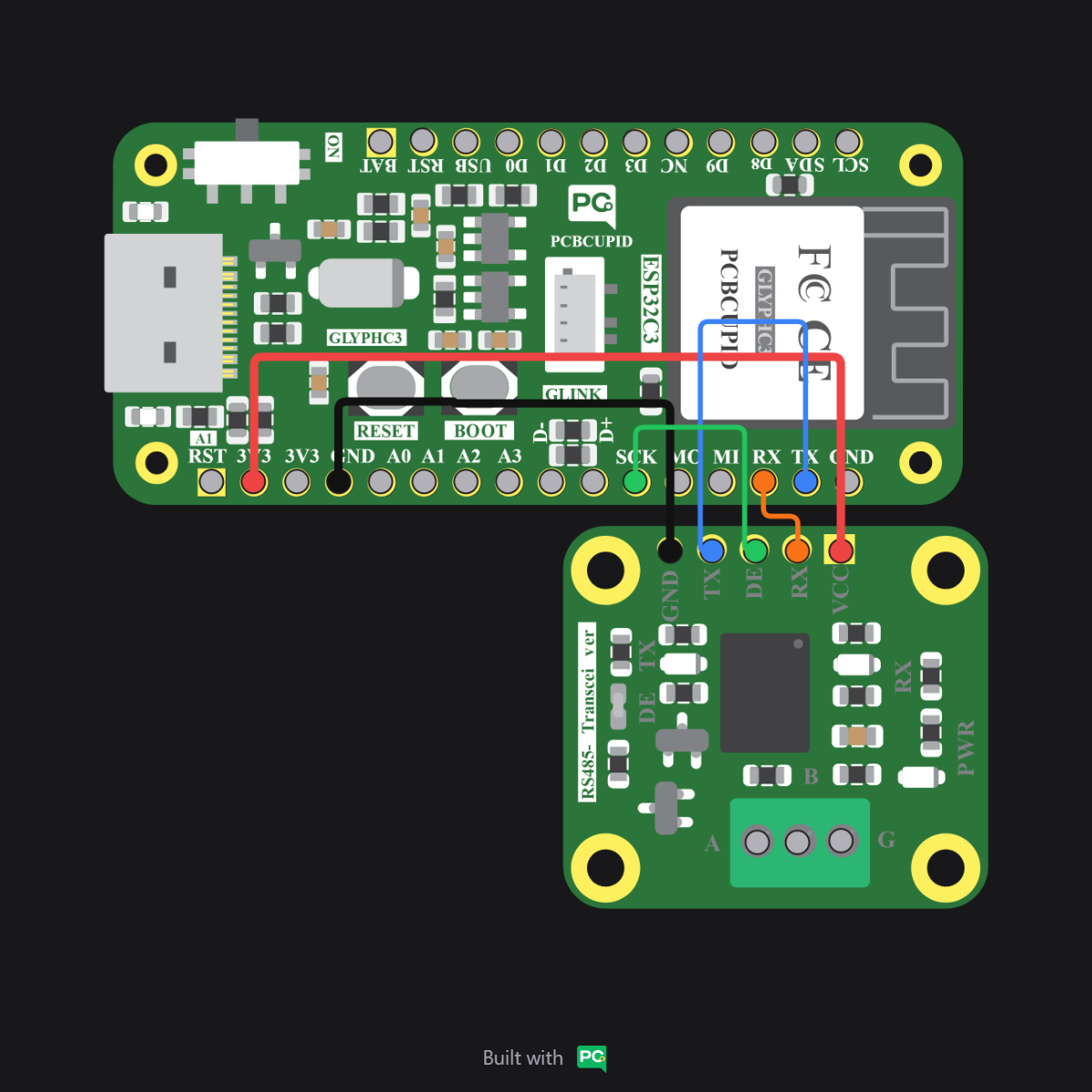
![RS-485 Circuit Diagram](https://files.pcbcupid.com/Documentation/Boards/g-mod/RS485_Transreciever%20/RS485%20CIRCUIT%20DAIGRAM/RS485_20260327T071505.png)

***
